AnkiWeb
- Rating
- 11 (👍 11 · 👎 0)
- Updated
- 2025-06-10
- Anki versions
- 25.06~
- Description language
- pt
AnkiWeb addon 1067771610
Removes orphaned review log entries left after card deletion, cleans the database, triggers full sync, and may affect FSRS calculations.
Open on AnkiWeb GitHub Ask about alternatives
stale
| Min Anki | Max Anki | Updated |
|---|---|---|
| 2.1.49 | 2.1.66 | 2024-08-19 |
| 23.10 | 25.06+ | 2025-06-10 |
Loading…
Deletes selected cards' review logs permanently, making them truly new, with automatic backups and collection-wide clearing.
Insert synthetic review logs for chosen dates so heatmaps and stats recognize missed days, with configurable deck, daily count, and day-start handling.
Scans an Anki collection to find and safely delete orphaned images, audio, and video, filtering by type or date, while showing and renaming media used by each card.
Cleans unnecessary spaces and furigana in Japanese Anki text while preserving needed reading spaces and HTML, with check, diff, fix, undo, and change log safeguards.
Browse, search, preview, insert, replace, rename, and clean up Anki media images, including orphans and duplicates, with automatic card-related suggestions and recoverable deletions.
Detects and safely deletes unused empty note types, with interactive selection, protected defaults, and undo support.
Bug Report: https://github.com/cjdduarte/Disconnected_Review_Log_Cleaner/issues
The Disconnected Review-Log Cleaner add-on is designed to identify and remove orphaned review log entries that accumulate in the database over time. When cards are deleted, their associated review histories can become disconnected, meaning they're no longer linked to any active card. This tool efficiently cleans these orphaned entries, ensuring a tidier and more optimized database.
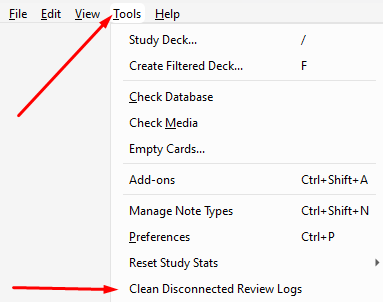
Language is automatically detected from Anki settings or system locale.
CollectionOp API (Anki 25.06+ compatible)OpChanges return object for sync compatibilitymodSchema, setMod(), save(), requireReset()