AnkiWeb
- Rating
- 0 (👍 0 · 👎 0)
- Updated
- 2026-08-18
- Anki versions
- 25.09.2~
- Description language
- en
AnkiWeb addon 1098736891
Syncs vocabulary and cloze phrases saved in a language-learning reader into Anki notes, returning review states and daily activity counts via a scoped API token.
Open on AnkiWeb GitHub Ask about alternatives
active
| Min Anki | Max Anki | Updated |
|---|---|---|
| 2.1.50 | 25.09.2+ | 2026-08-18 |
Loading…
Generates full German Anki flashcards from one word, with translations, sentences, grammar, image, audio, and optional cloze cards using your free API keys.
Syncs vocabulary decks bidirectionally with Google Sheets, writing intervals, lapses, ease, and suspension states while gating reverse cards and supporting multiple tabs.
Syncs Readwise Reader articles into a configurable Anki deck and note type for incremental reading, removing archived articles on resync.
Creates Sentence Translation note types and cards for translating sentences both ways and learning target word order, with a GUI for editing word correspondences.
Generates customizable MCQ, cloze, and basic Anki flashcards from images via Gemini AI, with profiles, field mapping, batching, and context-aware processing.
Generates AI multiple-choice vocabulary questions with blanked sentences and deck-word distractors for selected notes or whole decks, configurable via config.json and syncable to mobile.
Lector is a language-learning reader. It is an open-source alternative to LingQ and Clozemaster. Use Lector Cloud, or self-host it with one Docker Compose file.
Import the text that you want to read. Tap a word for a translation. Save it. Practise it. Send it to Anki. A self-host stores data in one SQLite file.
Try the hosted app · Docs · Discord


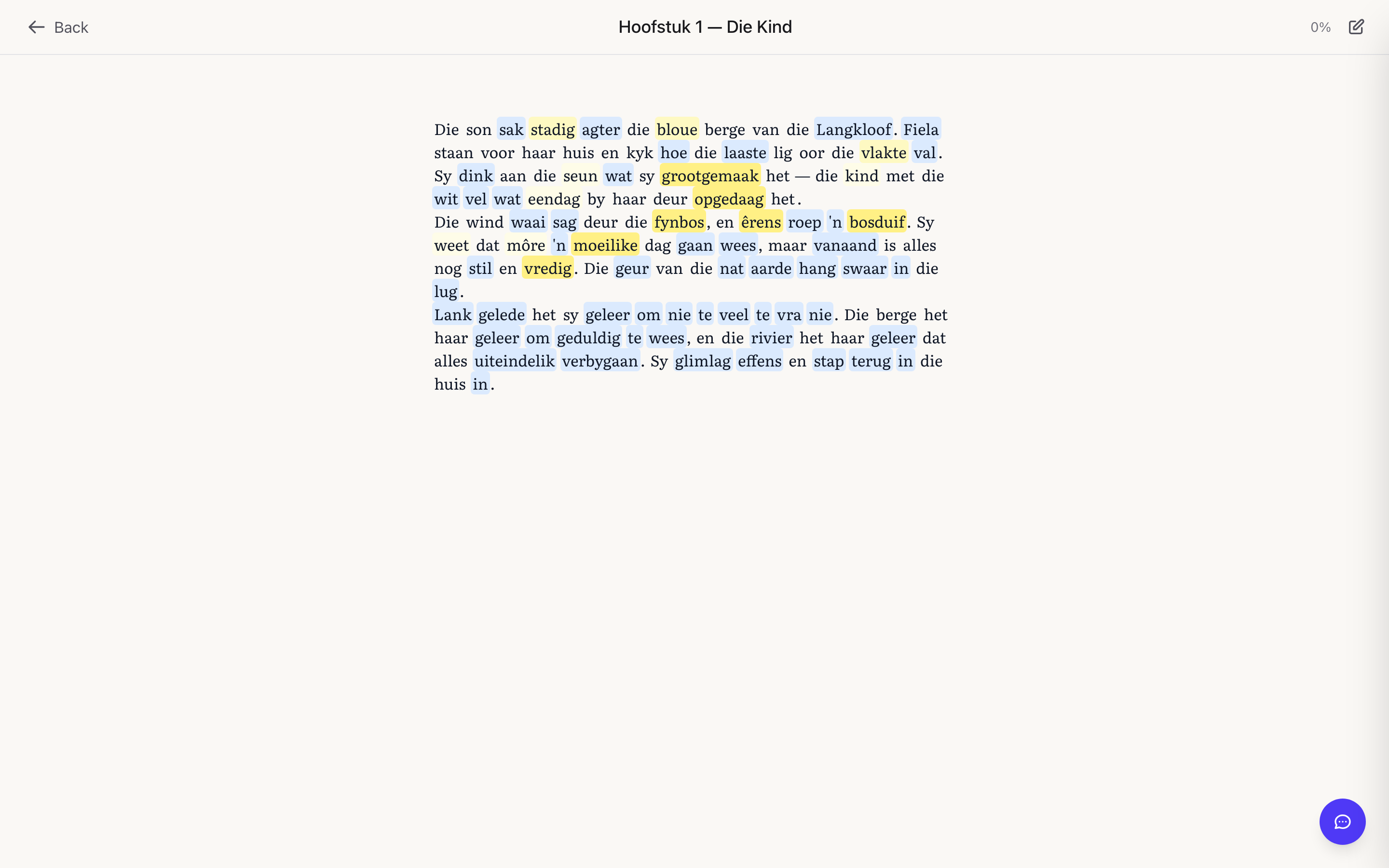
A local dictionary covers common words with no API key.
Optional local models run through the bundled Ollama service.
Optional cloud models cover rare words and the tutor.
| App | Host | Database | Anki |
|---|---|---|---|
| Lector | Lector Cloud, or one Compose file | SQLite | Two-way (beta) |
| LingQ | Hosted only | Cloud | File export |
| Clozemaster | Hosted only | Cloud | No documented export |
| Lute | pip, Docker, or source | Local files | One-way AnkiConnect |
| LinguaCafe | Four Compose services | MySQL | One-way AnkiConnect |
Full pages live at lector.dev/vs.
You need Docker and Docker Compose.
git clone https://github.com/heuwels/lector.git
cd lector
docker compose up -d
Open http://localhost:3400.
The UI listens on port 3400. The API listens on port 3457. The browser calls the API directly, so both ports must be reachable.
If the browser is not on the server, set API_URL to the origin that the browser uses for the API. Example: http://192.168.1.10:3457.
# optional: cloud translation for rare words
export ANTHROPIC_API_KEY=sk-ant-...
docker compose up -d
The image is registry.lector.dev/lector:latest. That is our own address in
front of GitHub's registry, and pulling through it is the only way we have any
idea how many installs exist — GitHub publishes no pull statistics. No IP
address is stored; the privacy policy explains
what is recorded and how. To stay out of those numbers, pull
ghcr.io/heuwels/lector:latest instead — it is the identical image, and both
Compose files carry it as a commented-out line.
A production Compose file with health checks lives in deploy/. Full
environment notes live in deploy/README.md.
If you do not want to run a server, use the hosted app at app.lector.dev. Paid plans start at $5 per month.
Reader. Import a file or a stream. Each word has a state: new, learning, or known. Tap a word for a translation. The reader accepts:
Cloze practice. Frequency-ordered sentences. Choose an answer from a list, or type the missing word. Spaced repetition (SRS) with mastery levels.
Vocabulary. Save words as you read. Track known and learning states. Save phrases as well as single words.
Anki. The Lector Sync add-on on AnkiWeb is the recommended integration. The add-on code is 1098736891. Cloud mode and a remote HTTPS self-host always use it. A local self-host can instead push cards to AnkiConnect on the computer that runs Anki. Reviews in Anki can update mastery in Lector.
Tutor and journal. Ask grammar questions in plain language. Write in the target language. The tutor returns corrections. Use the Claude API or a local model.
Listen. Optional text-to-speech (TTS). YouTube captions stay timestamped. A podcast upload can become a transcript and a listen-along lesson.
Data. SQLite on your server. Export and restore from Settings. The self-host does not need a cloud account.
Language packs ship for:
A pack includes a dictionary, frequency data, and cloze sentences. Japanese and Korean have a dictionary. They do not have a cloze bank yet. The reader still works for a language with no pack. Depth is lower without a pack.
The language picker lists only the languages that you study. Open the picker and select Add a language to start another one. Open Settings, then Languages, to add a language or to remove one from the list. A language that you remove keeps its words, texts, and cards.
The image holds no dictionaries. Lector downloads the dictionary for a language when you add that language. It keeps the file in the lector-dict volume, so an image update does not remove it. The download runs in the background. The language works at once, because a word with no dictionary entry yet goes to the AI lookup.
The ghcr.io/heuwels/lector:full tag holds every dictionary. It is about 2.6 GB larger. Use it for an air-gapped install. Set DICT_FETCH=0 with it.
Afrikaans was the first pack. It remains the most complete reference set. It is not the product. The product is the reader for any language that you study.
See lector.dev/docs/languages for pack status.
Two transports exist. Open Settings, then Anki Integration, then Connection.
AnkiConnect for a local self-host. The browser talks to AnkiConnect on localhost:8765. Install the AnkiConnect add-on. Allow your app origin:
{
  "webCorsOriginList": ["http://localhost:3400", "http://localhost:3456"]
}
Lector Sync add-on for cloud mode or a remote HTTPS self-host. A page on HTTPS cannot call localhost on the computer that runs Anki. The add-on runs inside Anki Desktop. It pulls queued cards onto Lector note types. It writes review states back to Lector. Point api_url at your Lector origin.
If you want a file, copy .env.example to .env. Compose also reads the process environment.
| Variable | Purpose |
|---|---|
ANTHROPIC_API_KEY |
Cloud translation and tutor. Optional. The local dictionary covers common words. |
API_URL |
Browser-facing API origin. Required when the browser is not on the server. |
LECTOR_MODE |
selfhost (default, one user, no login) or cloud (accounts). |
LLM_PROVIDER |
anthropic (default) or an OpenAI-compatible backend. |
OPENAI_COMPAT_URL |
Local model endpoint. The bundled Ollama service is http://ollama:11434. |
CLASSIFY_WORKER |
Set to 1 to fill the fluency radar. Compose sets this for you. |
DICT_LANGS |
Dictionaries to download at start. Use all for every language. Unset downloads only what you add in the picker. |
DICT_FETCH |
Set to 0 to never download a dictionary. Use it with the :full image. |
DICT_DIR |
Where the dictionaries live. The default is the lector-dict volume. |
TRANSCRIBE_WORKER |
Set to 1 to transcribe podcast uploads. Needs a Whisper endpoint. See deploy/README.md. |
The app runs with no API keys. Claude is only required for rare words, phrase translation, and the tutor.
The app caches TTS audio under DATA_DIR/tts-cache. Classification can use a provider batch API at half the synchronous price. Details live in deploy/README.md.
LECTOR_MODE=cloud enables accounts. The self-host stays free. Cloud mode is also the multi-user option on your server.
Required:
BETTER_AUTH_SECRET: generate with openssl rand -base64 32. Cloud mode does not start without it.BETTER_AUTH_URL: public origin for auth links, for example https://app.example.com.Optional:
GITHUB_CLIENT_ID and GITHUB_CLIENT_SECRET: Sign in with GitHub.OIDC_ISSUER, OIDC_CLIENT_ID, and OIDC_CLIENT_SECRET.RESEND_API_KEY: verification mail. Without it, mail lands in the server log.TURNSTILE_SITE_KEY and TURNSTILE_SECRET_KEY: bot protection on sign-up.CAUTION: Do not change LECTOR_MODE before you read Move self-host data to an account. If you switch an existing self-host database to cloud mode, the old library stays in the database. The new account does not see it until you move it.
LECTOR_CLOUD_GATE=external sends login to a gateway such as Cloudflare Access. The AWS path lives in deploy/cloud/.
In self-host mode every row belongs to the implicit local user. Cloud mode shows only rows that the signed-in account owns. An empty library after the switch is not data loss.
adopt-local-data moves every row from local to one fresh account. If the target account already owns rows, the script refuses. The default run does not write data.
Stop the app.
Copy DATA_DIR to a backup. Include lector.db. See Backups.
Set LECTOR_MODE=cloud.
Set the auth variables.
Start the app.
Create the target account in the browser.
Check the mail link.
List accounts:
docker compose exec lector sh -c \
  'cd /app/api && DATA_DIR=/app/data bun run src/scripts/adopt-local-data.ts --list'
Run the move with no write. The command prints per-table counts:
docker compose exec lector sh -c \
  'cd /app/api && DATA_DIR=/app/data bun run src/scripts/adopt-local-data.ts --to you@example.com'
Run the same command with --commit to apply it.
Sign in.
Confirm the library, the vocabulary, and the stats.
Keep the backup.
To roll back:
DATA_DIR.LECTOR_MODE.In-app export. Open Settings, then Learning data, then Export all learning data. This is a JSON export of the library, vocabulary, SRS state, journal, and stats. Restore it with the matching import.
Volume copy. If the app is stopped, copy DATA_DIR. If the app still runs, create a SQLite checkpoint first:
sqlite3 "$DATA_DIR/lector.db" "PRAGMA wal_checkpoint(TRUNCATE)" && cp -a "$DATA_DIR" /path/to/backups/
The hosted app streams writes to object storage with Litestream. See deploy/cloud/.
To run from source, read CONTRIBUTING.md. That file also holds the folder styleguide and the OpenAPI rules.
npm install
npm run dev:api   # Hono API on :3457
npm run dev       # Next.js UI on :3456
Open http://localhost:3456.
Copyright © 2026 Luke Boyle.
Licensed under the GNU Affero General Public License v3.0 (AGPLv3). See LICENSE. You may use, self-host, study, modify, and redistribute Lector. If you run a modified version as a network service, you must offer the matching source to its users. See AGPL section 13.
