AnkiWeb
- Rating
- 128 (👍 91 · 👎 37)
- Updated
- 2021-03-29
- Anki versions
- unknown
- Description language
- en
AnkiWeb addon 1128979221
GitHub repository archived
Automatically fills Chinese flashcard fields with translations, Pinyin/Jyutping, audio, characters, Bopomofo, rubies, frequency, tone colours, and sentence examples; now archived.
Open on AnkiWeb GitHub Ask about alternatives
abandoned
| Min Anki | Max Anki | Updated |
|---|---|---|
| 2.1.0 | – | 2021-03-29 |
Loading…
Adds Pinyin and Zhuyin readings above Chinese characters in any field by converting text into ruby annotations, supporting simplified and traditional Chinese.
Automatically fills Chinese flashcard fields with translations, pinyin/Jyutping, audio, characters, Bopomofo, rubies, frequency, example sentences, and tone coloring.
Automatically fills Chinese flashcard fields, adding part-of-speech and Kangxi radical filling alongside existing Hanzi, Pinyin, English, Bopomofo, audio, examples, frequency, and tone colours.
Generates tone-colored pinyin, bopomofo, and jyutping readings, simplified/traditional variants, and injects CSS/JS into Anki card templates for Chinese study.
Automatically fills Chinese note fields with translations, pinyin, audio, characters, definitions, examples, tone colors, and frequency for Anki 25.07+.
Generates Chinese vocabulary notes in Anki with simplified and traditional characters, pinyin, meanings, audio, and example sentences, using simple or colorful templates.
Due to “real life” getting in the way, this project has not been maintained for some time, and — from what I understand — does’t work with recent versions of Anki. Sadly, the time to archive the repo has arrived.
Thanks to the community for all your support, from the bug reports to pull requests to the random friendly email. Damien has cultivated a really heathly culture around his product. Much appreciation to Thomas Tempé as well, for obvious reasons.
For those looking for an alternative, I am reliably informed (thanks 3ter) that Chinese Support 3 is functional, and is actively maintained.
I may return to add-on development at some point, but currently I don’t develop in Python anymore, and haven’t updated Anki in over a year. That said, feel free to hit me up with an email if there’s anything I might be able to help with.


Chinese Support Redux is an Anki 2.1-compatible rewrite of the original Chinese Support add-on. It offers a number of features that streamline the process of creating flashcards for learning Chinese. The current focus of development effort is on improving the stability of the add-on and the accuracy of its output. Once the core functionality is sufficiently robust and reliable, additional features will be considered.
Please note that the add-on is still in beta and is sometimes shipped in an unstable state. Please upgrade with each new release and report any issues on GitHub. The automated test suite is a work-in-progress, so I still rely heavily on user reports to supplement my own manual testing.
Important Notes
English, German or French, depending on what you want..tone1 {color: red;}
.tone2 {color: orange;}
.tone3 {color: green;}
.tone4 {color: blue;}
.tone5 {color: gray;}
The vast majority of features have been successfully ported, and the add-on is in a usable state, albeit with some definite rough edges.
The add-on is still in beta. By this I mean “it works, but I wouldn’t trust it with my children”. Expect occasional issues, and please make a back-up before trying it. I use it myself and haven't experienced data loss, but your mileage may vary.
Please report any issues here on GitHub. Feature requests are also welcome.
If you are new to the Chinese Support add-on, the wiki from the previous version is still relevant (here).
The core feature of the add-on is the automatic field filling. To take advantage of this, you need to have an Anki note type with the appropriate fields (e.g., Hanzi, English, Pinyin, Sound). See config.json for a list of valid field names.
If you don't already have such a note type, the easiest approach is to use one of the built-in models. Two types are installed automatically: Basic and Advanced. The only important difference is that the Advanced model shows more information.
To use the field-filling features:
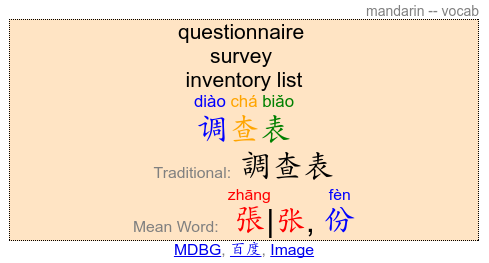
Chinese (Basic) or Chinese (Advanced) as the note type汉字)Hanzi field (sentences will also work)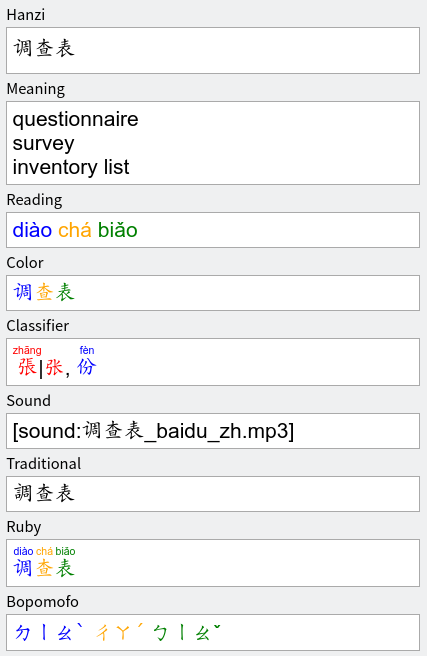
If you encounter any issues, the best way to have these addressed is to raise them on GitHub. Feature requests are welcome, with the caveat that all good things take time.
I understand the documentation is sparse. Anyone who wishes to add content to the wiki is more than welcome to.
For those who wish to run the tests locally, this is fairly straightforward.
Clone the repository:
git clone https://github.com/luoliyan/chinese-support-redux
cd chinese-support-redux
Ideally, set up a virtual environment to isolate the project:
curl https://pyenv.run | bash
pyenv virtualenv 3.6.8 csr
pyenv local csr
Install dependencies and run the tests:
pip install -r requirements.txt
make test
%AppData%\Anki2\addons21import platform
platform.architecture()
requirements.txt instead):import subprocess
subprocess.check_call(["pip3", "install", "mypy", "anki", "ankirspy", "aqt", "pyqt5", pyqtwebengine"])
requirements.txt for the project venvimport aqt
aqt.run()
tests folder as a plugin and error out. This is expected.testsanki-addon-dev on your hard drive and open it on PyCharm as a project. Then, open Anki source code folder as another project within the current project window by choosing Attach.Preferences → Project → Project Dependencies → anki-addon-dev, check the box to approve the add-on depends on Anki source code.[PATH_TO_ANKI_SOURCE_FOLDER]/anki-2.1.13/runanki-b [PATH_TO_ANKI_ADDON_PROJECT]/anki-addon-devanki-addon-dev/addons21/[YOUR_PROJECT_FOLDER]