AnkiWeb
- Votes
- 0 (👍 0 · 👎 0)
- Updated
- 2026-10-29
- Anki versions
- 2.1.1~
- Languages
- CSV, Python, JSON, JavaScript
- Description language
- en
AnkiWeb addon 1243350003
Reads review cards aloud offline using a natural neural voice, with built-in medical pronunciation fixes, cloze-aware front/back playback, a replay hotkey and adjustable speed and volume.
Open on AnkiWeb GitHub Ask about alternatives
active
| Min Anki | Max Anki | Updated |
|---|---|---|
| 2.1.1 | + | 2026-10-29 |
Loading…
Enables fully hands-free Anki review by reading cards aloud, recognizing spoken answers, and scoring them with AI, OCR, and multi-language support.
Reads flashcard text aloud offline with customizable voices, speeds, keyboard shortcuts, smart cloze handling, and over 150 built-in medical pronunciation corrections.
Explains topics, chats about study material, and generates basic, cloze, image-occlusion, and audio cards from notes, documents, and images, with free local text-to-speech.
Adds high-quality neural text-to-speech audio to individual cards or entire decks in 53 languages, with both single-card and whole-deck generation options.
Generates natural flashcard audio with four free online and offline text-to-speech engines, parallel processing, multi-language workflows, presets, and pitch, speed, and volume controls.
Provides an example third-party text-to-speech plugin that reads card fields aloud using gTTS, requiring Anki 2.1.20 or later.
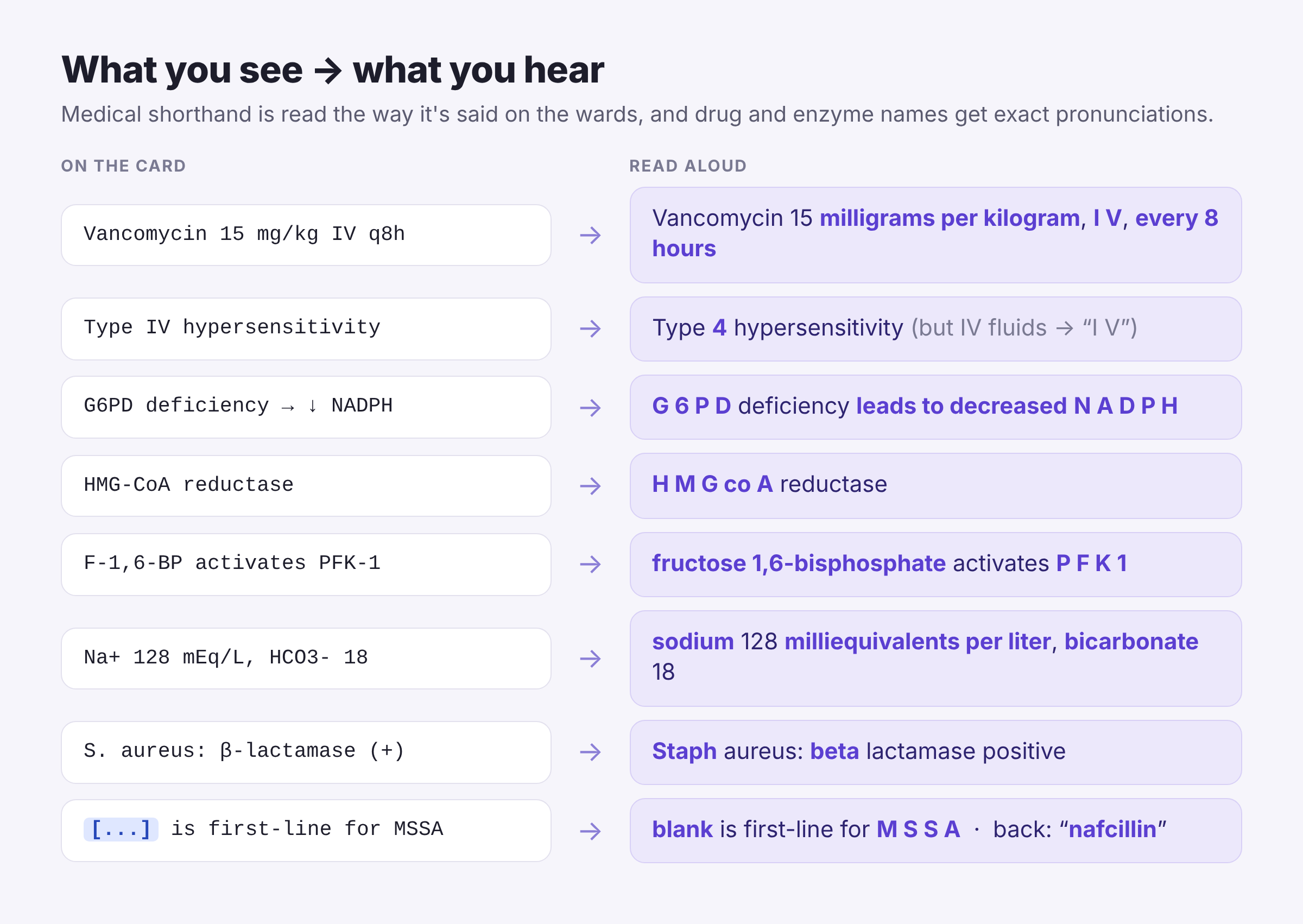
Card Read Aloud reads your review cards out loud in a natural, gentle human-sounding voice. It's built for medical students using AnKing and other med decks, so it says "I V", not "Roman four".
The natural voice is Kokoro, a free, open-source neural text-to-speech model (Apache 2.0). It runs on your own computer and works offline. Your cards never leave your machine.
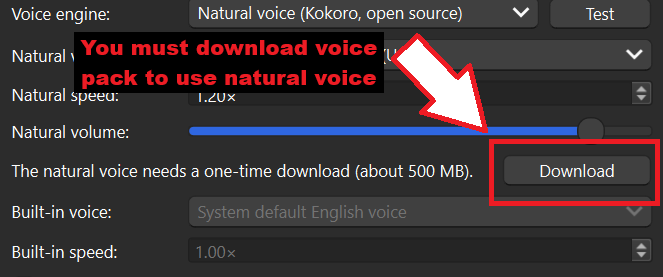
⚠️ Heads-up: one-time ~500 MB download. The natural voice isn't bundled. When you turn it on (Tools → Card Read Aloud → Settings → Download), the add-on downloads the voice model and a small private Python engine, about 500 MB. This happens once. It lives inside the add-on's own folder, never touches Anki's Python, and the Remove button deletes all of it.
Don't want the download? Choose Built-in voice to use your computer's own voices instead.
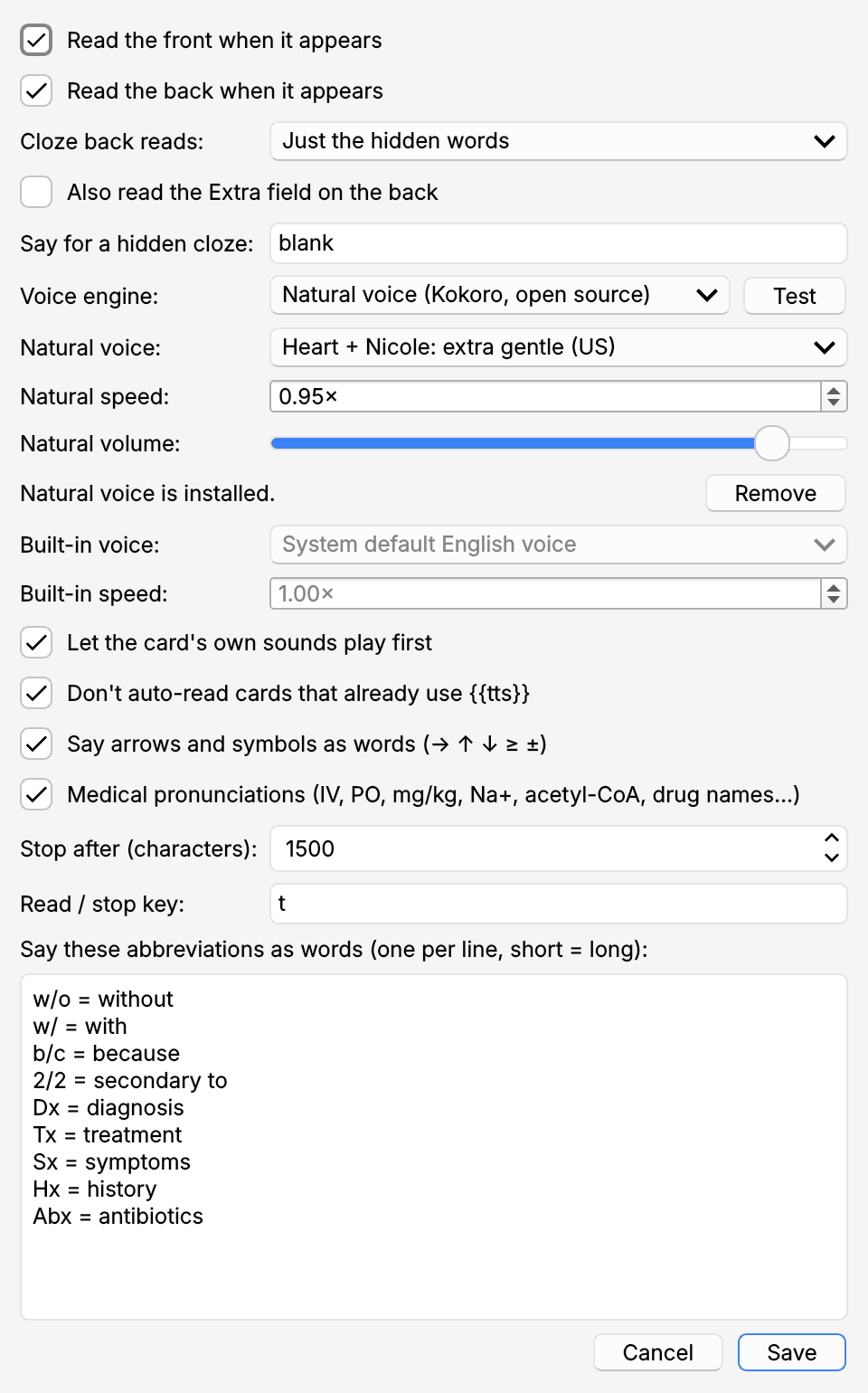
Open Tools → Card Read Aloud → Settings, or the Config button in the Add-ons window.
Voice: Kokoro-82M by hexgrad (Apache 2.0), run with kokoro-onnx. Add-on built with Claude by Anthropic.
card_read_aloud.ankiaddon from the Releases page and double-click it, or copy the card_read_aloud folder into Anki's addons21 folder.Leave a comment if you like this! Please let me know if any word is pronounced incorrectly :)
Open an issue. Include your Anki version, your operating system and, for natural voice problems, the file card_read_aloud/user_files/natural_voice/log.txt.

Card Read Aloud reads your review cards out loud in a natural, gentle human-sounding voice. It's built for medical students using AnKing and other med decks, so it says "I V", not "Roman four".
The natural voice is Kokoro, a free, open-source neural text-to-speech model (Apache 2.0). It runs on your own computer and works offline. Your cards never leave your machine.
⚠️ Heads-up: one-time ~500 MB download is REQUIRED FOR NATURAL VOICE. The natural voice isn't bundled. When you turn it on (Tools → Card Read Aloud → Settings → Download), the add-on downloads the voice model and a small private Python engine, about 500 MB. This happens once. It lives inside the add-on's own folder, never touches Anki's Python, and the Remove button deletes all of it.
Don't want the download? Choose Built-in voice to use your computer's own voices instead.


Open Tools → Card Read Aloud → Settings, or the Config button in the Add-ons window.
1.8: fixes cards being read twice when the add-on was installed both from AnkiWeb and from a file.
1.7:
Voice: Kokoro-82M by hexgrad (Apache 2.0), run with kokoro-onnx. Add-on built with Claude by Anthropic.
card_read_aloud.ankiaddon from the Releases page and double-click it, or copy the card_read_aloud folder into Anki's addons21 folder.See CHANGELOG.md.
Open an issue. Include your Anki version, your operating system and, for natural voice problems, the file card_read_aloud/user_files/natural_voice/log.txt.
