AnkiWeb
- Votes
- 0 (👍 0 · 👎 0)
- Updated
- 2026-10-18
- Anki versions
- 26.09.2~
- Languages
- Python, JSON
- Description language
- en
AnkiWeb addon 1472156233
Turns a list of English words into Anki sentence cards written by an AI, with highlighted words, translations, grammar badges and audio, plus a non-AI import option.
Open on AnkiWeb GitHub Ask about alternatives
active
| Min Anki | Max Anki | Updated |
|---|---|---|
| 25.07 | 26.09.2+ | 2026-10-18 |
Loading…
Generates complete Anki flashcards for German, English and Spanish from a single typed word, including translations, example sentences, grammar, images, audio and optional cloze cards.
Autofills Anki card fields using ChatGPT or Claude via customizable prompts that reference field names, with saved prompts and batch filling across multiple selected cards.
Stores YouTube videos in a searchable sentence database, adds matching audio, sentences, and screenshots to existing cards, and creates Subs2SRS decks from videos or playlists.
Automates AI-powered vocabulary card creation with audio, translations, images, definitions, mnemonics, and progressive exercises, but requires the separately purchased companion dictionary.
Generates AI content for selected flashcards using Claude, ChatGPT, Gemini, or DeepSeek, saving custom-prompted results—definitions, translations, example sentences—directly into chosen fields via your own API key.
Automates German flashcard creation using OpenAI GPT and DALL-E for translations, grammar details, CEFR-level example sentences, audio pronunciations, and AI-generated images, currently Mac-only.
Turn the English words you pick up each day into Anki cards you'll remember.
Paste your list of new words, an AI writes short example sentences for each one, you keep the ones you like, and each sentence becomes a card: the word highlighted, translated the way that sentence uses it, with audio and a badge naming its grammar.
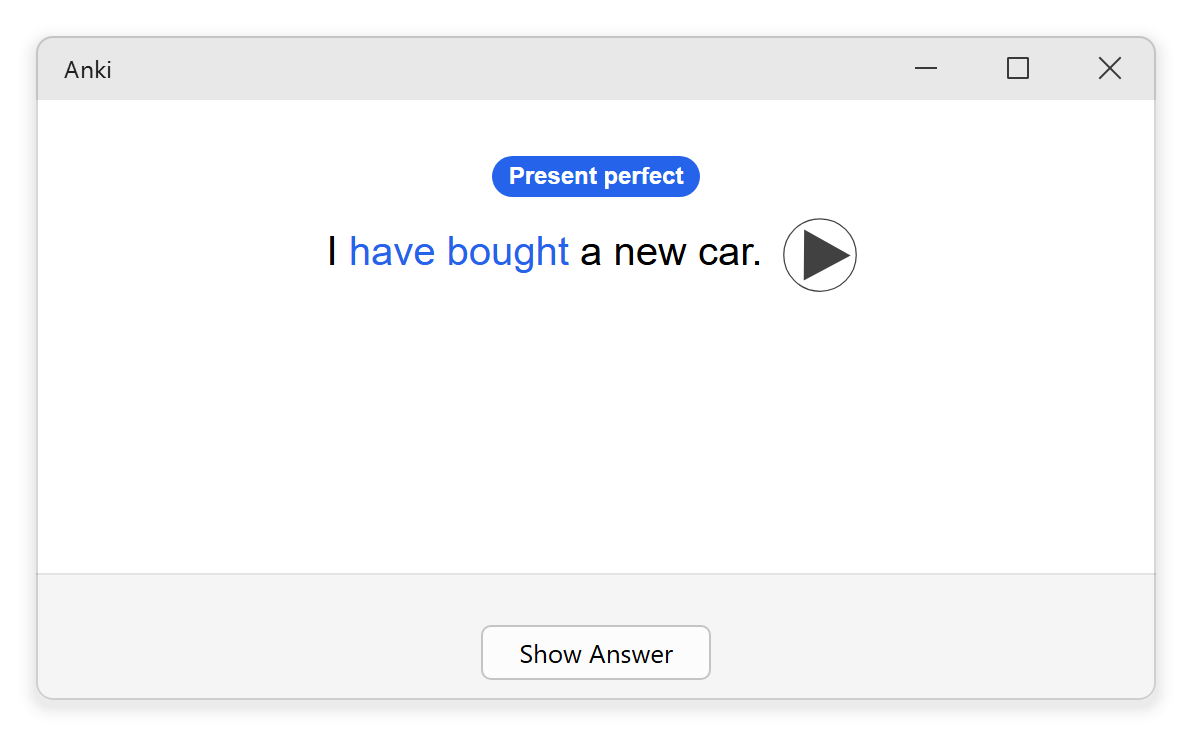
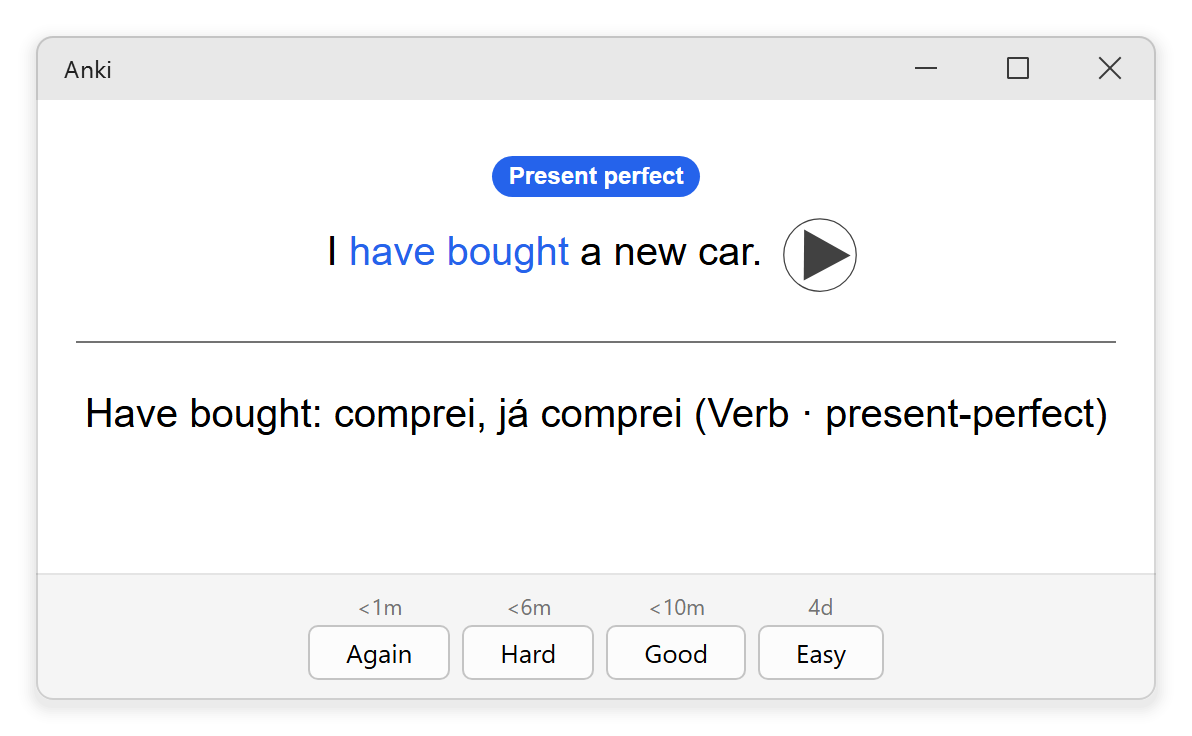
Everyone learns English their own way. Sea Minerator is built around one of them: learn each word inside a real sentence, hear it, and review it with spaced repetition.
Already have your sentences? Tools → Import cards… turns them into the same kind of card without the AI: paste a front line and a back line for each card, and press Ctrl+B to highlight the part you're studying.
Setup: open Tools → Sea Minerator settings…, choose your native language and AI provider, paste the key, load the models and test the connection.
Privacy: the add-on has no server of its own. Your list of words goes to the AI provider you chose, with the grammar topics already in your collection; if you chose a recorded audio source, the sentences go to that service (Gemini falls back to Google Translate).
Guide, source code and bug reports: github.com/luks-santos/anki-sea-minerator
Turn the English words you pick up each day into Anki cards you'll remember.
Sea Minerator is an Anki add-on. Paste your list of new words, an AI writes short example sentences for each one, you keep the ones you like, and each sentence becomes a card: the word highlighted, translated the way that sentence uses it, with audio and a badge naming its grammar.


Everyone learns English their own way. Sea Minerator is built around one of them, the one I use every day: learn each word inside a real sentence, hear it, and review it with spaced repetition.
It fits you if:
It's probably not for you if you want ready-made decks, word → definition cards, or a language other than English to learn. Explanations and translations, though, come in your own language: 20 are available, from Portuguese and Spanish to Japanese and Arabic.
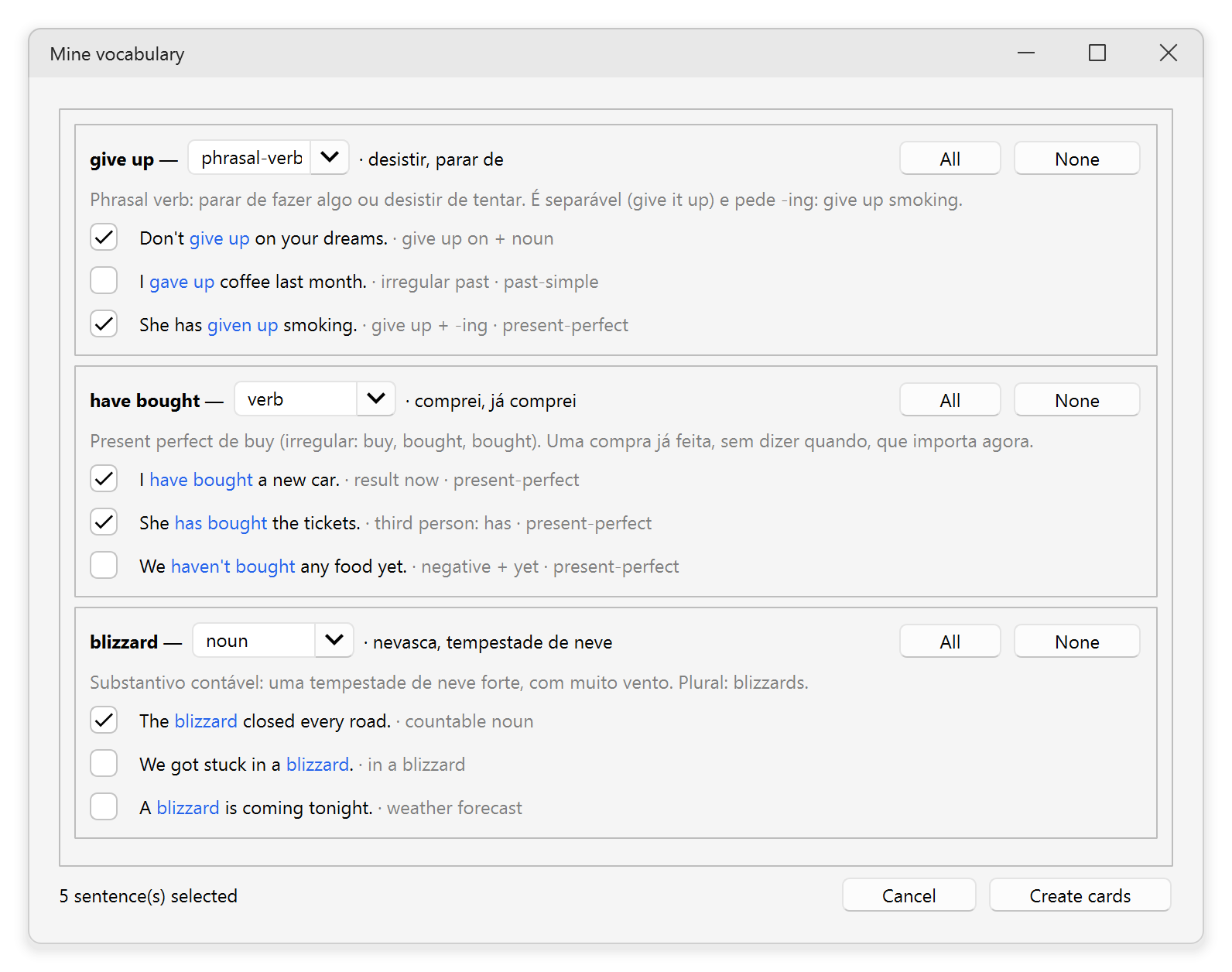
1. Paste your list of the day. In Anki, open Tools → Mine vocabulary…,
type one word or expression per line, choose a deck and click Mine.

2. Keep the sentences you like. For each word you get a short explanation in your language, its translations, its class and example sentences. Check the ones that should become cards.

3. Study. Click Create cards. Each checked sentence is one card:
Present perfect, Modal verbs…); a
vocabulary-only sentence has none.The whole batch is one undo step (Edit → Undo).
Got them from a class, a book or a teacher? Tools → Import cards… turns them
into the same kind of card, without the AI. Paste a front line and a back
line for each card, select a part and press Ctrl+B to highlight it, and
pick the grammar topic: it becomes the badge.

Sea Minerator needs Anki 25.07 or later for desktop (Windows, macOS or Linux). The cards it creates also work in AnkiDroid and AnkiMobile.
In Anki, open Tools → Add-ons → Get Add-ons…, paste the code
1472156233, and restart Anki. New versions then arrive through Anki's
own add-on updates. See the
AnkiWeb page.
To install from a file instead, download sea-minerator.ankiaddon from the
latest release,
open Tools → Add-ons → Install from file…, pick the file, and restart Anki.
Open Tools → Sea Minerator settings…:

By default the cards speak with your computer's own voice. For a recording that sounds the same on every device, set Audio source to Google Translate (free, unofficial) or Gemini.
Privacy: the add-on has no server of its own. Your list of words goes to the AI provider you chose, with the grammar topics already in your collection, so new cards reuse them. If you chose a recorded audio source, the sentences go to that service (Gemini falls back to Google Translate). Your key is stored in plain text in Anki's add-on folder on your computer.
The add-on's only runtime dependency, httpx, is vendored into
src/seaminerator/_vendor/ with its own dependencies, because an
.ankiaddon has no install step. Only pure-Python packages belong there,
since the add-on ships as one zip for every platform.
bash scripts/vendor.sh   # (re)populate src/seaminerator/_vendor/
bash scripts/build.sh    # produce dist/sea-minerator.ankiaddon
For development:
pip install -e ".[dev]"
pytest -q
ruff check .
ruff format --check .
mypy src
MIT, see LICENSE.