AnkiWeb
- Rating
- 0 (👍 0 · 👎 0)
- Updated
- 2023-05-24
- Anki versions
- 2.1.64~
- Description language
- en
AnkiWeb addon 1501397084
GitHub repository archived
Generates animated graphs and videos of Anki deck history, including interval bars, ease bars, card-type pies, and rating pies, though users are advised to use Search Stats Extended instead.
Open on AnkiWeb GitHub Ask about alternatives
abandoned
| Min Anki | Max Anki | Updated |
|---|---|---|
| 2.1.0 | 2.1.64+ | 2023-05-24 |
Loading…
Extends Anki's stats with many additional graphs, including future due, retention, review speed, heatmaps, lapse, repetition, time, FSRS, and time machine charts, plus configurable display and language options.
Adds a card-interval history graph to the stats menu and shows today's progress, requiring initial data generation that may take minutes.
Filters Anki statistics by note type, card type, or tag; hierarchical tags are supported, with a tag's statistics including notes in its subtags.
Exports collection metadata, deck summaries, optional per-card scheduling and full review log to one JSON file for external analysis.
Adds graphs to Anki's statistics tracking learned, matured, net matured, and lost matured cards, plus cumulative totals to help monitor learning progress.
Displays customizable animated text feedback in the reviewer based on answers, showing grades, intervals, card type and ease/difficulty, with font and animation options.
Graphs from this addon are available in a much more accessable format in the stats menu.
Github: https://github.com/Luc-Mcgrady/Anki-Search-Stats-Extended
Ankiweb: https://ankiweb.net/shared/info/1613056169
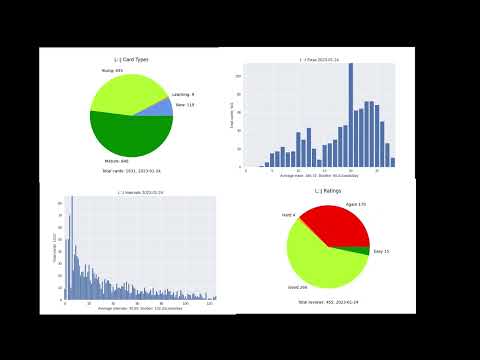
*Edited together in Kdenlive
Create a time-lapse of your intervals over time
Full disclosure, for some reason the intervals at the end and the intervals in the anki stats are different. The reason for this I don't know but the graph looks pretty regardless.
Bar animated chart but this time for your ease.
This is the animated version of your card types (young, mature etc).
This wont be perfect because the new cards come in when they are created not when they are moved into your deck. Also learning cards are just counted as cards with an interval less than 1. Theres probably a way to fix that but it shouldn't make too big a difference.
This option creates an animated pie chart of all the ratings you gave to reviews on every day you rated them.
For all of these your going to need python installed with pip. All the automatic install does is run these commands so its probably more reliable than doing this manually. Only read this if the automatic install has failed.
Just install matplotlib
$ pip install matplotlib
If this doesn't work then my only guess is your pip is probably for a different python than the one anki uses. so try find the one python uses and run that ones pip.
Try and run anki in administrator mode if you get errors regarding permissions in folders.
In windows it wont count if you install matplotlib in your python site-packages like if you did the linux way. Anki has its own python runtime and its own packages. Conveniently these packages are in the lib folder
pip install --target=".../anki/lib" matplotlib
Where .../anki = your anki install location.
Probably the same as windows, otherwise good luck.