AnkiWeb
- Votes
- 0 (👍 0 · 👎 0)
- Updated
- 2026-10-18
- Anki versions
- 2.1.1~
- Languages
- Python, JavaScript, CSS, JSON
- Description language
- en
AnkiWeb addon 1521667910
Plays YouTube and local videos inside Anki cards, letting you mark, preview, and chain clips, with speed, loops, subtitles, shortcuts, and synced WebM encoding.
Open on AnkiWeb GitHub Ask about alternatives
active
| Min Anki | Max Anki | Updated |
|---|---|---|
| 2.1.1 | + | 2026-10-18 |
Loading…
Combines PDFs, EPUBs, videos, web pages, and notes with normal flashcards in incremental study sessions, letting you highlight, extract new cards, prioritize, and resume where you left off.
Converts YouTube videos, playlists, or channels into translated vocabulary flashcards with optional text-to-speech or video audio, screenshots, rom
Plays card audio and video through mpv with configurable start, end, length, subtitle, and window-position options, pausing on the last frame between clips.
Rewards card reviews with short YouTube time based on answer ease, automatically opening and pausing a video window; adding notes earns 60 seconds, and a manual menu opens it anytime.
Automatically moves failed cards into a two-stage filtered deck loop, promoting and releasing them as they pass, without altering long-term scheduling.
Embeds YouTube videos directly in Anki cards with adjustable playback speed, autoplay, mute, video dimensions, aspect ratio, and corner radius settings.
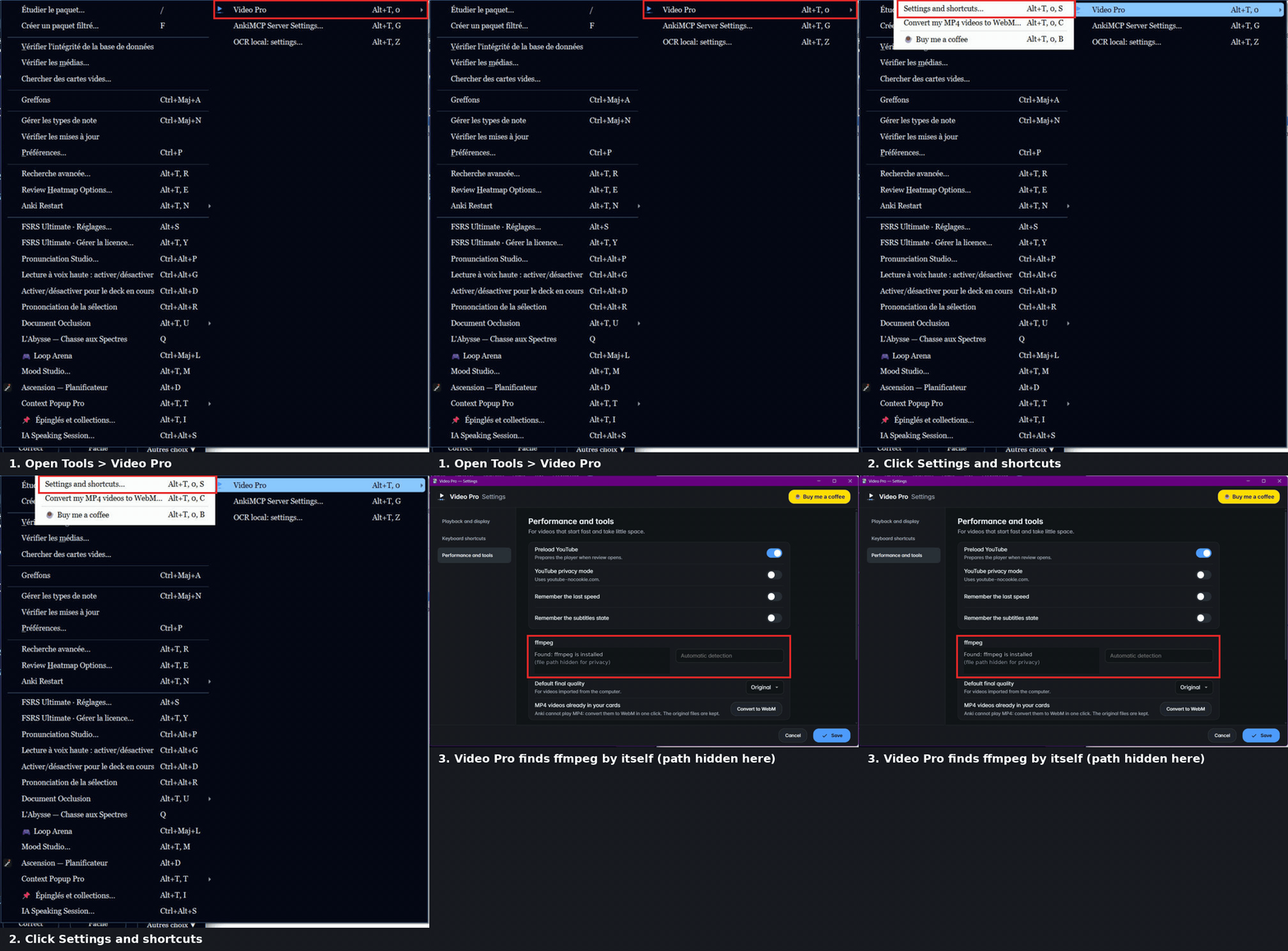
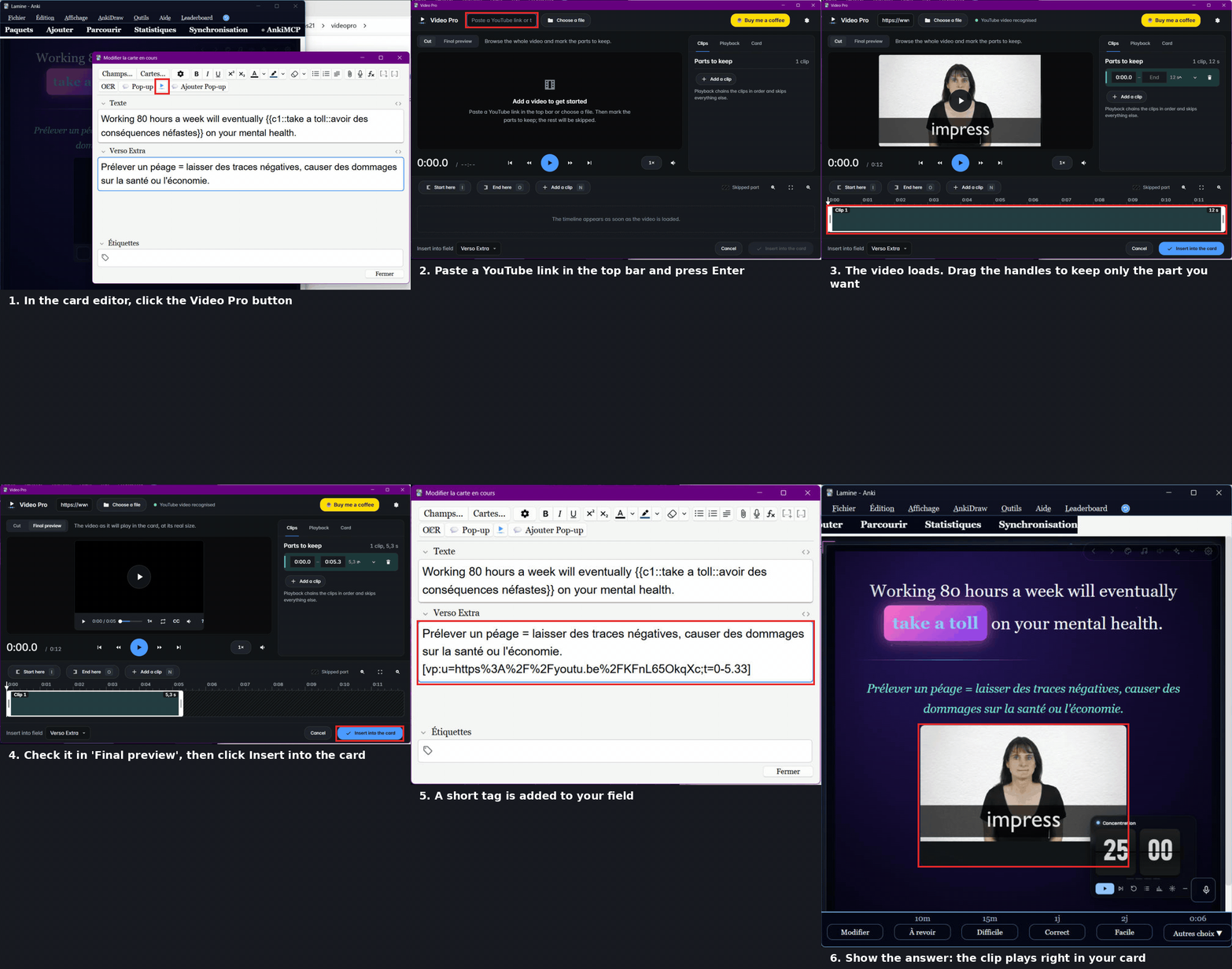
Real captures of Anki (English interface) with short numbered captions added. The ffmpeg path is hidden for privacy. / Captures réelles d'Anki (interface en anglais), avec de courtes légendes ajoutées. Le chemin de ffmpeg est masqué.
Play YouTube videos and local video files inside your cards, and keep only the parts you need.
YouTube videos need nothing. For local files, install ffmpeg (a “full” build, with libvpx): on Windows, winget install Gyan.FFmpeg, then restart Anki. Official download page: ffmpeg.org/download.html.
English, Français, Español, Deutsch, Italiano, Português, Nederlands, Русский, 日本語, 中文. The language follows Anki (or can be chosen in the settings). English and French are proofread; the other languages are machine translations. Right-to-left languages (Arabic, Hebrew) are not supported: English is shown.
No account, no tracking, no data is sent anywhere by this add-on. YouTube videos are loaded from YouTube by the standard embedded player (optional privacy mode: youtube-nocookie.com). The small “thank-you” message shown once after an update only stores the last version seen in user_files/coffee.json on your computer; you can turn it off (show_update_banner = false, or “Don't show again”).
AnkiDroid / AnkiMobile do not run add-ons: the [vp:…] tag is shown as is. Some YouTube videos forbid embedded playback. YouTube quality cannot be forced.
Video Pro is free. If it helps you study, a coffee helps me keep improving it:

Created by Habib Lamine Ouattara.