AnkiWeb
- Rating
- 8 (👍 7 · 👎 1)
- Updated
- 2024-09-23
- Anki versions
- 24.06.3~
- Description language
- en
AnkiWeb addon 1665515487
Locates identical, similar, and repetitive Anki cards by comparing field text, tagging and sometimes suspending matches for easier review.
Open on AnkiWeb GitHub Ask about alternatives
abandoned
| Min Anki | Max Anki | Updated |
|---|---|---|
| 23.10 | 24.06.3+ | 2024-09-23 |
Loading…
Compares notes for duplicates by grouping them via deck, note type, tags, or browser selection, using field matches, manual conditions, and regular expressions, then deletes, suspends, tags, or replaces fields.
Clones existing decks and subdecks in place, retaining media references; duplicates notes with at least one source card, omits tags, and deletes identical field clones, retaining oldest.
Groups and compares similar Qur’an verses with controlled context, audio recitation, transliteration, mushaf position, auto-tags, and direct Anki card creation.
Automatically suspends and tags a card after a predefined number of lapses, helping identify and remove difficult cards from the queue for reformatting.
Copies selected note IDs as shareable search strings and compares collections to reveal missing, extra, shared, suspended, and subject/tag breakdowns, with due-sibling finding.
Suspends new sibling cards until their older siblings mature, then restores them on the next deck browser render, with configurable rules.
This add-on for Anki helps you locate identical, similar and Repetitive cards in your deck. It compares the card text content in the selected deck and tags those that meet specific similarity criteria, making it easier to manage redundant or very similar cards.
For any problems or bug reports, visit:
https://github.com/cjdduarte/AnkiFuzzy/issues
Deck Selection: When you activate the add-on, it identifies the currently selected deck in Anki. A prompt will ask if you want to proceed with the analysis on the selected deck or switch to another one.
Similarity Analysis:
Tagging Similar Cards:
AnkiFuzzy::2-Analysis::1-Identical) for cards that are very close or exactly the same.AnkiFuzzy::2-Analysis::2-Similar) for cards with significant overlap, but not perfect.AnkiFuzzy::2-Analysis::3-Confirm) for cards that are somewhat similar but require further review.AnkiFuzzy::1-Suspend. This tag helps identify one of the duplicates, making it easier to suspend or delete redundant cards.Start the Add-on:
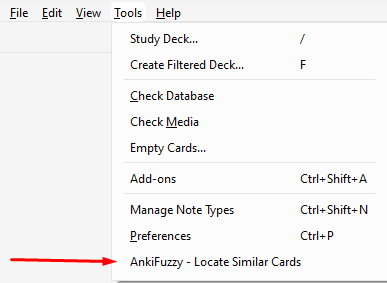
Monitor the Analysis:

Review Results Using Tags:
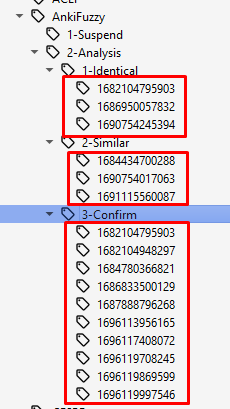
AnkiFuzzy::2-Analysis::1-Identical: for identical cards.AnkiFuzzy::2-Analysis::2-Similar: for similar cards.AnkiFuzzy::2-Analysis::3-Confirm: for cards that require confirmation.AnkiFuzzy::1-Suspend is used to highlight one card among duplicates, making it easier to identify which cards should be suspended or deleted.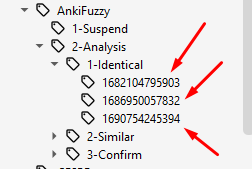
Below is an example of how the tags are structured, showing the linkage between duplicates:
This add-on allows you to customize the fields that will be checked to find the card content.
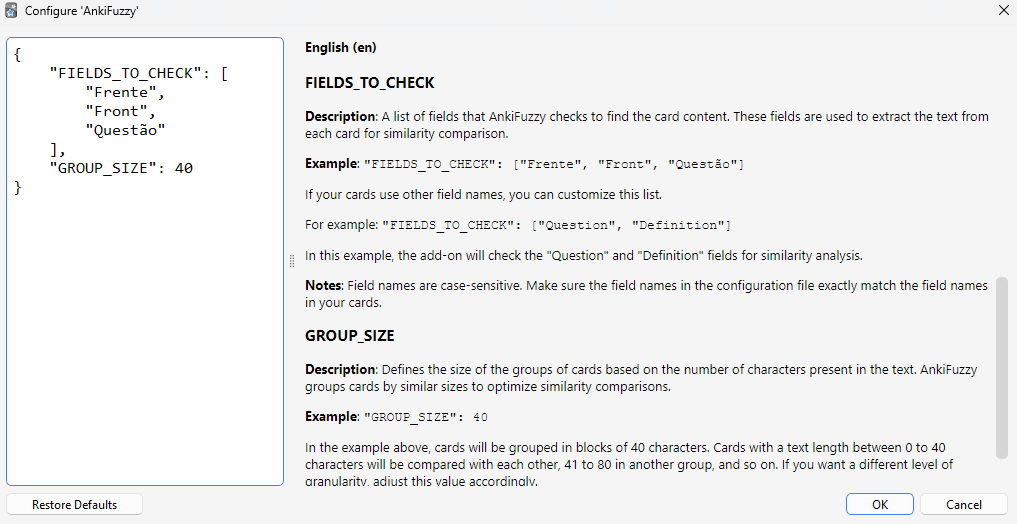
Description: A list of fields that AnkiFuzzy checks to find the card content. These fields are used to extract the text from each card for similarity comparison.
Example:
"FIELDS_TO_CHECK": ["Front", "Question"]
If your cards use other field names, you can customize this list. For example:
"FIELDS_TO_CHECK": ["Question", "Definition"]
In this example, the add-on will check the "Question" and "Definition" fields for similarity analysis.
Notes: Field names are case-sensitive. Make sure the field names in the configuration file exactly match the field names in your cards.
The add-on uses the following libraries and functions:
fuzz.token_sort_ratio (for sorting and comparing word tokens),fuzz.partial_ratio (for comparing parts of the text for partial overlap).token_sort_ratio: Set to 70 by default. Cards with a token sort ratio equal to or greater than 70 are considered for further analysis.partial_ratio: Set to 85 by default. If a card passes the token sort ratio test, it will be further analyzed using the partial ratio.v1.1.1 - Warning Handling:
difflib.SequenceMatcher.v1.1 - Tag and Menu Improvements:
v1.0 - Initial Release:
With this release, you provide users with a robust tool to manage redundant cards in their Anki decks.