AnkiWeb
- Rating
- 37 (👍 34 · 👎 3)
- Updated
- 2022-01-30
- Anki versions
- 2.1.49~
- Description language
- en
AnkiWeb addon 1739176371
Adds clickable tags via the {{clickable:Tags}} field, letting a single click search notes by tag and a double click limit results to the current deck.
Open on AnkiWeb GitHub Ask about alternatives
stale
| Min Anki | Max Anki | Updated |
|---|---|---|
| 2.1.0 | 2.1.49+ | 2022-01-30 |
Loading…
Adding a special Tags field to a card template makes tags clickable, searching notes by tag on single-click and current deck on double-click.
Renders tags as clickable pills in Anki reviewer/previewer, where single-click searches by tag and double-click searches within the current deck.
Add a filter before a field name, such as {{filter::Subsection}}, to make it clickable and open a browser showing all notes with the same value in that field.
Search the CC-CEDICT Chinese dictionary and automatically add cards to Anki decks, with multi-word lookup, input auto-detection, tags, and pinyin coloring.
Clicking a kanji on a vocab card shows other reviewed words in the deck that share it, after setting a clickable span and configuring fields and popup rows.
Browse, search, preview, insert, replace, rename, and clean up Anki media images, including orphans and duplicates, with automatic card-related suggestions and recoverable deletions.
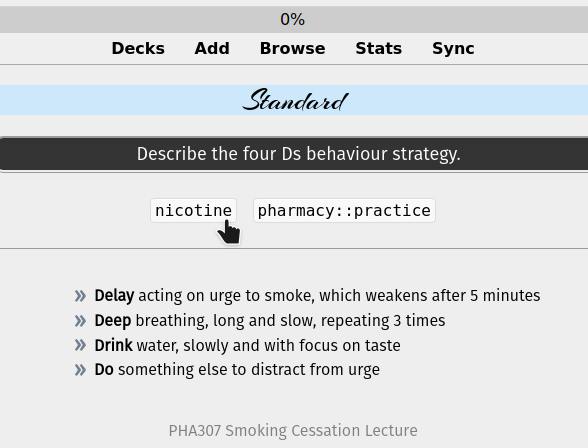
A stripped-down port of the Clickable Tags add-on to Anki 2.1.
Just add the {{Tags}} special field to your card template. The add-on will take care of the rest.
Single-click the tag to search for notes with that tag. Double-click to limit the search to the current deck.
<center><div style="vertical-align:middle;"><a href="https://www.theanking.com"><img src="https://raw.githubusercontent.com/AnKingMed/My-images/master/AnKing/TheAnKing-New.png?raw=true"></a></div></center>
<center> <a href="https://www.facebook.com/ankingmed"><img src="https://raw.githubusercontent.com/AnKingMed/My-images/master/Social/FB.png?raw=true"></a> <a href="https://www.instagram.com/ankingmed"><img src="https://raw.githubusercontent.com/AnKingMed/My-images/master/Social/Instagram.png?raw=true"></a> <a href="https://www.youtube.com/theanking"><img src="https://raw.githubusercontent.com/AnKingMed/My-images/master/Social/YT.png?raw=true"></a> <a href="https://www.tiktok.com/@ankingmed"><img src="https://raw.githubusercontent.com/AnKingMed/My-images/master/Social/TikTok.png?raw=true"></a> <a href="https://www.twitter.com/ankingmed"><img src="https://raw.githubusercontent.com/AnKingMed/My-images/master/Social/Twitter.png?raw=true"></a></center>
<div><center><a href="https://www.theanking.com/vip"><img src="https://raw.githubusercontent.com/AnKingMed/My-images/master/AnKing/Patreon.jpg?raw=true"></a></center></div>
<div><center><a href="https://courses.theanking.com"><img src="https://raw.githubusercontent.com/AnKingMed/My-images/master/AnKing/MasteryCourse.png?raw=true"></a></center></div>