AnkiWeb
- Rating
- 0 (👍 0 · 👎 0)
- Updated
- 2026-08-07
- Anki versions
- 25.09~
- Description language
- en
AnkiWeb addon 1873801775
Adds a review-aware AI chat assistant beside Anki for explaining cards, searching collections, inspecting study history, and reviewing proposed changes before applying.
Open on AnkiWeb GitHub Ask about alternatives
active
| Min Anki | Max Anki | Updated |
|---|---|---|
| 25.09 | + | 2026-08-07 |
Loading…
Connects local Anki to a hosted MCP platform so linked AI assistants can create, search, review, and schedule flashcards while the collection stays local.
Lets AI assistants work directly inside a live Anki collection to create, review, fix, and organize cards, with previews, approval, and backups.
Exposes Anki collection data via MCP, letting AI assistants search, create, update, and delete cards while controlling access through permissions.
Searches Anki notes by meaning with keyword, embedding, or hybrid retrieval, then generates cited AI answers using local or cloud providers.
Integrates an AI chat assistant into Anki review for grammar explanations, translations, examples, and custom card questions with per-deck prompts.
Generates medical flashcards from notes, explains card content, auto-fills answers, and answers questions with cited sources, all inside Anki for free.
An AI chat dock inside Anki, with the card you are reviewing and the structure of your collection available as context.
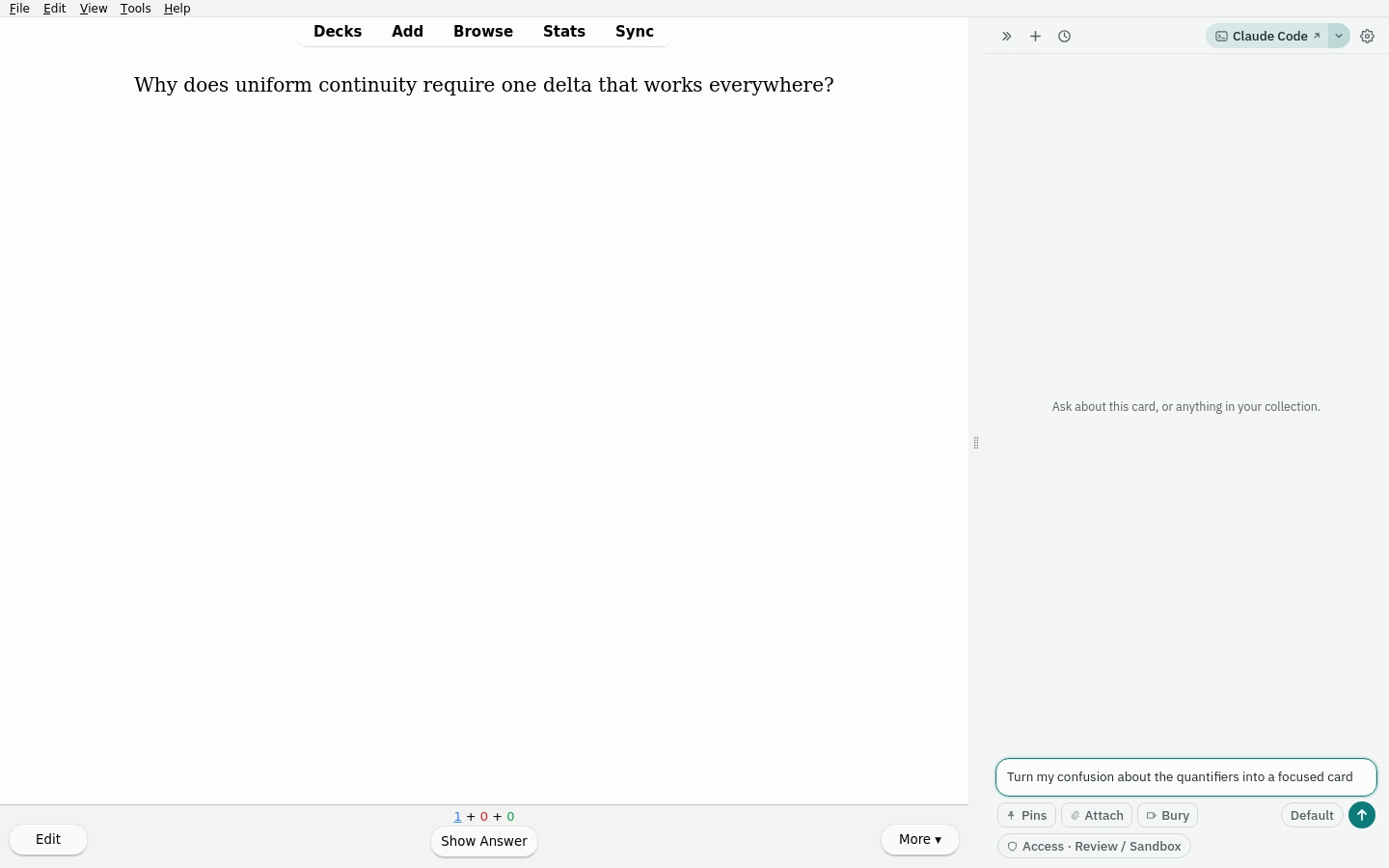
Browse the development-preview gallery.
Chat With Your Cards is built for questions that arise while studying: explain this card, find related material, inspect the surrounding topic, or propose a better note without leaving the reviewer. The agent can search the collection, read notes and cards, summarize deck/tag structure, and prepare changes through a reviewable proposal flow. It can also record native Anki Again reviews on exact cards the learner or an AI grader identifies as wrong, even when those cards are not scheduled today.
Understand the card in front of you. The current reviewer card is supplied as context, so the learner can ask the natural follow-up instead of copying the prompt into a separate chat.

Find the missing prerequisite. The assistant can search the learner’s own collection, explain the conceptual bridge, and suggest a short review path.

Turn a confusion into a proposal. New notes and edits remain pending until the learner reviews the fields, deck, tags, and rationale.

The captures use a synthetic collection created inside a disposable Anki profile. See the user stories for the scenarios and their product intent.
Public preview, v0.1.0. The core chat, collection tools, note proposals, safe application/revert path, and real-Anki GUI tests are working. This first release is intentionally for technically comfortable users while the supported backend set and installation experience broaden.
The supported backend is a locally installed, officially authenticated Claude Code CLI, connected to the add-on through a loopback MCP server. Codex and Pi adapters are planned. CWYC does not accept or store API keys.
Install Chat With Your Cards from AnkiWeb
for automatic updates, or download the exact
v0.1.0 .ankiaddon
from GitHub. Restart Anki when prompted, then open the dock with Ctrl+J
(Cmd+J on macOS). If Claude Code is not available, CWYC opens in a built-in
demonstration mode and shows setup instructions; Re-check switches to the
real backend without restarting Anki.
Read PRIVACY.md before use. CWYC sends the prompts and collection context needed for a chat through your installed Claude Code CLI. CWYC itself does not collect telemetry.
Content and deck writes pass through the proposal manager, which validates the operation, displays the change, and applies only what the user accepts. Scheduler grading passes through a separate, narrow grading manager backed by a pinned vendored copy of Safe Collection Operations. It uses Anki's native Grade Now/scheduler operations, exact card IDs, stable note GUID preflight, transactions, postconditions, and idempotent event cursors—never direct scheduling-row writes.
In Propose and Ask-each-read modes, grading waits on its dedicated confirmation chip. Auto-accept and Trusted writes may apply it immediately under their existing session caps; Read-only blocks it. Existing suspension and both forms of burial remain after the failure and are visibly offered for removal. Destructive content actions still create a backup checkpoint first.
Card content is treated as untrusted input. The local MCP server binds to a random loopback port and requires a per-session token; inheritance of unrelated user MCP servers is off by default. Sandboxed widgets have an opaque origin, a no-network content-security policy, and no access to the add-on or collection.
Read SAFETY.md for the threat model and COMPLIANCE.md for the distribution and provider-boundary review.
The add-on itself is pure Python and ships without an npm build step. The
React/assistant-ui source under ui/ is compiled into the checked-in web bundle
used by Anki.
# Lint, type-check, and run unit tests without Anki
make check

# Run the real add-on in disposable Anki under Docker/Xvfb
make test-gui-smoke-docker

# Fast frontend iteration against the scripted replayer
cd ui && npm run dev
The GUI smoke test uses
anki-addon-workbench to
install the add-on into a disposable profile, drive the real send and proposal
paths, manipulate real test notes, and capture light/dark screenshots. It never
opens or changes the user's normal Anki profile.
To recreate all three public user-story captures after the complete smoke suite:
CWYC_PUBLIC_SCREENSHOT=1 uv run --group dev \
  anki-workbench smoke --timeout 120 \
  --screenshot docs/images/chat-with-your-cards.png
See tests/gui_smoke/README.md for platform details.
| Path | Purpose |
|---|---|
chat_with_your_cards/ |
Add-on, bridge, tools, proposals, and bundled UI |
ui/ |
React/assistant-ui source and scripted development replayer |
tests/ |
Unit, contract, and disposable-Anki GUI tests |
DESIGN.md |
Architecture, decisions, milestones, and known issues |
SAFETY.md |
Threat model and write-safety invariants |
PRIVACY.md |
Data flow, local storage, and provider boundary |
SECURITY.md |
Security posture and vulnerability reporting |
COMPLIANCE.md |
Distribution and backend compliance review |
The .ankiaddon artifact is built deterministically from the tracked release
configuration in pyproject.toml.
MIT. See LICENSE.
Support continued development: ritornello.dev/support.