AnkiWeb
- Rating
- 7 (👍 7 · 👎 0)
- Updated
- 2023-06-26
- Anki versions
- 2.1.66~
- Description language
- en
AnkiWeb addon 1889069832
Provides configurable cloze note types for keeping related information on one note, with nested clozes, click-to-reveal, iteration, scrolling, and template-based options.
Open on AnkiWeb GitHub Forum topic Ask about alternatives
abandoned
| Min Anki | Max Anki | Updated |
|---|---|---|
| 2.1.56 | 2.1.66+ | 2023-06-26 |
Loading…
Provides a configurable cloze note type that keeps related cards and information on one note, with flexible display, iteration, scrolling, and styling options.
Reveals Anki cloze deletions progressively one at a time or with nearby context visible, adding optional images, audio, info, explanations, and customizable controls across Anki clients.
Enhances Anki cloze review with color-coded genuine and pseudo clozes, click or keyboard/touch reveal, auto-scrolling, no-cloze basic mode, and configurable shortcuts.
Enables proper type:cloze cards with multiple cloze blanks as input fields, instant feedback, and next-character hints in Anki.
Reorders due cloze cards in ascending cloze ordinal order by adjusting their due times, for use with the v3 scheduler.
Turns clipboard study material into Anki flashcards inside the Add window using your chosen AI provider, with queue review, custom note-type mapping, and card-quality prompts.
Reimplementation of Flexible cloze Anki addon to handle nested clozes avalable from Anki 2.15.56 as well as remove lesser used features for easier maintenance. FC2 (GitHub) is a configurable cloze note type for keeping related information (and cards) on the same note.
Ideas for the functionality of Flexible cloze (1 and 2) was blatantly stolen from trgkanki's Cloze (Hide all) and RisingOrange's Enhanced Cloze (for Anki 2.1) - both of which are excellent addons.
ALL CREDIT FOR INNOVATION GOES TO TRGANKI AND RISINGORANGE
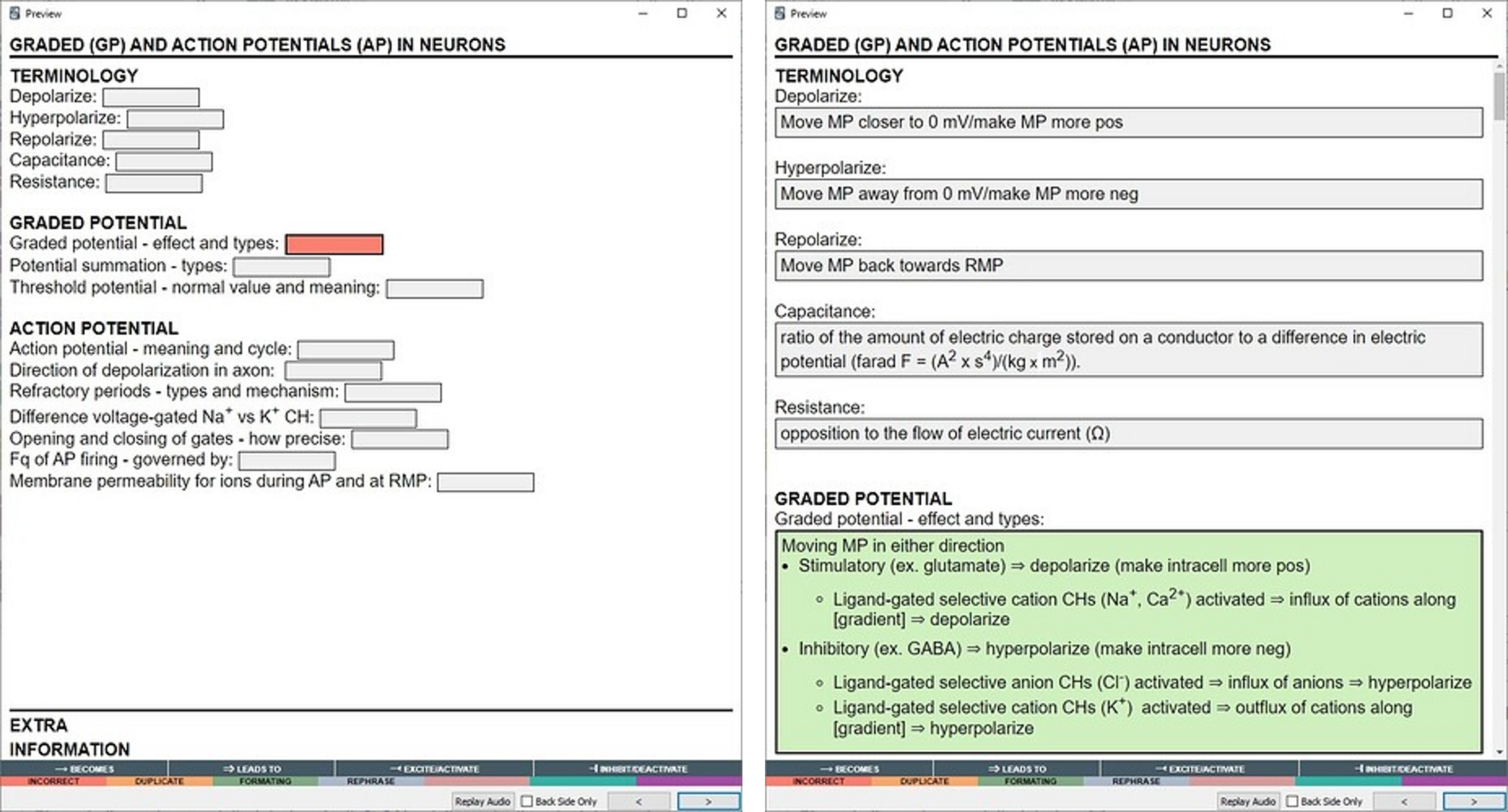
The addon adds two note types:
Flexible cloze 2: Has 5 fields: Title, Text, Notes, Mnemonics and Extra where Text is the cloze field and Title the default sort field/shown in the card/note table.Flexible cloze 2 (min); Has 2 fields: Text and Back Extra, similar to the core Anki cloze note type. When reviewing the first <h1> found in the Text field will be extracted and set as title (primarily for use with Markdown notes, there is no default way of inserting <h1> tags in the Anki editor), failing this it will insert the deck name.The functionality, apart from what is mentioned above, is the same for both.
Please note, I have no iOS device to test on, it should work as it is generic javascript. If something appears broken, please let me know (with debug info, see below).
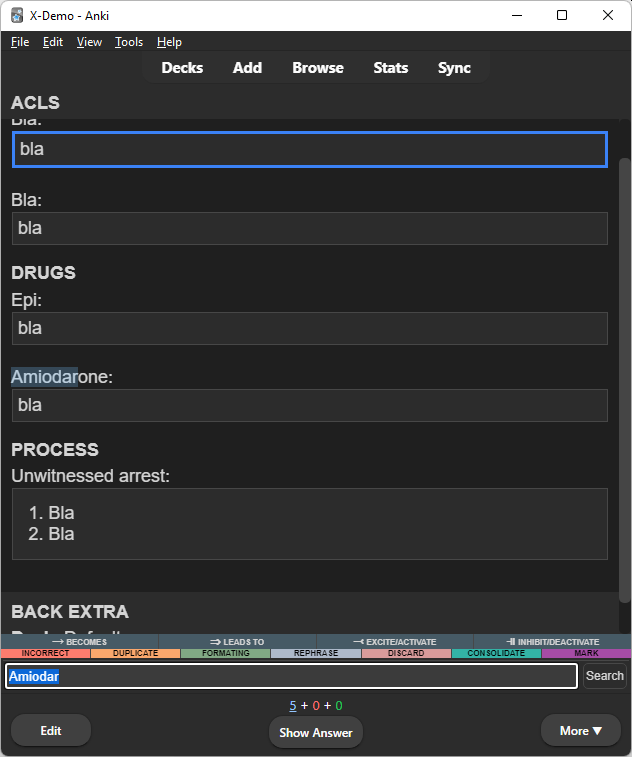
One note generation strategy is keeping one cloze note per "subject", rather than lots of small notes. This allows using Anki as the primary "note keeping location" rather than having the actual notes somewhere else (in OneNote, markdown files etc.) and have to create Anki notes for quizzing as a separate step. It also greatly improves maintainability (at lecture: "hmm, I seem to remember it was X, not Y, now where is that Anki note so I can amend it?"). During reviewing it adds the posibility to easily look up related info ("so if it wasn't ABX X for Y, for what was ABX X used?"). This while following the general card principles of making individual cards "atomic" and brief.
# ACLS

## Terminology

Bla: {{c1::bla}}
Bla: {{c2::bla}}

## Drugs

Epi: {{c3::bla}}
Amiodarone: {{c4::bla}}

## Process

Unwitnessed arrest: {{c5::

1. Bla
2. Bla

}}
You can of course also use FC2 if you just want some more configurability/functionality for "regular clozes".
Ctrl+F or top bar) - if you, like me, have all your notes in Anki and want to be able to look something up quickly from your phone.Using same ordinal clozes with iteration.loop = true and iteration.hide = true you can easily review lists by using next/previous keyboard shortcuts or edge taps to cycle through the clozes. Example:
Step 1: {{c1:someting}}
Step 2: {{c1:someting else}}
Step 3: {{c1:someting completely different}}
Configuration is made in the note template between:
Front/Back between the <!-- FC2 CONFIGURATION BEGIN/END --> tags.Styling after the /*-- FC2 FUNCTIONALITY END --*/ tag.The update logic is dependent on the user keeping these tag intact and updates will overwrite everything that is marked as "functionality".
.cloze class in Styling of the card template..cloze-inactive class in Styling of the card template.{{c1::!This will always be displayed when the cloze ordinal is not 1}}).
!expose will be hidden.prompt: Prompt format/text for clozes without hint. Example: [...]hint: Prompt format/text for clozes with hint where %h will be replaced by the hint text. Example: [%h]scroll: Configurable scrolling behavior on card show/flip, when clicking a hidden cloze and when cycling to next/previous with edge taps or keyboard shortcuts:
none: no scroll.min: scrolls as little as possible to get active cloze(s) into view.center: centers the active clozes in the viewport (or places the first active cloze at the top if all active clozes won't fit the viewport).context: as center but includes the context (content from preceding <hr>, <h1>-<h6> or inactive cloze).context-top: as context but aligns the start of the context at the top of the viewportcontext-bottom: as context but aligns the last of the active clozes at the bottom of the viewport (if the entire context fits, otherwise aligns top of context at top of viewport).initial.click.iterate.iteration - cycling active clozes with keyboard shortcut or edge tap. Iteration behavior can be configured as follows:
hidelooptopshow cloze initial display behavior:
inactive: inactive clozes. Setting to true will make FC2 behave similar to core Anki clozes. Setting to 'preceding' will show inactive clozes that come before the first active cloze (document order) and hide all other inactive clozes (if your note builds on access to preceding clozes to answer the current one(s)).addtional: Additional fields.fields: customizations of the interface
title: (only relevant for the min version) Wether to show the note "title field" (will parse out first <h1> or deck name if not found).legends: Array of array of HTML strings that will be inserted into elements at the bottom of the page for use as symbol legend(s). The logic expects each entry to be enclosed in a <div>. Remove/empty to remove legend.show_all_button: Show "Show all" button at bottom of card. (default false)log: Level of logging, pops up a logging field at bottom of page when level is met (false for none, error errors and true for errors and debug information, default error). Please provide this information if/when reporting errors/bugs.Tags, e.g add fc2.cfg.front.scroll.initial.context-bottom to set the front side initial scroll of the note to context-bottom (leave out the side to set for both front and back, e.g. fc2.cfg.scroll.initial.context-bottom)Styling section of the card template.Some useful companion addons if you, like I, keep one note per subject rather than per question:
Review in ascedning cloze ordinal order: Asdcending cloze reviews or AutoReorder or similar to review the cards from a note in ascending cloze ordinal order as later clozes may use the answers from earlier clozes.
For cloze order presentation of new cards use the the v3 scheduler and Deck options as follows:
New card gather order: DeckNew card sort order: Order gatheredBury new siblings, Bury review siblings and Bury interday learning siblings: offSort cloze ordinals in ascending order while keeping learning state: Sort clozes
If you prefer note taking in markdown: Markdown input
If you want to maximize the note taking space in the browser: Sidebar table
If you want a little more VS Code-y interface, consider CSS Injector - Change default editor styles with something like:
/* editor.css */
div > div.editor-field {
  border-radius: unset;
  border: none !important;
  box-shadow: none !important;
  padding-left: 10px;
  padding-right: 10px;
  padding-bottom: 5px;
}
div:not(:nth-child(1)) > .field-container {
  border-top: 1px solid var(--border);
}

.editor-toolbar .button-toolbar {
  border: none;
  padding: 7px 7px 0px 7px;
  margin: 0px;
}

.editor-field {
  --fg: #3b3b3b;
  --selected-bg: #ADD6FF80;
}
.night_mode .editor-field {
  --fg: #d4d4d4;
  --selected-bg: #ADD6FF26;
}

body {
  --fg: #3b3b3b;
  --canvas: #ffffff;
  --canvas-elevated: #ffffff;
  --border: #CECECE;
  --border-focus: 1px solid #3794ff;
}
body.night_mode {
  --fg: #858585;
  --canvas: #1e1e1e;
  --canvas-elevated: #1e1e1e;
  --border: #474747;
  --border-focus: 1px solid #3794ff;
}
The default styling of the template does not look like "regular Anki clozes". You can have the clozes display however you want by adjusting the CSS on the "Styling" page of the "Cards" dialog.
On both Front and Back (with the exception of show.additional which should be true on Back) set configuration to:
var config = {
    prompt: '[...]'             // Prompt when no hint
    hint: '[%h]',               // %h is replaced with hint text
    expose: {
        char: '!',              // Char to mark exposed cloze
        pos: 'begin',           // Char pos: `pre`, `begin`, `end` or `post`
        reverse: false          // If true exposed clozes are hidden, others shown
    },
    scroll: {                   // Valid values: `none`, `min`, `center` or `context`
        initial: 'none',        // Scroll on initial show
        click: 'min',           // Scroll on cloze click
        iterate: 'min'          // Scroll on iteration
    },
    iteration: {
        top: false,             // Always start iteration from top
        loop: true,             // Restart from top/bottom from end
        hide: false             // Hide cloze iterated away from
    },
    shortcuts: {
        next: 'j',              // Iterate to next cloze
        previous: 'h',          // Iterate to previous cloze
        toggle_all: 'k'         // Toggle all clozes and fields
    },
    show: {                     // `false` means initially collapsed/hidden
        inactive: true,         // Inactive clozes (`false`, `true` or `'preceding'`)
        additional: false,      // Additional fields (Note, Mnemonics etc.)
    },
    fields: {
        title: false,           // Title area
        legends: [],            // Configurable legends at bottom
        show_all_button: false, // Optional "show all" button at bottom of page
        log: 'error'            // Debug information level (`false`, `'error'` or `true`)
    }
}
In the Styling page insert the following below /*-- FC2 FUNCTIONALITY END --*/:
span.cloze { all: unset; color: blue; font-weight: bold; }
span.cloze-inactive { all: unset; }
There is effectively no add-on, it's all JavaScript (and HTML/CSS) and runs 100% "client side" (the only python is the update logic). The logic requires an Anki version based on the 2.15.56+ back end (i.e. Anki desktop 2.15.56+, AnkiDroid 2.16alpha93+ with Use new backend enabled or AnkiMobile 2.0.88+).
context-top and context-bottom, add note specific config through tags, add log option/info, add search function, add Flexible Cloze 2 (min) template which only has Text and Back Extra fields. Improve styling, esp. for night mode.show.inactive: 'preceding' option.