AnkiWeb
- Votes
- 0 (👍 0 · 👎 0)
- Updated
- 2026-10-04
- Anki versions
- 26.09~
- Languages
- Python, JSON, JavaScript, HTML, CSS
- Description language
- en
AnkiWeb addon 1956931509
Turns photos or PDFs of lessons into reviewable Anki flashcards using AI, including diagrams, formulas, audio and dictations, then sends them straight into Anki without duplicates.
Open on AnkiWeb GitHub Ask about alternatives
active
| Min Anki | Max Anki | Updated |
|---|---|---|
| 25.02 | 26.09+ | 2026-10-04 |
Loading…
Turns photos of textbook pages, worksheets, and handwritten notes into editable flashcards via Gemini vision, with a personal API key, duplicate checks, and single-click undo.
Generates tagged Anki decks from medical learning objectives and in-class PDFs using a structured prompt, outputting basic and cloze flashcards as JSON.
Turns PDFs or single images into image-occlusion cloze decks, with a built-in mask editor and context-preserving review through page navigation and PDF scroll view.
Reads PDFs inside Anki, links flashcards to their exact source page, and uses Gemini AI to generate cloze cards and explanations.
Underlines medical terms on review cards, offering hover or click explanations, plus card search, interactive lessons, retention dashboards, and customizable highlighting and popups.
Generates complete Anki flashcards for German, English and Spanish from a single typed word, including translations, example sentences, grammar, images, audio and optional cloze cards.
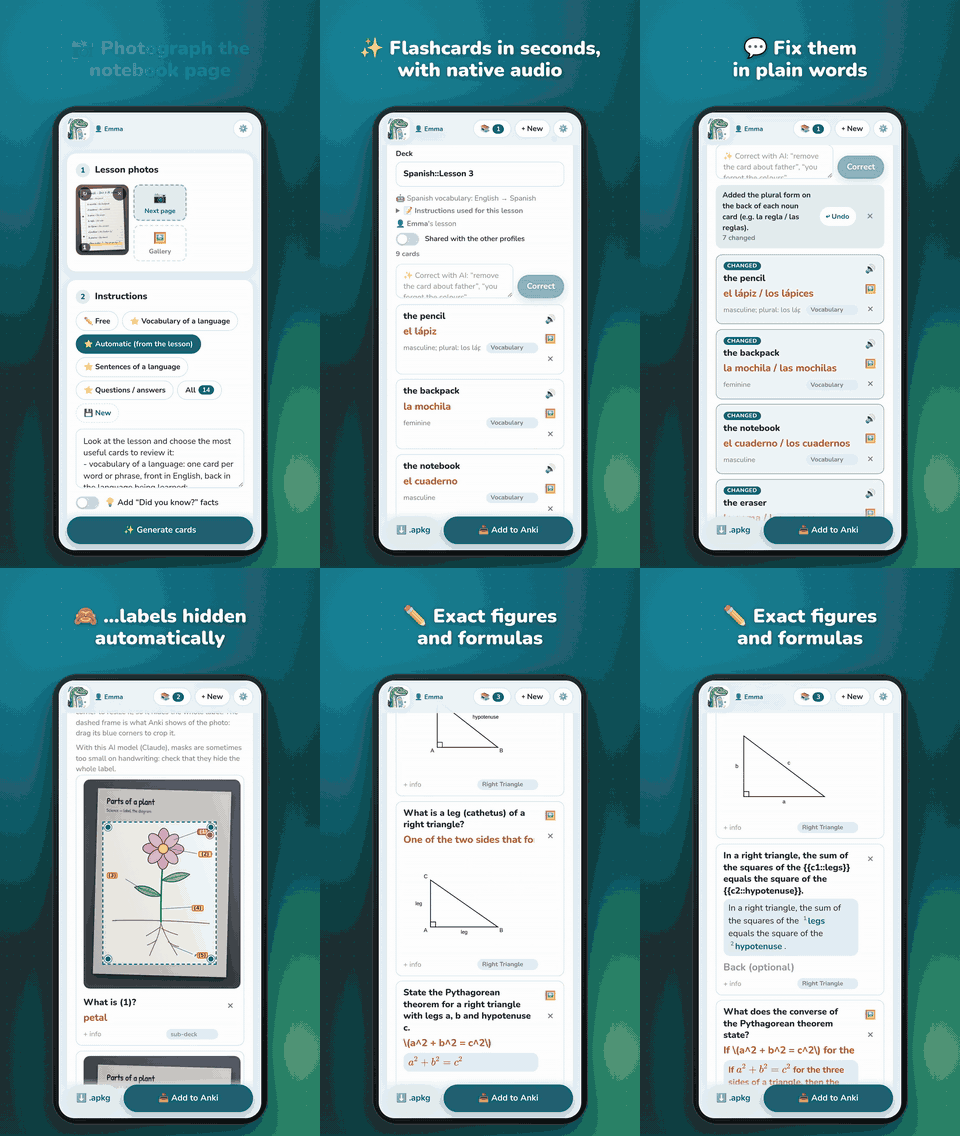
Snap a lesson with your phone, get Anki flashcards in seconds. Notosaurus reads a notebook or textbook page with AI (handwriting included) and makes the cards: you review them, then send them to Anki in one tap.
▶ Watch the 75-second demo ·
📖 Documentation
Getting started
Full guide · Documentation en français
Good to know
En français : prends une leçon en photo, Notosaurus en fait des cartes Anki. Guide de démarrage.

From school bag to flashcards: snap a lesson, get an Anki deck.

▶ Watch the full demo (75 s) · 📖 Documentation · ☕ Support on Ko-fi
Take photos of a lesson with your phone. A vision AI reads the pages and drafts Anki cards. You review and fix them, then send them straight into Anki or AnkiDroid, or download a .apkg.
Notosaurus was first built for learning languages (vocabulary and sentences, with audio), and now makes cards for any subject: history dates, definitions and theorems, diagrams, formulas, dictations, poems to learn by heart…
The documentation explains each of these in detail.
From the lesson
The cards
The review
Into Anki
.apkg. Sending a corrected lesson again updates its cards instead of duplicating them, and cards left over in Anki are listed, to delete if you want.For families
Coming soon to Google Play. Notosaurus on its own, on the phone: no computer, no AI key. Photograph the lesson, check the cards, and they go straight into AnkiDroid.
.apkg download is left out: the cards go into AnkiDroid.With your computer, for free. In the app's settings, 📍 Where does Notosaurus work? → 💻 On my computer, then scan the QR code of Anki → Tools → Notosaurus → Open on the phone: the app shows the computer's page, and lessons, AI and cards stay on the computer, with the add-on below. Each mode keeps its own lessons, and the icon's shortcuts switch between them.
The app's code is in android/.
Notosaurus starts and stops with Anki desktop and writes cards directly into the open profile. You use it from the phone's browser (or the app), on the same Wi-Fi. You don't need AnkiConnect.
notosaurus-<version>.ankiaddon from the latest release (to build it yourself, see CONTRIBUTING.md).Anki2/notosaurus-runtime/, next to the add-ons (about 300 MB, kept by add-on updates, removed with the add-on; outside the add-on's own folder, so that Anki can update it while Notosaurus runs, Windows included): uv, Python 3.13 and the Python libraries. It uses the uv shipped with Anki 25.07 to 26.05 or one already installed; otherwise it downloads a pinned uv release from GitHub and checks its SHA-256.Everything else is in the Tools → Notosaurus menu: open, open on the phone (QR code), getting started, settings, server status, restart, log and help.
Notosaurus runs on its own, even when Anki is closed, for instance on a home server. The .apkg download always works. "Add to Anki" needs Anki desktop open with the AnkiConnect add-on.
python3 -m venv .venv
.venv/bin/pip install -r requirements.txt
.venv/bin/uvicorn app.main:app --host 0.0.0.0
Then open http://localhost:8000 on the computer. For the phone (same Wi-Fi): ⚙️ → Phones, and scan the QR code. The ⚙️ page is reachable from the network in this mode, protected by an admin password created on the first visit.
Docker and the environment variables: see Advanced installation.
For the add-on, standalone and Docker, and for the app's "💻 On my computer" mode, which uses them. The app "📱 On this phone" needs none of this: no AI key, and its own settings page.
The ⚙️ page chooses:
data/settings.json (readable only by the server's user) and never sent back to the browser;Environment variables (see .env.example) provide defaults. Whatever is saved on the ⚙️ page wins.
| Provider | Notes |
|---|---|
| Gemini (default) | Official google-genai SDK. A free AI Studio key is enough to start. Falls back to other models when the main one is overloaded. |
| Claude | Official anthropic SDK. |
| OpenAI | GPT models, with an OpenAI key. |
| OpenRouter | One key for Gemini, Claude, GPT, Mistral…; the exact cost of each call. ⚙️ suggests its ~…-latest models (always the latest version of a family), the latest Gemini Flash by default. |
| Other OpenAI-compatible service | Any address: Ollama or LM Studio at home, Mistral… |
Demo (fake) |
Canned cards whatever the photo, no key and no cost: for the tests and for working on the interface. Not offered in ⚙️; set NOTOSAURUS_LLM=fake in .env. |
For the last three, Load models lists only models that accept images (and structured output, when the service says so). Test sends a small image to check that the model can read it and answer in JSON. The output format is always forced with a JSON schema. The user's prompt only says what to extract.
Local models (Ollama, LM Studio) work, but they read handwritten pages much less reliably. Claude and local models can't draw: pictures are then drawn by another service, chosen in ⚙️. What each costs: see AI services and costs.
There is no database. Everything is plain files under data/ (or NOTOSAURUS_DATA), so backing up Notosaurus means copying that folder.
data/
  settings.json                              settings and API keys
  prompts.json                               saved prompts
  children.json                              the children: class, decks, instructions
  exams.json                                 tests to prepare
  ai-calls.json                              every AI call and its cost
  lessons/
    2026-09-28-espagnol-lecon-5-la-famille/  one folder per lesson
      lesson.json                            deck, cards, prompt, voice, owner, dates
      page-1.jpg, page-2.jpg                 photos
      audio/la-madre-3f2a1c9e.mp3            card audio (included in the .apkg)
      images/                                card pictures, and diagrams with their labels hidden or shown
  cache/                                     voices and pictures, safe to delete
In the add-on, data/ lives in the add-on's user_files/ folder.
The interface follows the page's language picker, then Anki's language (in the add-on), then the browser's, and falls back to English.
To add a language, see CONTRIBUTING.md: it takes a single file.
Notosaurus is free software, with no ads and no tracking; the add-on is free to use. If it helps your family, you can buy me a coffee on Ko-fi ☕.
Setting up, tests, architecture, translations and releases: see CONTRIBUTING.md. The Android app: see android/README.md.