AnkiWeb
- Votes
- 2 (👍 2 · 👎 0)
- Updated
- 2026-10-22
- Anki versions
- 26.09.3~
- Languages
- Python, JSON
- Description language
- en
AnkiWeb addon 2097527231
Organizes the Anki deck list into labeled sections using customizable separator lines with styling, optional labels, spacing, and live preview, syncing with your collection.
Open on AnkiWeb GitHub Ask about alternatives
active
| Min Anki | Max Anki | Updated |
|---|---|---|
| 23.10 | 26.09.3+ | 2026-10-22 |
Loading…
Transforms the deck browser into a gallery of elegant cards with customizable covers, icons, progress indicators, and deck statistics for more visual, organized navigation.
Simplifies the deck browser by removing stats displays, shortcuts, and extra buttons, replacing New/Learn/Due columns with one total count while keeping native styling and study flow.
Adds visual Browser layouts, tabs, zoom, explorer-style navigation, drag-and-drop organization, folder colours, and a grid-based note-type manager with counters, quick editors, nested folders, and JSON import/export.
Displays a hierarchical deck list with review, correct-answer, and percentage metrics, plus text, flag and ease filters, drill-down analytics, CSV export, and collapse and context-menu navigation.
Displays a customizable floating graph tracking review pace against a target time per card, with average speed, display styles, hotkeys, and saved preferences.
Turns Anki into a markdown notebook where you write papers, organize them in folders, and generate Basic, reversible, and cloze cards from plain-text lines.
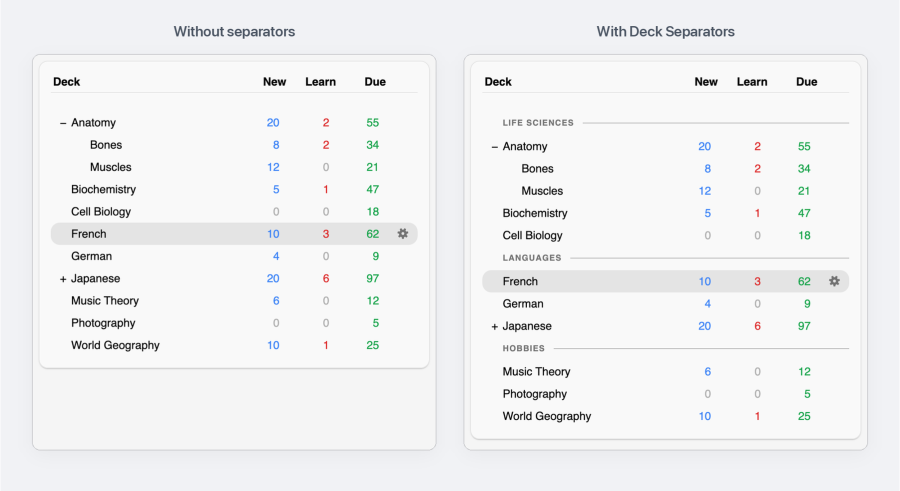
Organize your Anki deck list into clean, labeled sections.
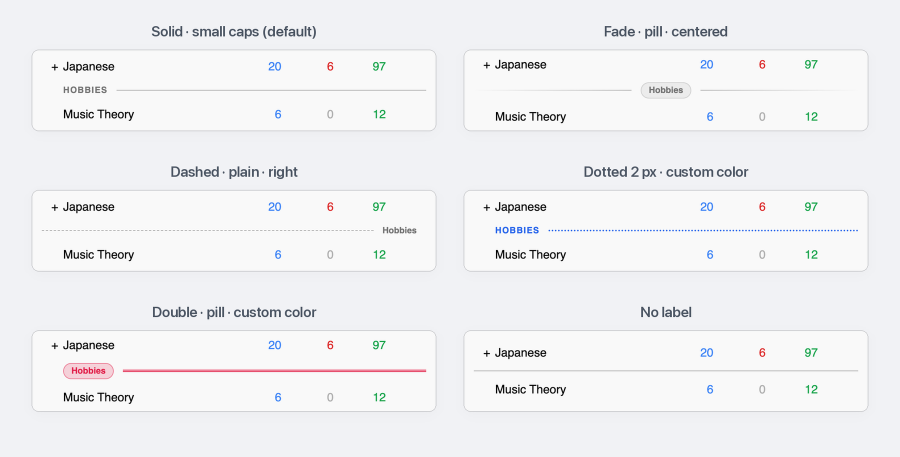
Separator ▸ Design… restyles every separator at once, with a live preview:
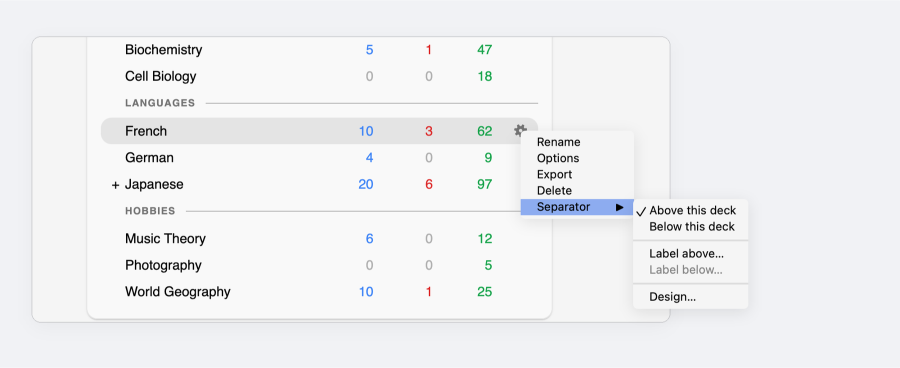
Click a deck's gear icon, then Separator ▸ Above this deck or Below this deck. Labels are optional: use Label above… or Label below… to name a separator. Click a separator to edit its label or remove it.
Screenshots, source and issues: https://github.com/tr3mo/deck-separators
Contact: mohammad@morad.io
Organize your Anki deck list into clean, labeled sections.


Click a deck's gear, then Separator ▸ Above this deck or Below this deck. Labels are optional. Click a separator to edit its label or remove it.

Separator ▸ Design… restyles every separator at once, with a live preview.


Separators follow Anki's theme unless you choose a custom color.
From AnkiWeb: in Anki, open Tools ▸ Add-ons, click Get Add-ons..., paste the code 2097527231 and restart Anki.
From a file: download deck_separators.ankiaddon from Releases, then in Tools ▸ Add-ons click Install from file..., pick the file and restart Anki.
Requires Anki 23.10 or newer. The legacy Qt5 builds of Anki are not supported.
Questions or feedback: mohammad@morad.io, or open an issue.