Better Markdown Anki

AnkiWeb addon 2100166052

Renders flashcards with advanced markdown, LaTeX math, syntax highlighting, theme-aware styling, tag badges, and interactive cloze toggles via React components.
AI-generated summary; may contain mistakes.

formattingappearancecard-templatescloze

Open on AnkiWeb GitHub Ask about alternatives

AnkiWeb

Rating
24 (πŸ‘ 20 Β· πŸ‘Ž 4)
Updated
2026-08-02
Anki versions
2.1.66~
Description language
en

Maintenance

active

  • Last update or commit was 16 days before the snapshot (2026-09-15).
  • The repository has 3 test files.
  • The repository has 2 GitHub Actions workflows.

Will it work on my Anki?

Version branches
Min AnkiMax AnkiUpdated
2.1.12.1.66+2026-08-02
History across monthly snapshots

Loading…

Similar addons

Markdown and KaTeX Support

Adds Basic and Cloze note types supporting Markdown and KaTeX, live desktop preview, code highlighting, chemistry formulas, and ==text== highlighting across internet-connected devices.

formattingcard-templatesmobile-compatible

Rating 88 πŸ‘ 84 Β· πŸ‘Ž 4 ⭐ 86 Anki 2.1.42~ Updated 2023-05-06

README

Better Markdown Anki

A powerful React-based Anki add-on that transforms your flashcards with advanced markdown rendering, interactive features, and modern web technologies for an enhanced study experience.
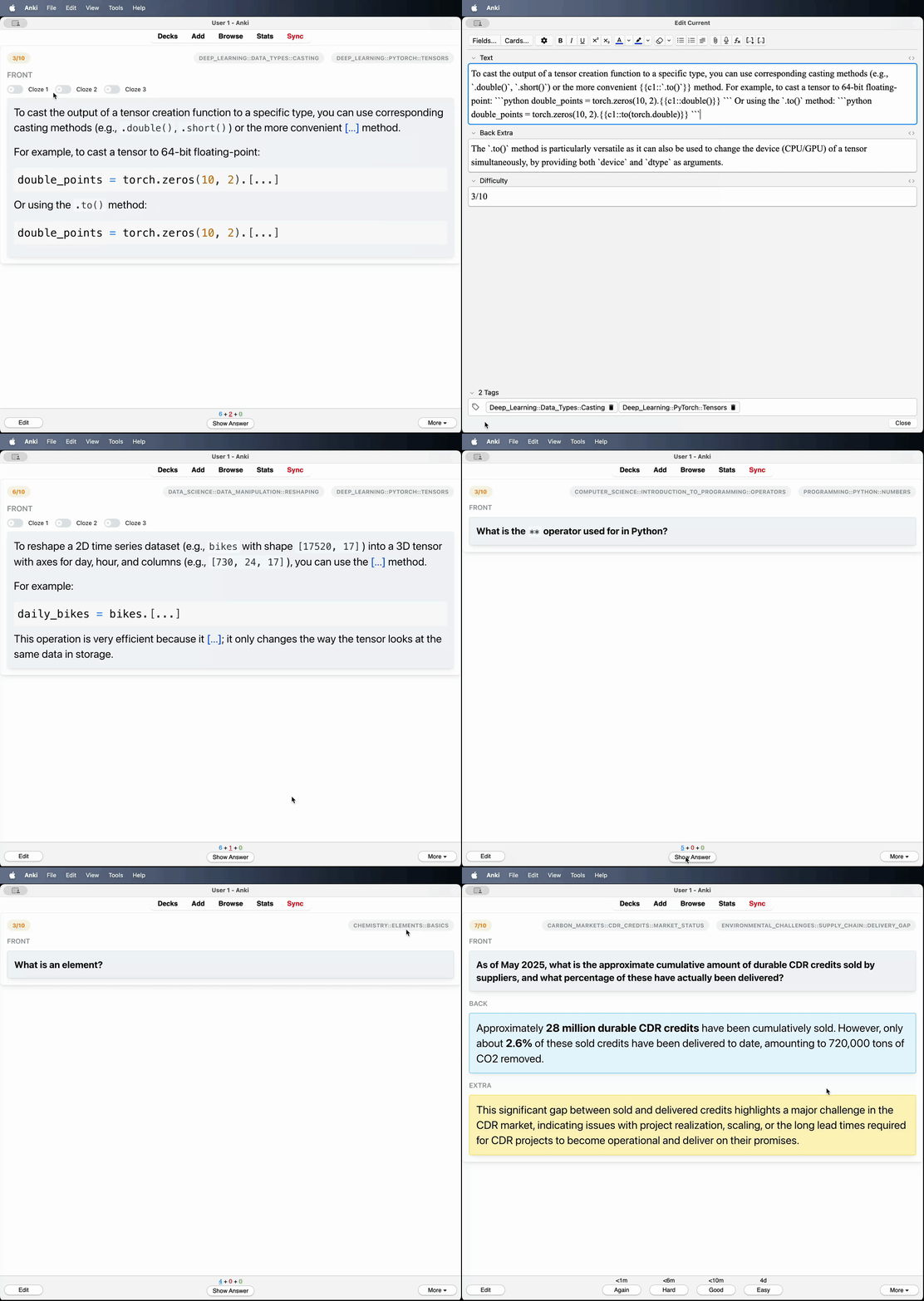
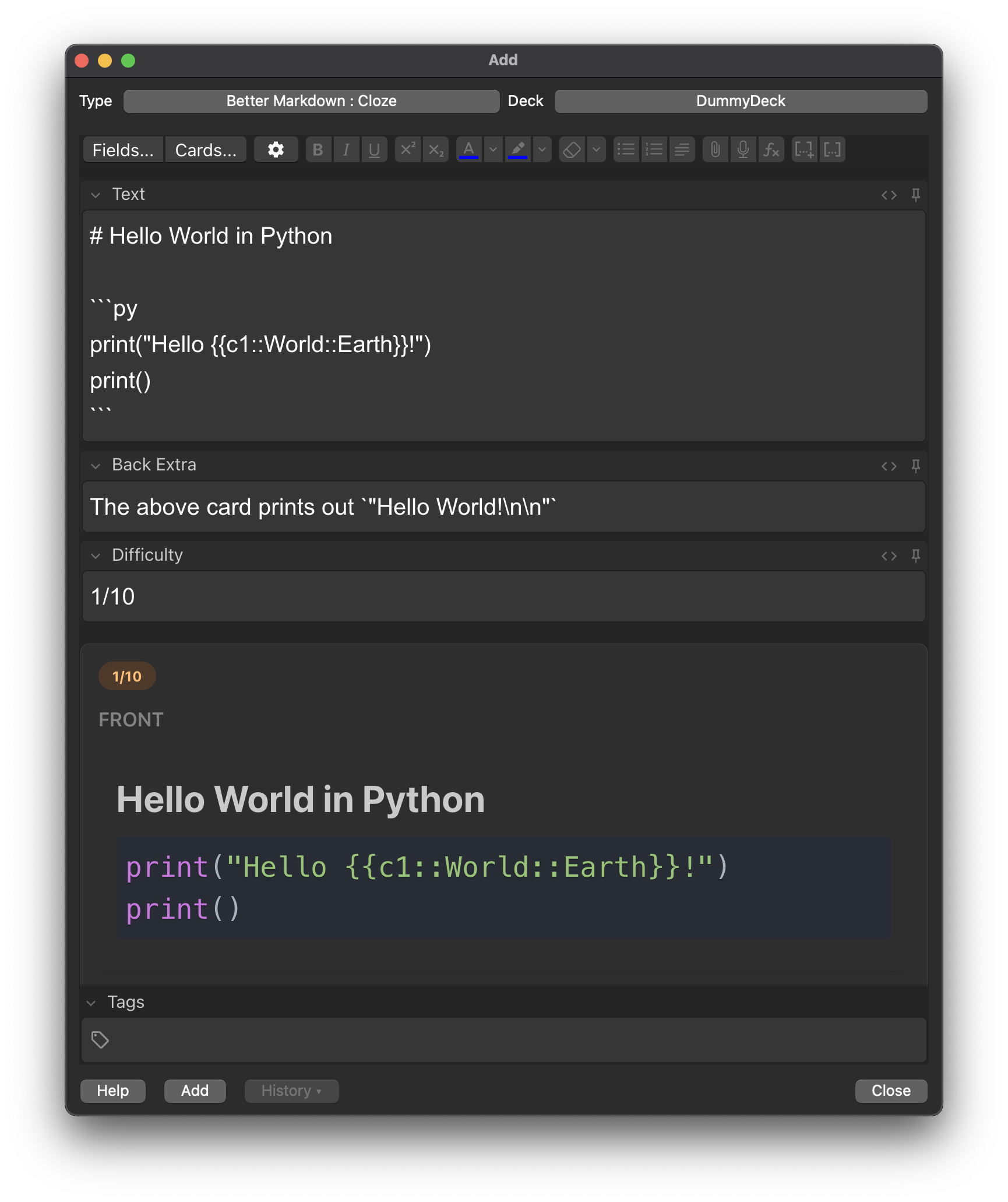
Preview

Better Markdown Anki Review

Better Markdown Anki Preview

Features

🎨 Enhanced Visual Experience

  • Theme-aware design that automatically adapts to Anki's light/dark mode
  • Color-coded card sections with distinct styling for front, back, and extra content
  • Modern UI components built with React and Mantine UI library

πŸ“ Advanced Markdown Support

  • Full markdown rendering with proper formatting for headers, lists, tables, and more
  • LaTeX math support using KaTeX for both inline ($...$) and block ($$...$$) equations
  • Syntax highlighting for code blocks with language-specific coloring
  • HTML entity decoding for proper character display

πŸ”„ Interactive Cloze Deletions

  • Toggle switches for each cloze deletion to show/hide content dynamically
  • Smart cloze processing that preserves formatting within code blocks and math expressions
  • Visual indicators for active/inactive cloze states

🏷️ Smart Card Organization

  • Tag display with styled badges for easy categorization
  • Difficulty indicators to show card complexity at a glance

Installation

  1. Download the add-on from the Anki add-on repository or by downloading the .apkg.
  2. In Anki, go to Tools β†’ Add-ons β†’ Install from file...
  3. Select the downloaded file and restart Anki
  4. The add-on will automatically create the necessary note types on first launch

Note Types

The add-on creates two specialized note types:

Better Markdown : Basic

  • Fields: Front, Back, Extra, Difficulty
  • Use case: Traditional question-answer flashcards with markdown formatting

Better Markdown : Cloze

  • Fields: Text, Back Extra, Difficulty
  • Use case: Interactive cloze deletion cards with enhanced markdown support

Usage

  1. Create a new note using one of the "Better Markdown" note types
  2. Write your content using standard markdown syntax
  3. The add-on will automatically render your markdown with enhanced styling
  4. Math expressions can be written using LaTeX syntax
  5. Use toggle switches to interact with cloze deletions dynamically

Technical Architecture

Core Technologies

  • React 19 with modern hooks and functional components
  • Mantine UI for consistent, accessible component design
  • Vite for fast development and optimized builds
  • TypeScript support for type safety

Markdown Processing Pipeline

  • ReactMarkdown for base markdown parsing
  • remark-math + rehype-katex for mathematical expressions
  • react-syntax-highlighter for code block formatting

Key Features

  • DOM mutation observation for real-time card updates
  • Automatic theme detection from Anki's CSS classes
  • Python backend integration with Anki's API
  • Automatic template and field management with version control

Development

# Install frontend dependencies
cd frontend
npm install

# Start development server
npm run fixtures
npm run dev

# Open http://localhost:5173/deck-preview.html to inspect the imported decks

# Run the automated regression suite and lint checks
npm test
npm run lint

# Build the production assets into better-markdown-anki/dist
npm run build

# Run the add-on integration tests from the repository root
cd ..
python3 -m unittest discover -s tests -v

Configuration

The add-on includes automatic configuration management:

  • Templates are updated automatically when the add-on loads
  • Missing fields are added to existing note types
  • Theme mode detection from Anki's CSS classes
  • Content changes monitored through DOM mutation observation

Browser Compatibility

Optimized for modern browsers with support for ES2020+ features, CSS custom properties, and DOM MutationObserver API.