AnkiWeb
- Rating
- 8 (👍 6 · 👎 2)
- Updated
- 2020-03-22
- Anki versions
- 2.1.24~
- Description language
- en
AnkiWeb addon 410936778
Tweaks the built-in HTML editor by prettifying HTML with Beautiful Soup, remapping a shortcut, setting a monospace font, resizing the editor, and disabling last-line cursor loading.
Open on AnkiWeb GitHub Ask about alternatives
abandoned
| Min Anki | Max Anki | Updated |
|---|---|---|
| 2.1.22 | 2.1.24+ | 2020-03-22 |
Loading…
Adds editor buttons, shortcuts, and menus to apply font/background colors, font sizes, custom classes, styles, and text wrappers in Anki.
Applies beautiful custom card templates to any Note Type via themes, drag-and-drop field mapping, per-field styling, live preview, light/dark adaptation, and automatic template backups.
Enables adding and editing Anki notes in extended CommonMark Markdown via editor fields or a separate window, with CodeMirror editing, extensions, and configurable conversion.
Adds real-time CSS/HTML color previews, click-to-pick color picker, syntax highlighting, and live card preview updates to Anki's Card Template Editor.
Adds monospace text and naive HTML/CSS syntax highlighting to Anki's template editor, with configurable highlighting, line numbers, search and replace, and indentation planned.
Adds configurable wrapper buttons and shortcuts to Anki for managing cloze navigation, wrapping/unwrapping, centering, citations, mnemonics, shuffling, and custom HTML.
A stripped-down port of the Clickable Tags add-on to Anki 2.1.
Just add the {{Tags}} special field to your card template. The add-on will take care of the rest.
Single-click the tag to search for notes with that tag. Double-click to limit the search to the current deck.
A set of tweaks to the built-in HTML editor. Hopefully an improvement for those who spend a lot of time editing cards.
Very alpha. Seems to work 99% of the time, but please make a backup of your collection first.
__init__.py to change)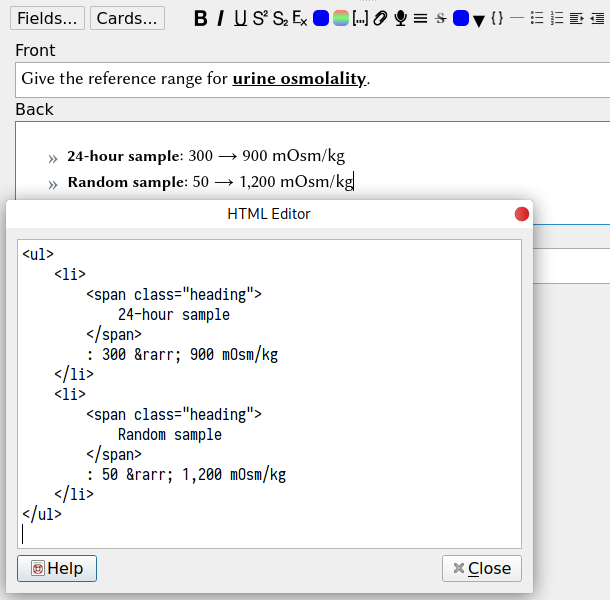
<sub> or <sup>Cloze note type.Term field to the note, containing the text that is hidden by the cloze._showClozeLength.js into your collection.media directory..hidden { color: transparent; }
<div class="term hidden">{{Term}}</div>
<script src="_showClozeLength.js"></script>