AnkiWeb
- Rating
- 47 (👍 44 · 👎 3)
- Updated
- 2024-01-31
- Anki versions
- 23.12~
- Description language
- en
AnkiWeb addon 43919973
Supports nested decks while delaying all cards by the deck's overdue days or a manual positive/negative day adjustment.
Open on AnkiWeb GitHub Ask about alternatives
abandoned
| Min Anki | Max Anki | Updated |
|---|---|---|
| 2.1.0 | 2.1.66 | 2024-01-31 |
| 23.09 | 23.12+ | 2024-01-31 |
Loading…
Displays a red number beside decks showing days overdue; with Delay Overdue Cards, clicking it prompts delaying cards by that many days, otherwise it still indicates overdue.
Limits new cards based on due, reviewed, and overdue workload to maintain a steady study load, using configurable total or per-deck thresholds.
Calculates realistic daily review and new-card targets by target date, including overdue, due, and learning cards, with intensity adjustment and simulation.
Creates a filtered deck for each real deck, adding a search term per deck, useful for studying due cards by creation order and syncing to mobile.
Provides a customizable progress bar or circle with live card counts, plus batch unsuspending by tag or deck and delaying overdue cards.
Spreads overdue review cards across a chosen future date range using even, front-loaded, back-loaded, or bell-curve distributions, with preview, deck selection, and backup recommendations.
An anki add-on that delays all cards by the number of days the deck is overdue.
You may also manually choose how many days you wish to delay the entire deck by. You can also bring the cards in the deck forward by entering negative numbers.
FOR EXAMPLE: This add-on will delay all of the cards based on the MOST overdue card. If one card was overdue by 60 days but the rest by 3 days, they would all be delayed by 60 days.
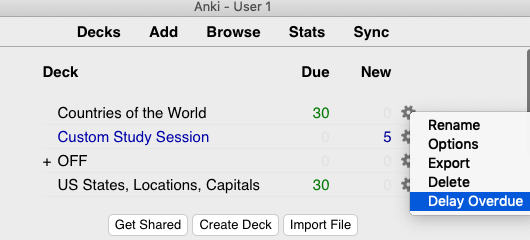
Click on the gear icon for the specific deck you want to delay. Choose delay option in the menu.
Please be careful to not get into the habit of constantly delaying cards instead of studying.