AnkiWeb
- Rating
- 2 (👍 2 · 👎 0)
- Updated
- 2026-08-05
- Anki versions
- 25.09.4~
- Description language
- en
AnkiWeb addon 452291788
Adds customizable answer buttons to Anki's reviewer for rescheduling cards with math, intervals, multipliers, ranges, dates, midpoints, plus per-card visibility, sorting, and filtered-deck options.
Open on AnkiWeb GitHub Ask about alternatives
active
| Min Anki | Max Anki | Updated |
|---|---|---|
| 24.04 | 25.09.4+ | 2026-08-05 |
Loading…
Supports FSRS rescheduling, postponing, advancing, breaks, load balancing, easy days, sibling dispersal, flattening, stats, and misuse remedies for Anki reviews.
Adds up to seven colored answer buttons with keyboard shortcuts, extra interval options for new and review cards, and customizable names/colors, though it conflicts with Button Colors.
Adds leech and lapse handling tools for Anki, including markers, reversal, custom actions, cross-device syncing, browser options, shortcuts, and text macros.
Provides a touch-friendly alternative dialog to reschedule the current card by interval, with configurable week, month, and year buttons, requiring ReMemorize for older Anki versions.
Spreads overdue review cards across a chosen future date range using even, front-loaded, back-loaded, or bell-curve distributions, with preview, deck selection, and backup recommendations.
Reschedules tomorrow's due cards from a selected deck randomly across future days, with progress, cancellation, and a rescheduling log.

Add custom buttons to the Anki reviewer's bottom bar. Each button can reschedule a card using a flexible syntax covering fixed days, interval multipliers, random ranges, specific dates, and midpoint intervals, along with per-card dynamic sorting and visibility conditions.
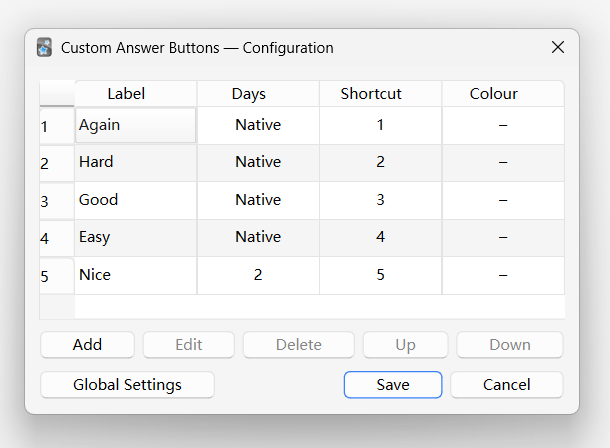
The Days field controls how the card is rescheduled.
14, 1.5).+, -, *, /, ( ).Use card interval variables directly (short one-character aliases accepted):
current — Current card intervalagain or a — Native Again intervalhard or h — Native Hard intervalgood or g — Native Good intervaleasy or e — Native Easy interval@YYYY-MM-DD — Calculates the exact number of days from today to the specified date (e.g., @2026-12-31).| Example | Behaviour |
|---|---|
14 |
Exactly 14 days later |
good * 1.5 |
1.5× the native Good interval |
hard + 2 |
2 days more than native Hard interval |
@2026-12-31 - 5 |
5 days before 31 Dec 2026 |
(good + hard) / 2 |
Average of Good and Hard intervals |
You can combine any variables, numbers, or dates using Range (~) or Midpoint (:):
X~Y)Generates a random interval between X and Y (inclusive):
| Example | Behaviour |
|---|---|
5~10 |
Random integer between 5 and 10 days |
hard~easy |
Random interval between native Hard and Easy |
good~15 |
Random interval between native Good and 15 days |
X:Y)Calculates the exact midpoint (X + Y) / 2 between X and Y:
| Example | Behaviour |
|---|---|
good:easy |
Midpoint between Good and Easy intervals |
10:20 |
Midpoint between 10 and 20 days (15 days) |
h:e |
Midpoint using short aliases |
@2026-12-31:good |
Midpoint between target date and Good interval |
< 1 day (including 0, decimals between 0.0 and 1.0, or negative numbers) is automatically floored to 1 day (1d).round()) to the nearest whole day.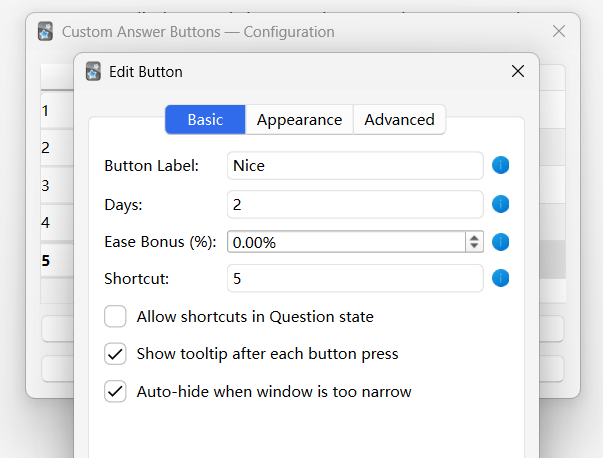
| Field | Description |
|---|---|
| Button Label | Text shown on the button |
| Days | Interval math expression (see above) |
| Ease Bonus (%) | Modifies the card's internal Anki Ease Factor when a value is provided. You must input a percentage number (e.g. 15 for +15%, -15 for -15%) |
| Shortcut | Keyboard shortcut, e.g. 5 or Ctrl+Shift+5 |
| Allow shortcuts in Question state | Trigger this button via keyboard before the answer is revealed. (Note: this applies to Native Buttons as well). |
| Show tooltip | Brief on-screen confirmation after each button press. (Note: this applies to Native Buttons as well). |
| Auto-hide when narrow | Hide this button when the window is too small. (Note: this applies to Native Buttons as well). |
Click Pick Colour… to open a colour picker. The preview shows the hex code on a coloured background. Click Clear to restore the default Anki style.
Three checkboxes: New / Learning / Review.
Hide this button when its computed interval falls outside a range:
| Field | Meaning |
|---|---|
| Hide if interval < | Button disappears when days < X (Supports Math/Variables) |
| Hide if interval > | Button disappears when days > X (Supports Math/Variables) |
Leave blank for no restriction. Particularly useful for multiplier or midpoint buttons:
Example: A "current" * 1.5 button with "Hide if interval > 180" won't appear on cards already scheduled far in the future, where aggressive multiplication would be inappropriate.
Visibility is evaluated dynamically per card based on the button's computed interval.
⚠ If you notice visual flickering or unexpected layout jumps, leave blank to turn it off.
Safely simulate a sequence of native button presses per card state to update the card's memory state and review history (revlog) before setting the due date. Separate fields for New, Learning, and Review states (defaults to good for New and Learning). (Note: this does not apply to Native Buttons).
Syntax: Separate keys by +
good+goodeasy+goodVariables:
againhardgoodeasyNote: Short aliases like a, h, g, and e are also accepted. Leave empty to skip simulation for this state.
Opened via the Global Settings button in the main config dialog.
| Option | Description |
|---|---|
| Take over native buttons | Replaces Anki's native Again/Hard/Good/Easy buttons with customisable versions that match this addon's styling and layout. Note: The native core logic remains intact; only the visual buttons are taken over. |
Auto (sort by interval)
Buttons are sorted by computed interval length each time a card is shown. For multiplier and midpoint buttons whose interval changes per card.
⚠ If you notice visual flickering or unexpected layout jumps, switch to Custom mode.
Custom (configured order)
Buttons appear in the order defined in the main list. Use the ↑↓ buttons to reorder manually.
Custom buttons natively support filtered decks. Because filtered decks have different rules (some reschedule cards, some don't), you can control how custom buttons behave inside them via the Global Settings dialog.
| Option | Behavior |
|---|---|
| Apply date only if 'Reschedule' is enabled | (Default) Smart mode. Custom buttons always appear. If the filtered deck has "Reschedule cards based on my answers" checked, they apply your target interval. If unchecked (e.g. for cramming), pressing them acts like a native Good button and safely returns the card to its home deck without altering its interval. |
| Always show and forcefully reschedule | Custom buttons always appear. Pressing them forcefully applies the target interval, overriding the filtered deck's "Reschedule" setting. |
| Hide custom buttons entirely | Custom buttons will never appear in any filtered deck. |
Technical note: When applying a custom date in a filtered deck, the addon answers with Good first to let Anki safely handle the deck-transition (return to home deck) before applying our specific due date.
This addon perfectly changes the exact due date of a card. However, it cannot directly modify FSRS Stability (S) and Difficulty (D).
Because Anki does not provide a native API to manually overwrite a card's S and D variables like it does for due dates, we are left with a limitation: your card's date is moved, but its underlying FSRS memory state doesn't fully reflect that massive jump.
While you can use the "Simulate Native Presses" feature in the Advanced tab to make the addon simulate clicking native buttons before setting the date (which updates S and D a little bit and logs the review), simulating a bunch of button presses at once still doesn't dramatically or predictably change S and D to perfectly match your custom interval.
Recommendation:
To put it simply, this addon is not compatible with other addons that modify or interact with the answer buttons.
Most other button-related addons work by intercepting and modifying Anki's built-in native buttons. However, this addon creates and injects completely new custom buttons into the interface. Because our buttons are separate entities, they fall entirely outside the scope of what those other addons modify or listen to. There is no workaround for this limitation.
New/Learning/Review state cards by interacting directly with Anki's Rust backend Protobuf definitions.good for New and Learning).revlog) and committed to the database, ensuring complete FSRS/SM-2 state tracking and card info logging.Ctrl+Z undo step.Days field now supports standard math expressions (+, -, *, /, ( )).[min, max] range — evaluated per card, liveQColorDialog replaces raw text input; preview swatch updates live5~10), specific date (@YYYY-MM-DD), midpoint (X:Y)*1.3g, x2h, ×1.5e)*1.5, x2) instead of using fixed days. Automatically respects deck options (Interval Modifier and Maximum Interval).14(+15%), *1.5(-10%)).You can install this addon directly from within Anki using its addon code:
<blockquote><b>452291788</b></blockquote>
<p><a href="https://ankiweb.net/shared/info/452291788">View on AnkiWeb</a></p>
.ankiaddon file.This project is fully open-source. You can view the source code, report bugs, or contribute on GitHub:
If you encounter any bugs, have feature requests, or need help configuring the addon, feel free to reach out via GitHub Issues or email!