AnkiWeb
- Votes
- 0 (👍 0 · 👎 0)
- Updated
- 2026-10-22
- Anki versions
- 26.08.1~
- Languages
- Python, JSON
- Description language
- en
AnkiWeb addon 527989666
Builds timed correct-answer streaks with rising sounds, themed emblems, countdowns, and five reward stages, with adjustable timing, volume, and display, without altering cards or scheduling.
Open on AnkiWeb GitHub Ask about alternatives
active
| Min Anki | Max Anki | Updated |
|---|---|---|
| 26.08.1 | + | 2026-10-22 |
Loading…
Turns Anki reviews into a focused momentum game with question/answer timers, protective streaks, optional audio and controller feedback, Time Boosts, and tools for flagging slow cards.
Tracks daily Anki review streaks with a clickable counter and history calendar, automatic streak freezes, rewarding animations after the first review of the day, and sharable progress.
Turns existing Anki decks into a free, customizable study experience with six interactive modes, XP and combos, progress tracking, themes, images and optional sound.
Plays Kahoot lobby music before cards and answer sounds after rating, with pitch-changing streak effects and toggleable themed thinking-sound categories.
Adds a Tamagotchi-style dog to the Anki home screen that is fed, watered, clothed and kept alive by daily review goals, with configurable breeds and milestones.
Turns daily Anki reviews into an RPG with XP, loot, skill upgrades, and weekly boss battles, adding battle animations, sounds, and a quest journal.
Build an answer streak with rising sounds, original emblems, and a countdown. Keep answering correctly before time runs out to climb through five reward stages. At five and beyond, the final sound repeats while your streak counter keeps growing.
Six original themes: Pulse, Prism, Orbit, Ember, Circuit, and Bloom — 30 synthesized sounds and six original geometric emblems. All assets are bundled; no downloads or local server are needed.
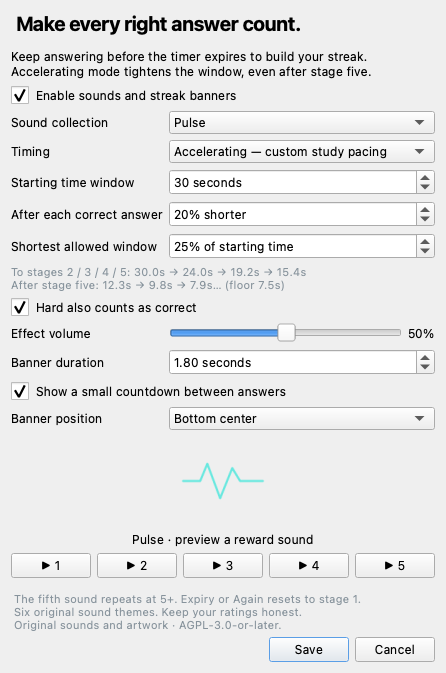
Install this add-on and restart Anki, then open Tools → Streak Lab…. Pick a theme, preview the five sounds, and adjust the volume and timing.
The timer counts time between ratings, including reading the question and viewing the answer. It uses your rating, not automatic grading. Rate honestly, even when a streak is on the line. Undo, leaving review, opening settings, or closing a profile resets the streak. Switching to another app does not pause the timer.
For Anki desktop with Qt 6. Tested with Anki 26.8.1 on macOS; other versions and operating systems are unverified. AnkiWeb hosts this download, but desktop add-ons do not run in the AnkiWeb study interface, AnkiMobile, or AnkiDroid.
Entirely offline. No account, telemetry, or network requests. Does not alter cards, notes, review scheduling, or card audio. If you have the personal Valorant Streak prototype, enable only one version to avoid duplicate effects.
Source code and releases · Report a bug
Code, synthesized sounds, and geometric artwork: AGPL-3.0-or-later. This public release uses original assets and branding. It is not affiliated with Riot Games or Ankitects. Timing is a custom study mechanic.
Version 1.3.0. Validation: 13 timing tests and isolated Anki/Qt checks covering overlays, settings, resets, all six emblems, and decoding every sound.
Build an answer streak with rising sounds, original emblems, and a shrinking countdown. Free, open-source, and entirely offline.

Install from AnkiWeb: in Anki desktop, open Tools → Add-ons → Get Add-ons, paste 527989666, and restart. The listing supports Anki 26.08.1 and newer.
Alternatively, download Streak-Lab.ankiaddon from Releases. In Anki desktop, open Tools → Add-ons → Install from file…, choose the package, and restart. Then open Tools → Streak Lab… to choose your theme and timing.
Requires Anki desktop with Qt 6. Tested with Anki 26.8.1 on macOS using its actual hooks and Qt libraries; other versions and operating systems have not been verified. Desktop add-ons do not run in AnkiMobile, AnkiDroid, or the AnkiWeb study interface. AnkiWeb hosts the download for desktop users.
If you have the personal Valorant Streak prototype, use only one version at a time to avoid duplicate effects. This public release has its own package ID and does not replace that prototype's files or settings.
Rate a card Hard, Good, or Easy to start a streak. Keep rating correctly before the countdown runs out to reach five reward stages. The fifth sound repeats for subsequent successes while the counter keeps growing. Again or an expired countdown resets it. Hard can be excluded in settings.
Accelerating mode starts with a 30-second window, then shortens each new window by 20%, down to 7.5 seconds. Both the starting time and shrink rate are adjustable. Fixed mode keeps the same window throughout.
The timer measures the gap between ratings, including reading the question and viewing the answer. Your own rating determines success; the add-on does not automatically grade answers. Rate honestly, even when a streak is on the line. Leaving reviews, undoing a rating, opening settings, or closing a profile resets the streak. Switching to another application does not pause the timer.
| Theme | Sound | Emblem |
|---|---|---|
| Pulse | Crisp electronic impact | Waveform |
| Prism | Bright bell tones | Faceted diamond |
| Orbit | Soft modulated synth | Orbiting rings |
| Ember | Warm harmonic tones | Flame |
| Circuit | Arcade harmonics | Circuit |
| Bloom | Gentle chimes | Flower |
Each theme includes five sounds, for 30 original effects. Adjust volume, popup duration, banner position, and countdown visibility, or disable rewards entirely. The add-on does not modify cards, notes, scheduling, or card audio. No server, account, telemetry, or network access is required.
python3 -m unittest discover -s tests -v
python3 scripts/build.py
The resulting package is dist/Streak-Lab.ankiaddon. The build includes only the listed runtime files, license, and catalog-referenced assets; no caches, local preferences, or developer files. Asset paths must stay inside the assets directory.
All sounds and vector art are generated from scratch by scripts/generate_assets.py, using Python's standard library. Run that script to reproduce the assets. There are no recordings, game samples, downloaded images, or third-party sound packs.
addon/core.py contains pure timing rules; addon/__init__.py integrates review hooks, Qt overlays, settings, and playback. Thirteen rule tests cover rolling deadlines, exact expiry, ratings, resets, accelerating windows, fifth-stage repeats, and invalid settings. An isolated Qt smoke test additionally checks settings, overlays, undo/reset hooks, all six emblems, and decoding all 30 WAV files. It does not open a personal Anki collection.
To run scripts/smoke_anki.py, use a Python interpreter matching your installed Anki runtime and put its app_packages on PYTHONPATH; QT_QPA_PLATFORM=offscreen runs without displaying the test window.
Report bugs using GitHub Issues, including your Anki version, operating system, and steps to reproduce. Please do not attach your collection or private card content.
Code, generated sounds, and geometric artwork are licensed under GNU AGPL v3 or later; see LICENSE. The first source snapshot was a personal Valorant-inspired prototype, which explains the repository URL. The public Streak Lab package includes original assets and branding. It is not affiliated with Riot Games or Ankitects and does not reproduce verified game timing.