AnkiWeb
- Votes
- 0 (👍 0 · 👎 0)
- Updated
- 2026-10-18
- Anki versions
- <=25.09.5
- Languages
- Python, JavaScript, JSON
- Description language
- en
AnkiWeb addon 553529817
Displays a slim transparent progress bar below Anki's toolbar showing today's answers, remaining cards and estimated progress, with customizable solid or gradient colors and a live preview.
Open on AnkiWeb Ask about alternatives
active
No GitHub repository linked.
| Min Anki | Max Anki | Updated |
|---|---|---|
| 25.09.5 | – | 2026-10-18 |
Loading…
Replaces standard deck stats with a customizable, theme-adaptive dashboard showing per-deck progress, remaining cards and today's completed reviews, configured through a graphical menu.
Displays a customizable, themeable progress bar above or below review cards, showing completion, cards left, speed, time spent and remaining, finish estimates, and deck breakdowns.
Displays a color-coded progress bar showing time spent, answer speed, and estimated time remaining to finish the current deck's reviews.
Splits review sessions into configurable chunks and displays two linked progress bars with color-coded intervals, timers, session tracking, and optional FSRS-based retention coloring.
Earns play-money tokens through Anki reviews, spendable on cosmetic themes, real-world event trading, leaderboards, weekly challenges, and a shop.
Sets per-deck daily new-card goals, fixed or deadline-based, and displays progress badges and bars on deck lists and overview screens, including subdecks.
A slim progress bar below Anki’s toolbar, with a transparent background. See today’s answers, remaining cards and estimated progress at a glance.
Solid colour

Gradient

Open Tools → Proper Progress Bar settings…, or Tools → Add-ons → Proper Progress Bar → Config.
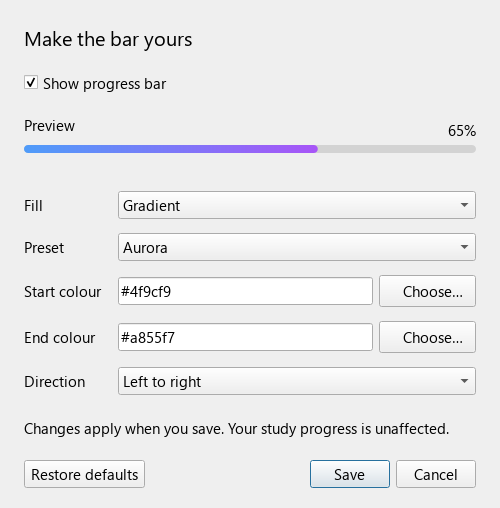
Choose a solid colour or gradient, pick colours visually, and see a live preview. Gradient presets include Ocean, Aurora, Sunset, Forest and Rose. You can also choose your own start and end colours and change the direction. Save applies changes immediately; Cancel discards them. Restore defaults resets the choices in the window.
Answers today ÷ (answers today + remaining cards). Repeated answers count each time. Daily limits, burying and new learning steps can change the workload; the percentage is an estimate, not a measure of memorisation.
Moving or deleting cards can change totals. Filtered-deck cards use their current/original deck membership. Day boundaries follow Anki’s rollover in your computer’s local timezone.
Version 1.2.0 · Anki desktop 25.09.5 · MIT licence.
Verified using a temporary collection, Anki’s Chromium display, review updates, Undo, gradient rendering and settings Save/Cancel checks. Desktop only.