AnkiWeb
- Votes
- 0 (👍 0 · 👎 0)
- Updated
- 2026-10-23
- Anki versions
- 25.09.4~
- Languages
- Python, JSON
- Description language
- en
AnkiWeb addon 859636264
Adds a macOS Look Up option to the right-click menu, opening the system dictionary panel over selected text in the reviewer, previewer, card layout and editor, plus native menus and an L shortcut.
Open on AnkiWeb GitHub Ask about alternatives
active
| Min Anki | Max Anki | Updated |
|---|---|---|
| 25.09 | 25.09.4+ | 2026-10-23 |
Loading…
Looks up definitions of selected words and phrases during review via the macOS dictionary, opened with Cmd+D instead of a context menu.
Lets you highlight medical terms during study and open DocCheck or Wikipedia articles in a configurable language in an in-Anki side panel.
Adds a right-click lookup option that opens selected words in the macOS Dictionary while reviewing cards and in the editor.
Adds a side panel of customizable clickable emoji bubbles in Anki's main window for one-click access to favorite websites or program paths, with add, edit, delete, and reorder options.
Shows offline synonyms from your own collection on Chinese review cards as known/total counts on the front and a clickable synonyms panel on the back.
Imports yomitan-format dictionary zip files and adds definitions to selected notes using configurable note types, source and destination fields, with HTML or plain-text output and optional overwriting.
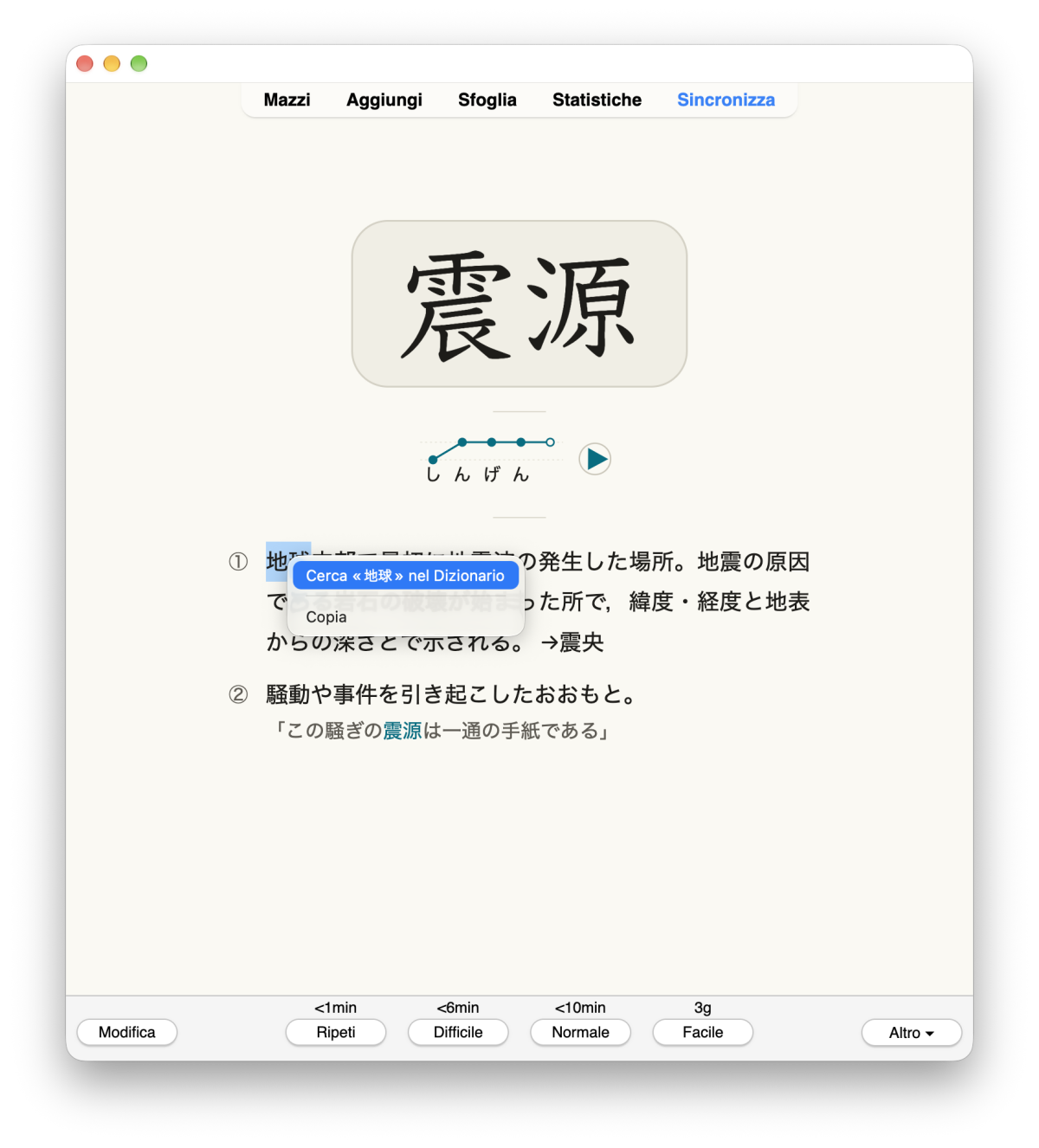
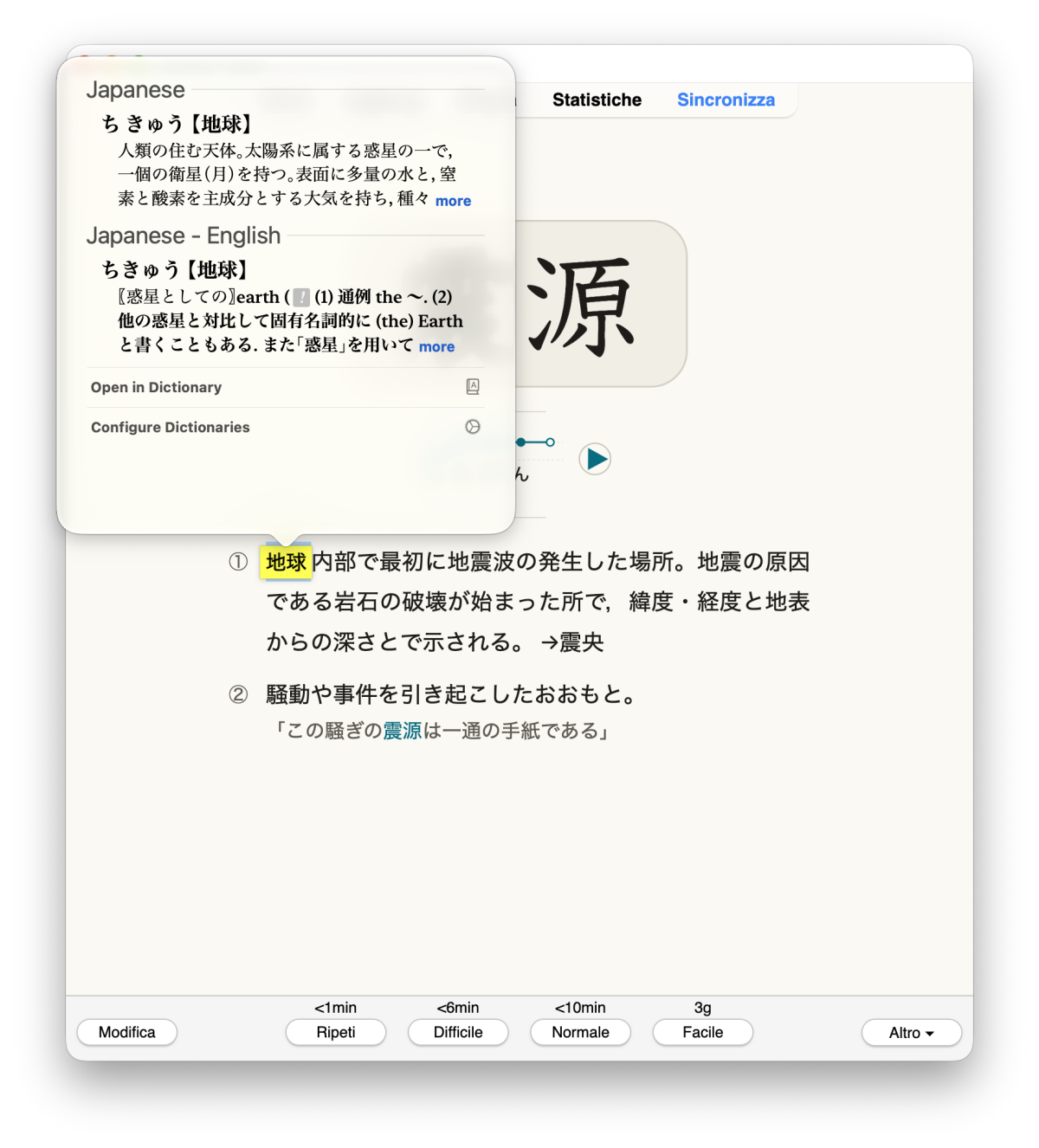
macOS only. On Windows and Linux the add-on loads and does nothing.
On any card, select a word, right-click and choose "Look Up "…" in Dictionary". The macOS Look Up panel opens over the word as you are used to in macOS.
Limitations: while a native menu is open, Anki's timers pause. Tested only with Anki 25.09.4 on macOS 27, Apple Silicon.
Privacy: The selected text goes only to macOS Look Up or the Dictionary app, and only when you ask. It uses Apple's AppKit through Python's ctypes, with no extra libraries.
Earlier add-ons from other people: (OSX Dictionary Lookup, Mac OSX Dictionary Lookup).
Guide in English, Italian and Japanese, source code and bug reports: https://github.com/Amost-/anki-macos-look-up License: AGPL-3.0-or-later.
Select a word on a card, right-click and choose Look Up "…" in Dictionary. The macOS Look Up panel opens over the word, as in Safari or in AnkiMobile on iPhone.
macOS only. On Windows and Linux the add-on loads and does nothing.
| Right-click on a selected word | Look Up panel over the word |
|---|---|
 |
 |
.ankiaddon file from Releases, double-click it or use Tools → Add-ons → Install from file…, then restart Anki.Tools → Add-ons → select the add-on → Config. Changes apply from the next right-click; the shortcut changes after restarting Anki.
| Option | Default | Meaning |
|---|---|---|
mode |
"popover" |
"popover": Look Up panel over the word. "dictionary_app": open the Dictionary app instead. |
menu_label |
"" |
Text of the menu item; {text} is replaced by the selection. Empty: use Anki's language. |
max_label_chars |
20 |
Longest selection shown in the menu item. The lookup always uses the whole selection, up to 100 characters. |
in_editor |
true |
Also add the item in the editor. |
native_menu |
true |
Show right-click menus as native macOS menus. false: keep Anki's menus. |
shortcut |
"L" |
Review shortcut. In Qt names on macOS, Ctrl = ⌘, Alt = ⌥, Meta = ⌃. "" turns it off. |
ctypes, with no extra libraries:
showDefinitionForAttributedString:atPoint: for the panel;NSMenu for the menus;NSWorkspace to open the Dictionary app, with the open command as fallback.resetMouseButtons, as Qt itself does after its own native menus, so the next clicks reach Anki's toolbars.__init__.py, macos_lookup.py, native_menu.py, objc_bridge.py.Open an issue: https://github.com/Amost-/anki-macos-look-up/issues
Tools → Add-ons → select the add-on → Delete, then restart Anki.
Earlier add-ons, OSX Dictionary Lookup and Mac OSX Dictionary Lookup, open the Dictionary app. This add-on adds the in-place Look Up panel and native menus.
AGPL-3.0-or-later, the same license as Anki. See LICENSE.