AnkiWeb
- Rating
- 3 (👍 2 · 👎 1)
- Updated
- 2025-12-15
- Anki versions
- 23.09~
- Description language
- en
AnkiWeb addon 1106575667
Exports Anki decks to standalone HTML files with custom templates, CSS, queries, embedded images, and live preview.
Open on AnkiWeb GitHub Ask about alternatives
stale
| Min Anki | Max Anki | Updated |
|---|---|---|
| 23.09 | + | 2025-12-15 |
Loading…
Exports Anki decks to print-ready PDFs or standalone offline HTML with native rendering, themes, typography, layout controls, subdeck picking, and interactive image viewing.
Exports selected Anki card backs into a standalone HTML file with original CSS and images, suitable for printing, sharing, archiving, or saving as PDF.
Exports selected Anki card answer sides as high-quality PNGs in batch, organized by deck, embedding images, rendering HTML/CSS/MathJax, with progress and configurable settings.
Exports Anki cards as images using customizable Jinja2 HTML templates and CSS, with options for resolution, cloze replacement, excluded fields, per-note templates, and ImageMagick auto-cropping.
Adds a "Save HTML" menu to Anki's preview view, saving the whole page with CSS, JavaScript and images to a local file for debugging complex templates.
Imports and exports Anki note type CSS and card templates, with configurable delimiters, global CSS, common epilog support, directory memory, and improved error handling.
Export your Anki decks to standalone HTML files with custom styling and formatting.
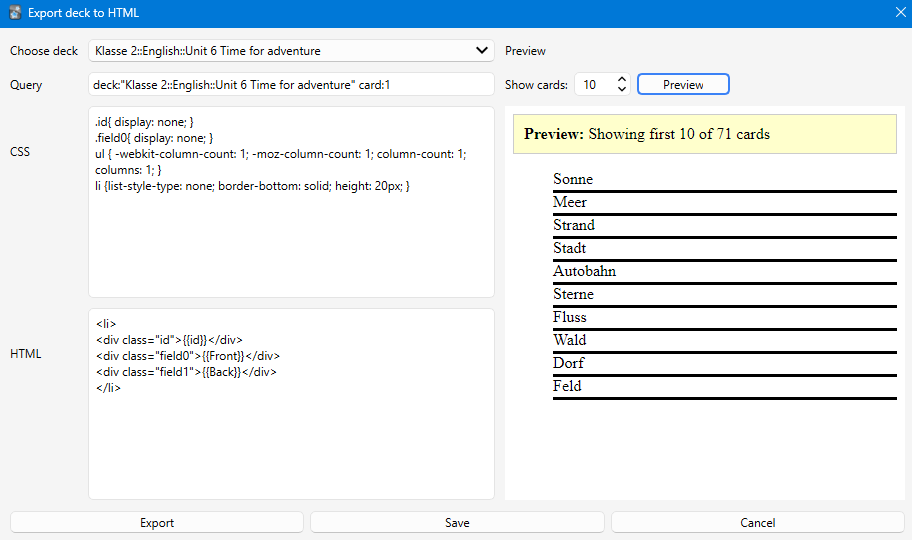
This addon allows you to export Anki cards to a single HTML file with full control over the layout and styling. Based on the original "Export cards to Html" addon, this version has been updated with modern features and support for newer Anki versions.
The addon uses a simple template system with placeholders:
Use {{fieldName}} to insert card fields:
<li>
  <div class="id">{{id}}</div>
  <div class="field0">{{Front}}</div>
  <div class="field1">{{Back}}</div>
</li>
{{id}} - Card number (1, 2, 3, etc.){{Front}}, {{Back}}, etc. - Your card fields{{Front//Text}} - Fallback syntax for multiple card typesAdd any CSS to style your cards:
.id { display: none; }
li { border-bottom: solid; height: 20px; }
ul { column-count: 3; }
Use Anki's search syntax to filter cards:
deck:"Deck Name" - All cards in a deckdeck:"Deck Name" card:1 - Only specific card typetag:important - Cards with specific tagClick Save to store your current template, CSS, and query for the selected deck. The next time you open the dialog, your settings will be restored.
The preview panel shows how your exported HTML will look:
Based on the original "Export cards to Html" addon. Updated and enhanced with modern features including live preview, better UI, and support for current Anki versions.
If you encounter any issues or have suggestions, please report them on the addon's GitHub page or AnkiWeb reviews.