AnkiWeb
- Rating
- 51 (👍 45 · 👎 6)
- Updated
- 2025-06-16
- Anki versions
- 25.06~
- Description language
- en
AnkiWeb addon 1336389630
Automates Korean study fields by filling translations from a built-in English dictionary and audio from Google or NAVER, with basic and advanced note types.
Open on AnkiWeb GitHub Ask about alternatives
stale
| Min Anki | Max Anki | Updated |
|---|---|---|
| 2.1.0 | 2.1.44 | 2024-02-13 |
| 2.1.45 | 24.11 | 2024-05-26 |
| 25.02 | 25.06+ | 2025-06-16 |
Loading…
Automates Spanish flashcard creation by auto-filling translations, gender, plurals, sentence fields, and Google TTS audio using an offline dictionary with translation fallback.
Automates Italian flashcard creation by auto-filling translations, grammatical gender, plurals, and TTS audio from a typed word or sentence, using an offline dictionary with translation fallback.
Automates Japanese flashcard creation by auto-filling translation, kana, On'yomi/Kun'yomi, transitivity, part-of-speech, and TTS audio from offline lexical databases and Google Text-to-Speech.
Automatically fills Chinese flashcard fields, adding part-of-speech and Kangxi radical filling alongside existing Hanzi, Pinyin, English, Bopomofo, audio, examples, frequency, and tone colours.
Automatically fills Chinese flashcard fields with translations, pinyin/Jyutping, audio, characters, Bopomofo, rubies, frequency, example sentences, and tone coloring.
Automatically fills French Anki card fields from typed words or sentences, providing translations, grammar, gender, plurals, offline dictionary lookup, TTS audio, and translation fallback.
Support for Korean language study for Anki 2.1.
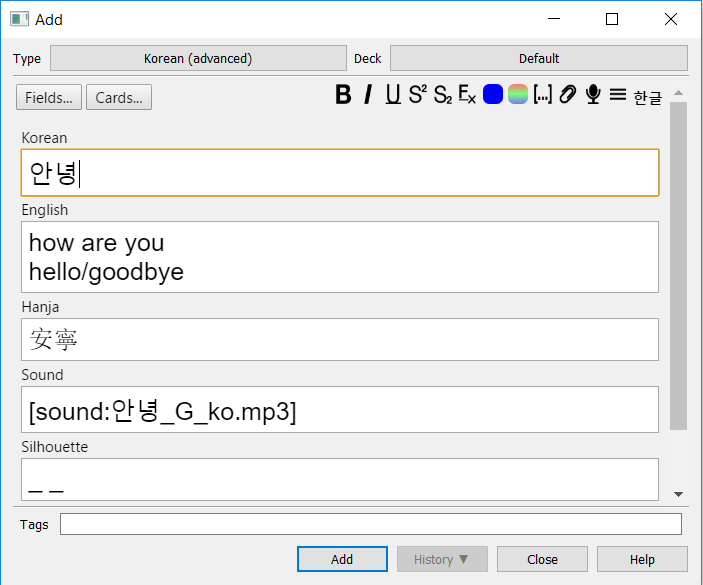
Use the supplied Korean (basic) or Korean (advanced) note type, or use your existing note type (just make sure your field names are called "Korean", "English", "Hanja", and "Sound".)
For bug reports, issues and feature requests, and to discuss contributing to the add-on:
With newer Anki Versions the way comments are handled changed. The plugin tries to update these templates automatically, but might detect false positives. In this case manual migration is recommended.
Click Browse, select a card with the correct template, select Cards, go to the Back Template and replace <!-- {{Sound}}--> with <div class=korean-support-sound>{{Sound}}</div>, then click on Styling and add .korean-support-sound { display: none; } to the bottom as a new line.