AnkiWeb
- Votes
- 0 (👍 0 · 👎 0)
- Updated
- 2026-10-31
- Anki versions
- 2.1.1~
- Languages
- JavaScript, Python, CSS, JSON
- Description language
- en
AnkiWeb addon 1450038911
Marks hard medical terms and abbreviations on any card with dotted underlines and shows plain-English pop-up definitions on hover or click, without altering notes.
Open on AnkiWeb GitHub Ask about alternatives
active
| Min Anki | Max Anki | Updated |
|---|---|---|
| 2.1.1 | + | 2026-10-31 |
Loading…
Provides in-addon tooltips with stem definitions and word origins for nearly 3000 medical terms, requiring Anki's Qt6 version.
Disables AMBOSS tooltips on hover, patching the reviewer so definitions appear only when a highlighted term is clicked, with compatibility fixes for cloze cards on Windows.
Highlights medical terms in flashcards so clicking opens offline popups with definitions, clinical relevance, mnemonics, practice cases, and calculators.
Shows pop-up explanations, images, and relevant article links when hovering medical terms in any flashcard, and provides targeted Qbank sessions based on Anki progress or tags.
Underlines medical terms on review cards, offering hover or click explanations, plus card search, interactive lessons, retention dashboards, and customizable highlighting and popups.
Adds hoverable Wikipedia tooltips with definitions and images to underlined terms in flashcards during review, with configurable language, appearance, class targeting, and blocked-word lists.
Hover a hard medical term on any card and get a short, plain-English definition.
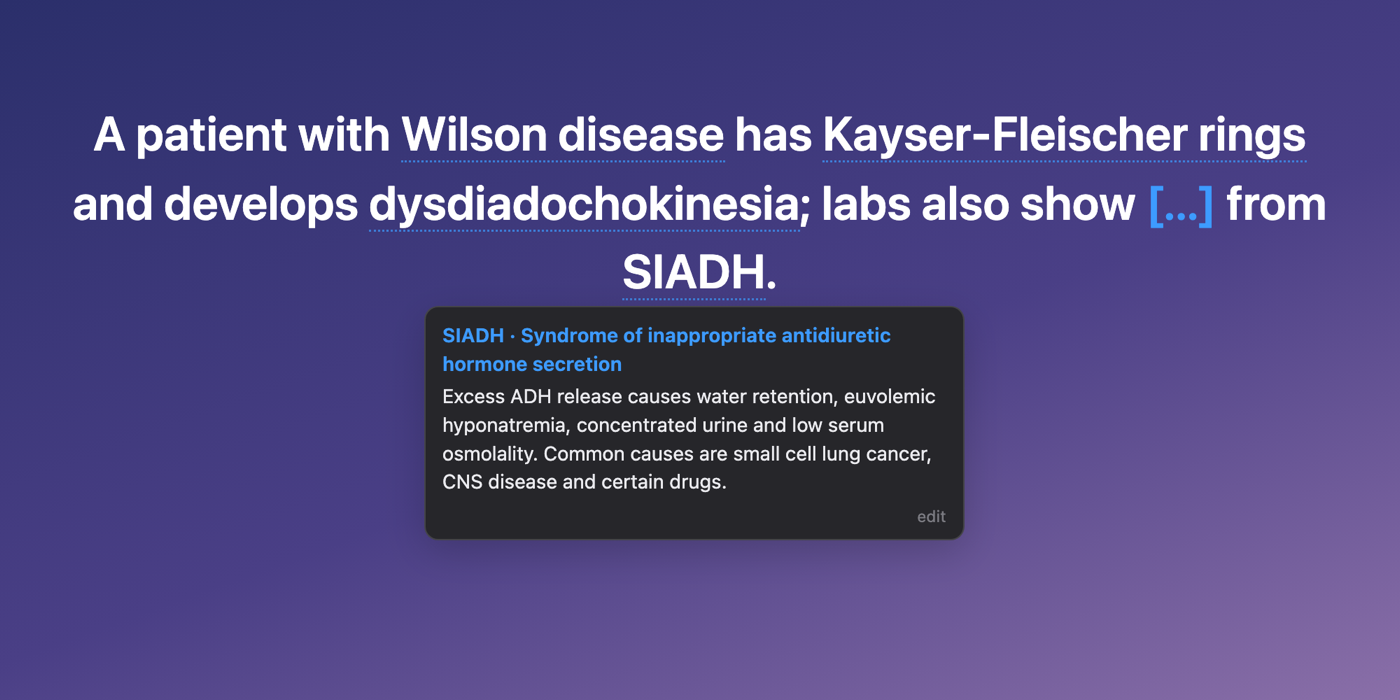
Hard terms on your cards get a faint dotted underline. Hover one (or click it) and a small pop-up explains what it is, plus the one association that makes the card make sense. Abbreviations work too: hover SIADH and the pop-up spells it out, then defines it.
What's in it
How to use
Compatibility
Accuracy The definitions are short study aids, not a clinical reference. They can be incomplete or occasionally wrong, so don't use them for patient care. Spotted a bad or missing definition? Please report it on GitHub with the term and the fix.
Open source Code is MIT-licensed; the definitions are CC BY-SA 4.0. Source, the full term list and contribution steps are on GitHub. The term list is built in part from MeSH, courtesy of the U.S. National Library of Medicine. Not affiliated with AnKing, AnkiHub, AMBOSS or NLM.
Plain-English definitions for hard medical terms, right on your Anki cards.
Hard terms on a card get a faint dotted underline. Hover one (or click it) and a short definition pops up: what it is, plus the one association that makes the card click. Abbreviations work too. Hover SIADH and the pop-up spells it out before defining it.

1450038911
(AnkiWeb page).hover_glossary-<version>.ankiaddon from
Releases, then
Tools → Add-ons → Install from file….Needs Anki 2.1.50 or newer on desktop (Mac, Windows, Linux). AnkiMobile and AnkiDroid don't run add-ons.
| Action | What happens |
|---|---|
| Hover a dotted term | Definition appears |
| Click a term | Pins the pop-up open (click elsewhere or press Esc to close) |
| edit in a pop-up | Reword that definition for yourself; kept across updates |
| Tools → Hover Glossary definitions | Turn the whole thing on/off |
Settings (Tools → Add-ons → Hover Glossary → Config):
showOnQuestion (default true): set to false to mark terms only after the answer is shown.markEveryOccurrence (default false): set to true to underline repeats too.hoverDelayMs (default 120): how long to rest on a term before the pop-up opens.Definitions are short study aids. They can be incomplete or occasionally wrong, so don't use them for patient care. Found a bad or missing definition? Open an issue with the term and the fix, or send a pull request (see below).
addon/                 the add-on (what ships in the .ankiaddon)
  web/glossary.js      finds terms in the drawn card and runs the pop-up
  web/glossary_data.js compiled glossary (generated, don't edit by hand)
data/defs/*.jsonl      the definitions, one JSON line per candidate term
DEFINE.md              the writing rules every definition follows
tools/                 extraction, checks and packaging scripts
Each line in data/defs is either a kept term:
{"id": 1234, "term": "Koilonychia", "def": "Spoon-shaped nails…", "syn": [], "abbr": []}
or a skipped candidate ({"id": 1235, "skip": "obvious"}).
To change a definition, edit its line, then rebuild:
python3 tools/build_data.py data/defs/batch_*.jsonl -o addon/web/glossary_data.js
To build the installable file:
python3 tools/package.py
To try changes in a browser without Anki, serve the repo folder and open
tools/test_harness.html. It mimics the review screen, including Onigiri's
click-to-reveal and inline editing.
The candidate list was generated from a local copy of the AnKing deck
(tools/dump_anking.py → match.py / extra_terms.py → make_candidates.py). It isn't
in this repo because it quotes AnKing card text. The definitions themselves are original
writing.
data/defs, addon/web/glossary_data.js):
CC BY-SA 4.0. Reuse them freely with credit, and share
adaptations under the same license.Term list built in part from MeSH, courtesy of the U.S. National Library of Medicine. Not affiliated with or endorsed by AnKing, AnkiHub, AMBOSS or NLM.