AnkiWeb
- Rating
- 1 (👍 1 · 👎 0)
- Updated
- 2026-02-04
- Anki versions
- 2.1.1~
- Description language
- en
AnkiWeb addon 1513387587
Exports and imports Anki note types as portable JSON files, with selective export/import and smart conflict resolution.
Open on AnkiWeb GitHub Ask about alternatives
stale
| Min Anki | Max Anki | Updated |
|---|---|---|
| 2.1.1 | + | 2026-02-04 |
Loading…
Bulk imports, updates, and exports Anki cards via JSON, with automatic note type creation, media embedding from URLs, and per-card deck/tag options.
Exports and imports Anki note type definitions to plain text files in mirrored directory hierarchies, with searchable selective export, clean overwrite, round-trip editing, and lossless synchronization via metadata files.
Adds visual Browser layouts, explorer-style navigation, tabs, drag-and-drop deck folders, colours, and a visual note-type manager with grid details, folders, and JSON import/export.
Imports and exports CSS and card templates for all Anki note types, with configurable delimiters, CSS filenames, and global CSS merging behavior.
Imports and exports Anki note type CSS and card templates, with configurable delimiters, global CSS, common epilog support, directory memory, and improved error handling.
Create and link mind maps to Anki cards, edit nodes bidirectionally, navigate visually, customize, back up, and export portable offline viewers.
This repository is a fork of the original Anki Plugins project by ssricardo, with additional custom plugins.
| Plugin | Description |
|---|---|
| Fill the Blanks Expanded | Enhanced cloze deletions with input fields |
| Note Type Export | Export and import note types as JSON |
Enhanced cloze deletion add-on with input fields and instant feedback, including:
All new features are built upon the excellent foundation created by the original author.
{{c1::Guten}} {{c2::Morgen}}, wie {{c3::geht}} es {{c4::dir}}?

Das ist {{c5::sehr}} {{c6::schön}}!
<table cellspacing="10" cellpadding="0" style="border-collapse:separate;"> <tr> <td style="vertical-align:top;"> <a href="https://raw.githubusercontent.com/belagrun/anki/refs/heads/main/images/2026-01-30_19-03-16.jpg" target="_blank" rel="noopener"> <img src="https://raw.githubusercontent.com/belagrun/anki/refs/heads/main/images/2026-01-30_19-03-16.jpg" width="260" alt="2026-01-30_19-03-16"> </a> </td> <td style="vertical-align:top;"> <a href="https://raw.githubusercontent.com/belagrun/anki/refs/heads/main/images/2026-01-30_19-03-24.jpg" target="_blank" rel="noopener"> <img src="https://raw.githubusercontent.com/belagrun/anki/refs/heads/main/images/2026-01-30_19-03-24.jpg" width="260" alt="2026-01-30_19-03-24"> </a> </td> </tr>
<tr> <td style="vertical-align:top;"> <a href="https://raw.githubusercontent.com/belagrun/anki/refs/heads/main/images/2026-01-30_19-03-33.jpg" target="_blank" rel="noopener"> <img src="https://raw.githubusercontent.com/belagrun/anki/refs/heads/main/images/2026-01-30_19-03-33.jpg" width="260" alt="2026-01-30_19-03-33"> </a> </td> <td style="vertical-align:top;"> <a href="https://raw.githubusercontent.com/belagrun/anki/refs/heads/main/images/2026-01-30_19-03-47.jpg" target="_blank" rel="noopener"> <img src="https://raw.githubusercontent.com/belagrun/anki/refs/heads/main/images/2026-01-30_19-03-47.jpg" width="260" alt="2026-01-30_19-03-47"> </a> </td> </tr>
<tr> <td style="vertical-align:top;"> <a href="https://raw.githubusercontent.com/belagrun/anki/refs/heads/main/images/2026-01-30_19-04-08.jpg" target="_blank" rel="noopener"> <img src="https://raw.githubusercontent.com/belagrun/anki/refs/heads/main/images/2026-01-30_19-04-08.jpg" width="260" alt="2026-01-30_19-04-08"> </a> </td> <td style="vertical-align:top;"> <a href="https://raw.githubusercontent.com/belagrun/anki/refs/heads/main/images/2026-01-31_21-24-50.jpg" target="_blank" rel="noopener"> <img src="https://raw.githubusercontent.com/belagrun/anki/refs/heads/main/images/2026-01-31_21-24-50.jpg" width="260" alt="2026-01-31_21-24-50"> </a> </td> </tr>
<tr> <td colspan="2" style="text-align:center; vertical-align:top;"> <a href="https://raw.githubusercontent.com/belagrun/anki/refs/heads/main/images/2026-01-31_21-29-45.jpg" target="_blank" rel="noopener"> <img src="https://raw.githubusercontent.com/belagrun/anki/refs/heads/main/images/2026-01-31_21-29-45.jpg" width="260" alt="2026-01-31_21-29-45"> </a> </td> </tr> </table>
Instant Feedback: As you type, each field changes color:
Settings Used:
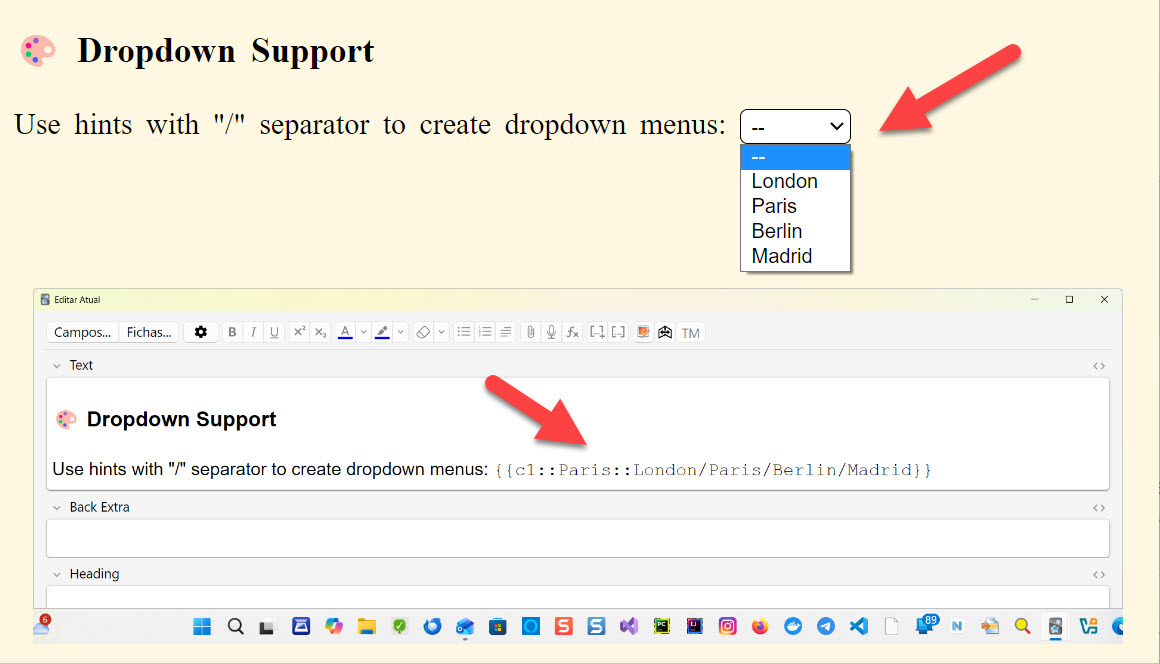
feedback-enabled: true (real-time visual feedback)feedback-ignore-case: false (distinguishes uppercase/lowercase)feedback-ignore-accents: true (ignores accents)Use hints with "/" separator to create dropdown menus:
{{c1::Paris::London/Paris/Berlin/Madrid}}
When the same ordinal appears more than once (e.g., c1 repeated), typing in one field instantly mirrors the input in the other(s). A small superscript number appears to the right of each repeated cloze to indicate the shared ordinal.
Example 1:
{{c1::Paris}} is the capital of France. {{c1::Paris}} is in Europe.
Example 2:
{{c1::Paris::London/Paris/Rio de Janeiro}} is the capital of France. {{c1::Paris::London/Paris/Rio de Janeiro}} is in Europe.
Notes:
c1 with c1).c1 and c2) are not linked.{{cloze:YourField}} with {{type:cloze:YourField}}{{type:cloze:YourField|fill-blanks}}{{c1::answer}}Access settings via Tools → Add-ons → Fill the Blanks Expanded → Config
Original Repository: https://github.com/ssricardo/anki-plugins
The original project contains several useful Anki add-ons developed by ssricardo. Please check out the original repository for more great add-ons!
Special thanks to ssricardo for creating and maintaining the original Fill the Blanks Expanded add-on. This project would not exist without their excellent work and dedication to the Anki community.
If you find this add-on useful, please consider supporting the original author:
Buy ssricardo a coffee
If you feel like supporting their work...
☕ https://www.buymeacoffee.com/ricardoss
Your support helps maintain and improve these tools for the entire Anki community!
# Generate distribution package (.ankiaddon)
# Fill the Blanks Expanded
python build.py -source 1 -dist

# Note Type Export
python build.py -source 2 -dist

# Install to local Anki (Windows)
python build.py -source 1 -dev  # Fill the Blanks
python build.py -source 2 -dev  # Note Type Export
Export and import Anki note types (models) as portable JSON files.
Export: Go to Tools → Export Note Types...
.json fileImport: Go to Tools → Import Note Types...
.json file{
"format_version": "1.0",
"metadata": {
"exported_at": "2026-02-04T12:00:00Z",
"anki_version": "24.11",
"count": 2
},
"note_types": [
{
"name": "Basic",
"type": 0,
"css": ".card { font-family: arial; }",
"fields": [...],
"templates": [...]
}
]
}
🌐 My Website:
👉 Isabela Grünevald
📧 My E-mail:
✉️ naveroute@gmail.com
This fork maintains the same license as the original project.