AnkiWeb
- Votes
- 0 (👍 0 · 👎 0)
- Updated
- 2026-10-30
- Anki versions
- 2.1.1~
- Languages
- Python, JavaScript, CSS, JSON
- Description language
- en
AnkiWeb addon 1516024775
Combines a study-day dashboard with forecasts, undos and study-ahead, ranked trouble-spot analysis by tags or subdeck, and fully remappable keyboard shortcuts with extra AnKing review keys.
Open on AnkiWeb GitHub Ask about alternatives
active
| Min Anki | Max Anki | Updated |
|---|---|---|
| 2.1.1 | + | 2026-10-30 |
Loading…
Plans new-card introduction toward a deadline and forecasts card maturation, tracking progress against milestones with consistency metrics and actionable study advice.
Turns Anki review data into a private local dashboard for progress, forecasts, deck health, FSRS insights, and safe, undoable search-based card and note maintenance.
Advances only FSRS-safe cards from selected upcoming days into a filtered deck, previewing daily load and allowing optional beyond-safe selection, while unreviewed cards keep original due dates.
Provides a customizable statistics dashboard showing review activity, success rates, study patterns, heatmaps, streaks and due forecasts, with deck filters, themes and local multilingual support.
Ranks your weakest decks and tags from review history, builds filtered drills, and uses Claude to generate practice questions, mnemonics, and topic notes.
Displays an interactive heatmap calendar and stats on Anki's main screen, tracking reviews, retention, speed, focus, workload forecasts, plus themes and background photos.
One window for your study day, the topics you miss most, and your keyboard shortcuts. Built for Step 1 students using AnKing-style decks, and it works with any deck.
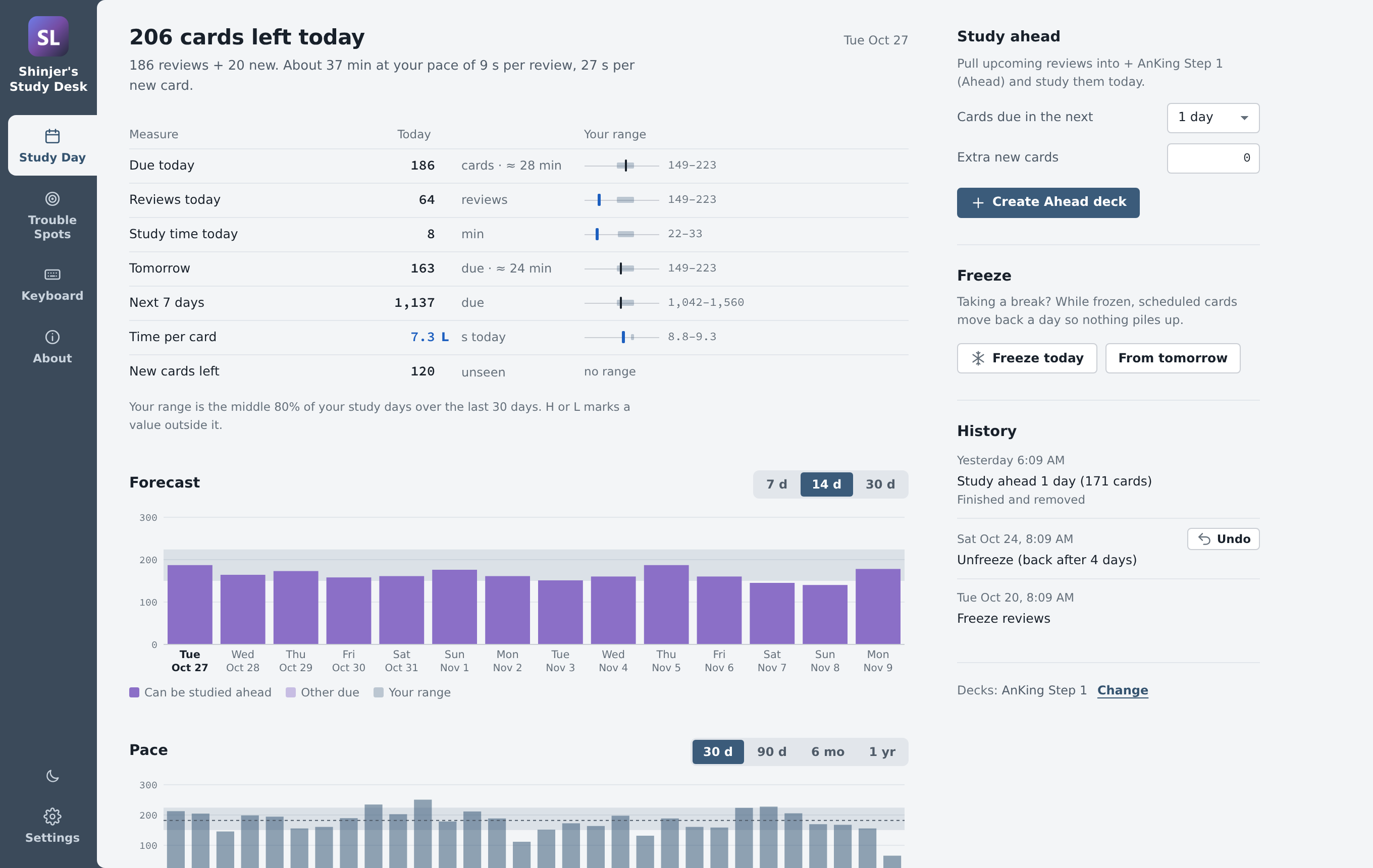
Study Day Today's reviews and new cards next to your usual range, flagged H or L when they're outside it. Study ahead pulls upcoming reviews into a temporary deck when you have time to spare. Freeze pauses reviews for a break so they don't pile up. Also a forecast, your pace, and a history where every action can be undone.
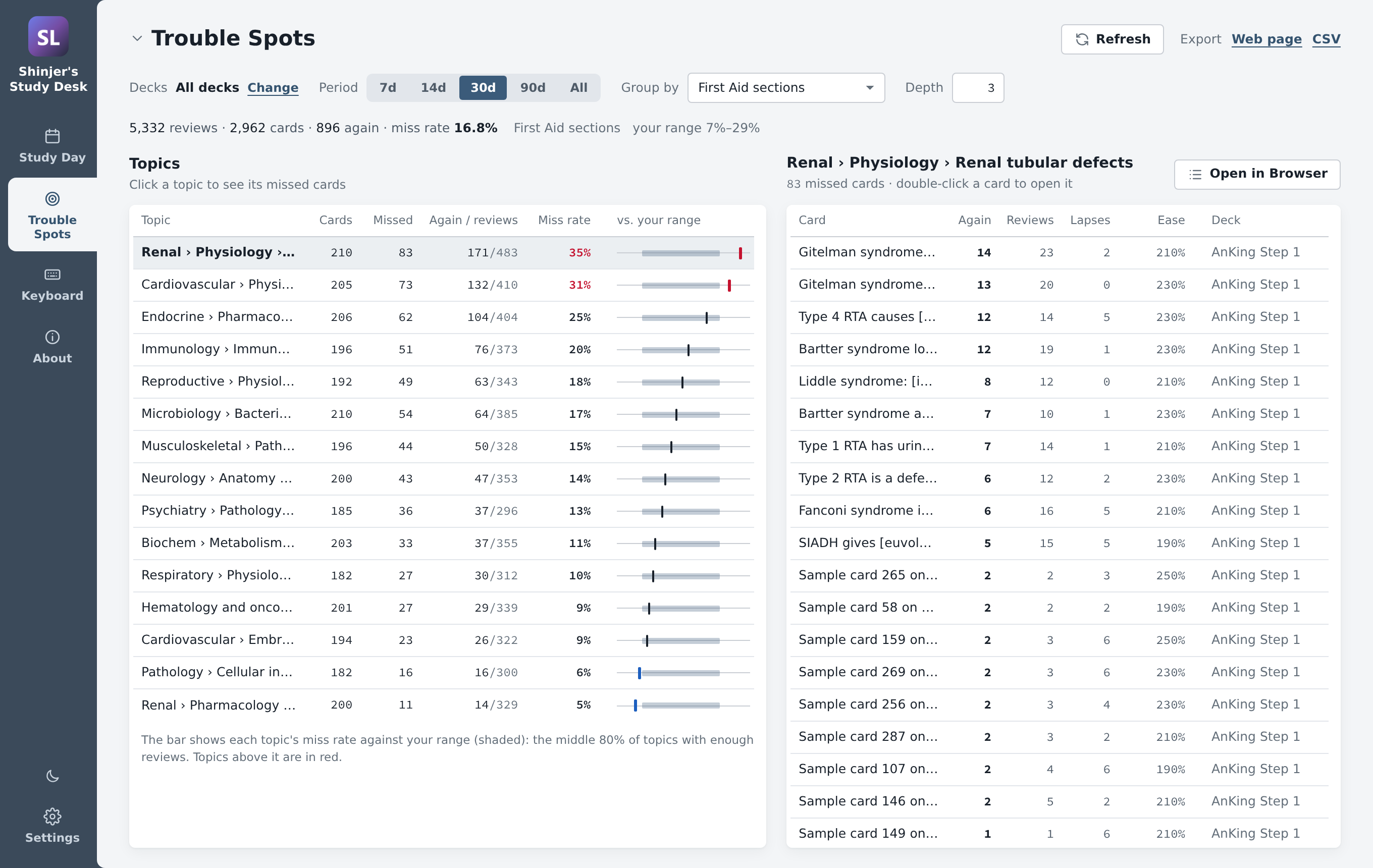
Trouble Spots Topics ranked by how often you miss them, grouped by First Aid section, Pathoma chapter, Boards & Beyond or Sketchy video, organ system, subdeck or any tag. Click a topic to see its cards, open them in the Browser, or export a study sheet. It never changes your cards.
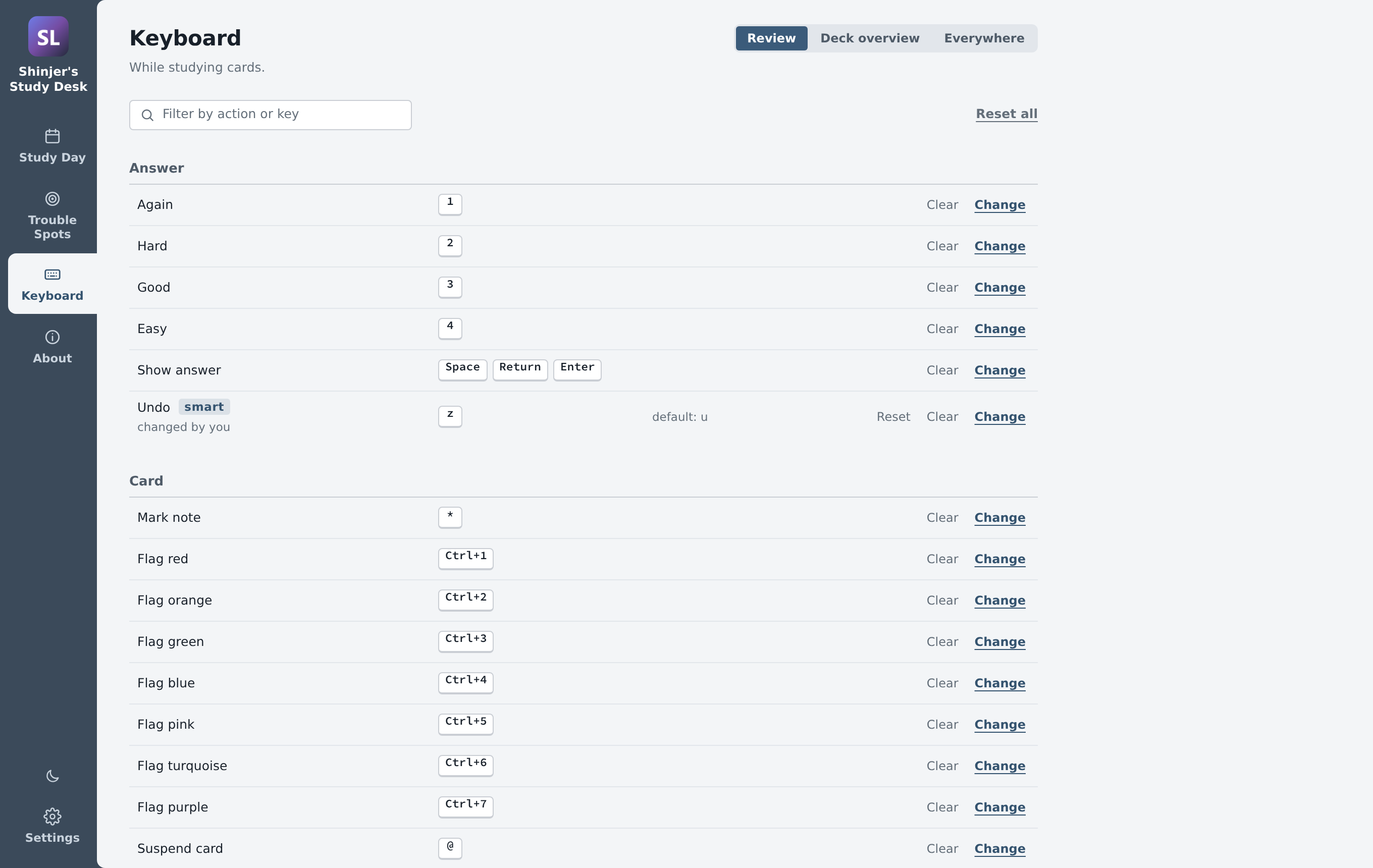
Keyboard Change any shortcut on the review screen, the deck overview or anywhere in Anki. Click an action and press a key; if the key is taken, swap it, move the old action to a spare key, or unbind it. Smart undo flips back to the question instead of undoing a review.
It also adds review keys for AnKing cards: c reveals the next cloze and v reveals them all, p copies the image under the mouse (or right-click › Copy image), and g copies the card's text with the clozes filled in. Open next hint and Open all hints (First Aid, Bootcamp…) can be bound too.
Also
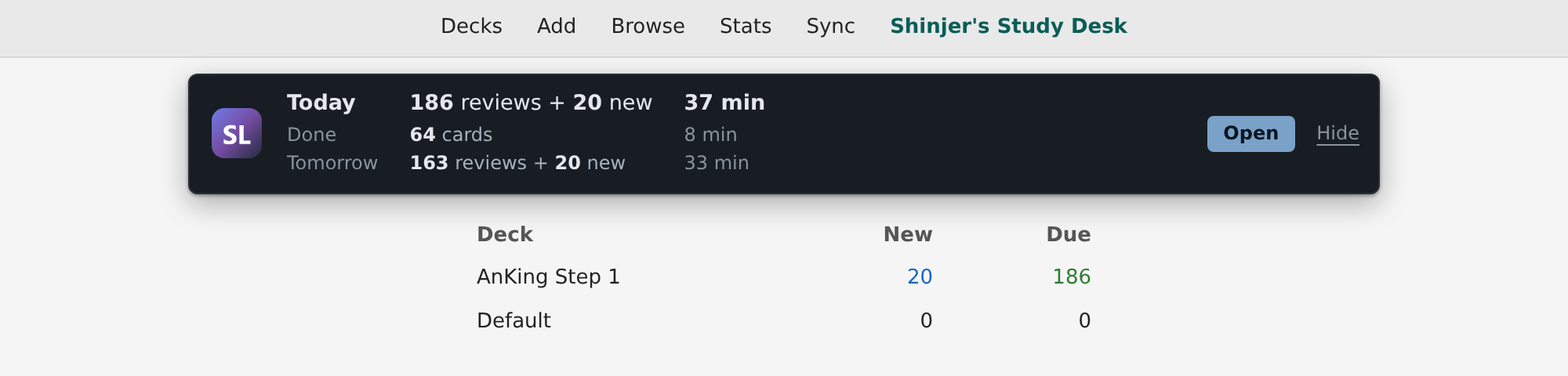
Opening it The Shinjer's Study Desk link in Anki's top bar, the status bar on the Decks screen, or Tools › Shinjer's Study Desk…
Requirements Anki 24.11 or newer.
Problems, ideas, source code Please report bugs on GitHub rather than in reviews, since I can't reply to reviews. Include your Anki version (Help › About). Full guide and source: https://github.com/shinjer-li/shinjers-anki-study-desk
Free and open source (MIT) · by Shinjer Li
An Anki add-on that puts your study day, the topics you miss most, and your keyboard shortcuts in one window. Built for Step 1 students using AnKing-style decks, and it works with any deck.

You need Anki 24.11 or newer on Windows, macOS or Linux.
From AnkiWeb (easiest): in Anki, go to Tools › Add-ons › Get Add-ons…, enter the code
ANKIWEB_CODE and restart Anki.
From GitHub: download shinjers_study_desk.ankiaddon from the
latest release and
double-click it, or use Tools › Add-ons › Install from file…. Then restart Anki.
Updates come through Tools › Add-ons › Check for Updates if you installed from AnkiWeb.
Using Study Day Control, Trouble Spots or Keybind Remapper? Disable them (don't delete them yet) before installing. Your settings are copied over once. See Moving over from the old add-ons.

Today's reviews and new cards next to your usual range, flagged H or L when they're outside it. Study ahead pulls upcoming reviews into a temporary deck when you have time to spare. Freeze pauses reviews for a break so they don't pile up. There's also a forecast, your pace, and a history where every action can be undone. It stays in step with Anki's own Edit › Undo.

Topics ranked by how often you miss them, grouped by First Aid section, Pathoma chapter, Boards & Beyond or Sketchy video, organ system, subdeck or any tag you type. Click a topic to see its cards, open them in the Browser, or export a study sheet or CSV. It only reads your collection and never changes your cards.

Every shortcut on the review screen, the deck overview and everywhere else in Anki. Click an action and press a key. If the key is taken, swap it, give the old action a spare key, or unbind it. Smart undo flips back to the question instead of undoing a review.
It also adds review keys for AnKing cards: c reveals the next cloze and v reveals them all,
p copies the image under the mouse (or right-click › Copy image), and g copies the card's
text with the clozes filled in. Open next hint and Open all hints (First Aid, Bootcamp…) can be
bound too.

Light, dark or Auto (follows Anki's night mode), eleven color themes, the window, the top-bar link, and each tab's own options. Tools › Add-ons › Shinjer's Study Desk › Config opens this tab. The About tab has a quick start and links back here.

#AK_Step1_v12::#FirstAid::…), but can
group by subdeck or any tag.Open an issue. Include your Anki version (Help › About) and, if there was an error window, its text.
The add-on lives in shinjers_study_desk/. Its
README explains how the code is laid out, how to add a tab,
and how to run the tests.
python build.py # dist/shinjers_study_desk.ankiaddon
The screenshots are drawn from the add-on's real page with made-up data:
python tools/sample_data.py     # needs the `anki` package; writes tools/out/sample.json
python tools/screenshots.py     # needs Playwright + Chromium; writes docs/screenshots/
To try local changes, link or copy shinjers_study_desk/ into Anki's add-ons folder
(Tools › Add-ons › View Files) and restart Anki.
MIT © 2026 Shinjer Li