AnkiWeb
- Votes
- 1 (👍 1 · 👎 0)
- Updated
- 2026-10-02
- Anki versions
- 26.09.2~
- Languages
- Python, JSON
- Description language
- en
AnkiWeb addon 969391836
Advances only FSRS-safe cards from selected upcoming days into a filtered deck, previewing daily load and allowing optional beyond-safe selection, while unreviewed cards keep original due dates.
Open on AnkiWeb GitHub Ask about alternatives
active
| Min Anki | Max Anki | Updated |
|---|---|---|
| 23.10 | 26.09.2+ | 2026-10-02 |
Loading…
Creates filtered decks of optimal cards for studying ahead, choosing those whose intervals would be reduced by the smallest percentage.
Reschedules Anki cards using FSRS review histories, postpones or advances selected cards, balances daily workload, schedules breaks, disperses sibling cards, flattens backlogs, and reports memory and learning-step statistics.
Visualizes study activity, streaks, upcoming reviews, and new-card learning on a heatmap, with configurable workload, time, and FSRS-based scoring plus selectable date-range statistics.
Turns Anki review data into a private local dashboard for progress, forecasts, deck health, FSRS insights, and safe, undoable search-based card and note maintenance.
Buries new cards whose siblings are due within a configurable number of days ahead, preventing new cards from previewing answers to upcoming reviews.
Adds customizable reviewer buttons that reschedule cards using math expressions, multipliers, random ranges, midpoints, and target dates, with per-card visibility conditions, dynamic sorting, shortcuts, and optional native button takeover.
Get tomorrow's reviews out of the way today, without wasting FSRS efficiency.
Want to clear tomorrow, or the next few days, before an exam, a trip or a long shift?
Classic study-ahead add-ons pull cards blindly. You end up reviewing cards that are nowhere near due, and FSRS rewards you with almost no stability gain. FSRS Helper's Advance does it properly and only picks cards that are safe to review early, but it works on your whole collection and can't target specific days.
FSRS Study Ahead combines both. Choose the days you want to relieve, and the add-on picks only the cards FSRS considers safe to review early. They go into a filtered deck, so anything you don't get to simply stays on its original date.
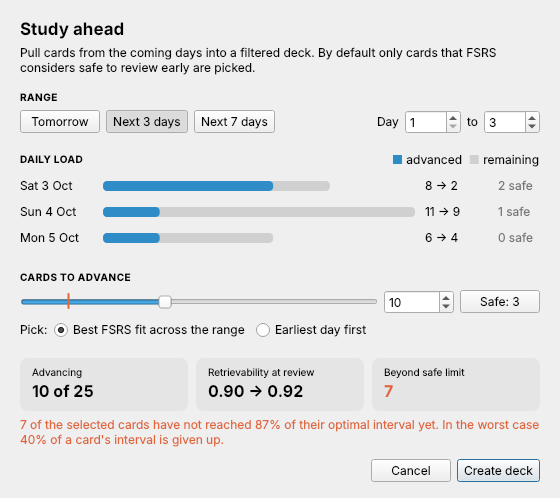
How it works
Usage Tools → FSRS Study Ahead… → choose your days → Create deck.
Requirements Anki 23.10 or newer with FSRS enabled. Works alongside FSRS Helper, but does not need it.
Credits Safe criterion and ranking follow FSRS Helper by Jarrett Ye and contributors.
Source code and bug reports github.com/pape-n/fsrs-study-ahead
Get tomorrow's reviews out of the way today, without wasting FSRS efficiency.
Want to clear tomorrow, or the next few days, before an exam, a trip or a long shift? Classic study-ahead add-ons pull cards blindly, so you spend reviews on cards that are nowhere near due and gain almost no stability from them. FSRS Helper's Advance does it properly and only picks cards that are safe to review early, but it works on your whole collection and can't target specific days.
FSRS Study Ahead combines both. Choose the days you want to relieve, and the add-on picks only the cards FSRS considers safe to review early. They go into a filtered deck, so anything you don't get to simply stays on its original date.

Running the dialog again rebuilds the same filtered deck.
For every review card FSRS knows its stability, desired retention and decay. From these the add-on computes the optimal interval t_opt, i.e. the time at which retrievability falls to your desired retention. The share of the interval given up by reviewing today is
1 − elapsed_days / t_opt
A card counts as safe if this is below 0.13, the threshold used by FSRS Helper. Under the FSRS-6 default parameters, reviewing at 87% of the interval yields about 93–95% of the stability gain of an on-time review. Retention does not suffer, the cost is a slightly earlier next review.
Elapsed days come from the last review timestamp Anki stores with each card, falling back to due − ivl if it is missing. This keeps the result correct even after due dates were moved with Set Due Date or by other add-ons.
969391836fsrs_study_ahead.ankiaddon from the releases and double-click it.Requires Anki 23.10 or newer with FSRS enabled. Works alongside FSRS Helper, but does not need it.
Tools → Add-ons → FSRS Study Ahead → Config
| Key | Default | Meaning |
|---|---|---|
deck_name |
FSRS Study Ahead |
Name of the filtered deck |
safe_threshold |
0.13 |
Max. share of the optimal interval that may be given up |
default_days |
1 |
Default end of the range in days |
deck_order |
6 |
Order inside the filtered deck (6 = due, 8 = ascending retrievability, 1 = random) |
python3 build.py
creates fsrs_study_ahead.ankiaddon in the repository root.
Safe criterion and ranking follow FSRS Helper by Jarrett Ye and contributors (MIT). This add-on does not depend on FSRS Helper.
MIT © Nils Pape