AnkiWeb
- Rating
- 0 (👍 0 · 👎 0)
- Updated
- 2024-11-03
- Anki versions
- 24.10~
- Description language
- en
AnkiWeb addon 1552714896
Translates vocabulary from the web via PONS in Anki’s editor, letting users choose languages, grammar info, and selected translations to copy to flashcards.
Open on AnkiWeb GitHub Ask about alternatives
stale
| Min Anki | Max Anki | Updated |
|---|---|---|
| 2.1.1 | 24.10+ | 2024-11-03 |
Loading…
Translates vocabulary from PONS for Anki flashcards, allowing users to choose languages, optional grammar info, and copy selected translations onto cards.
Fetches Cambridge Dictionary UK/US IPA pronunciations from the first field, lets users choose variants, and inserts them into the fourth field via editor/browser tools.
Adds Google Dictionary American and/or British English accents, meanings, and translations to vocabulary entries, with fixes for newer Anki versions.
Imports words from Kindle's Vocabulary Builder into chosen Anki decks, optionally translating them via Google Translate and including usage examples.
Embeds AI services like ChatGPT, Gemini, and Claude into Anki's editor and reviewer for generating, translating, or explaining flashcards, with custom prompts and one-click paste.
Translates text with DeepL in Anki, but is no longer needed because the original add-on has been fixed; requires a DeepL API key.
Works on config: Anki 2.1.54 (b6a7760c) Python 3.9.7 Qt 6.3.1 PyQt 6.3.1 Platform: Mac 12.5.1 Flags: frz=True ao=True sv=2
Anki-Translator is a Add-On for the flashcard program Anki.
This Add-On translates vocabularies for you. So if you want to add a new flashcard to your deck you can open this Add-On and let it find translations for you from the web.
All the Translations come from PONS.
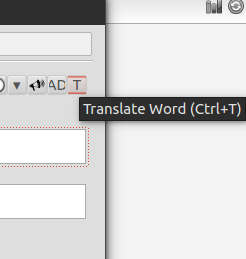
Just click this translate button in Anki's Editor.

A new window opens where you choose the source and target languages and if you want grammar infos (like grammatical gender, etc.).
After you entered the vocable and clicked on 'Translate' the translations get loaded. You mark the checkboxes of the translations you want to have on your flashcard and leave the window with a click on 'OK'.
The chosen translations get copied on your flashcard.
You can change the default values for source and target language and also for the grammar infos. Just change the values of the variables in the file 'init.py'. You can find the file in the Add-Ons Folder of your Anki Installation.
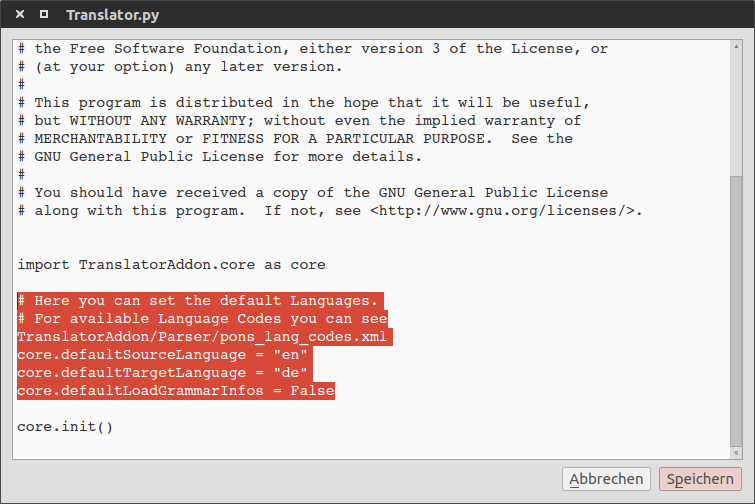
(See the highlighted lines.)
Download this project as a zip and uncompress the folder into your Anki Addon folder (../addons21/Anki-Translator-master).