AnkiWeb
- Votes
- 0 (👍 0 · 👎 0)
- Updated
- 2026-10-27
- Anki versions
- 26.09.3~
- Languages
- Python, CSS, JavaScript, JSON
- Description language
- en
AnkiWeb addon 1616260025
Redesigns Anki's home screen, deck overview, answer bar and menus with light/dark themes, stats and activity heatmaps, without altering cards, scheduling or collection data.
Open on AnkiWeb GitHub Ask about alternatives
active
| Min Anki | Max Anki | Updated |
|---|---|---|
| 25.09 | 26.09.3+ | 2026-10-27 |
Loading…
Transforms Anki's home screen into a customizable study dashboard with 34+ coordinated light/dark scenes, drag-and-drop widgets, progress stats, a review calendar heatmap, and countdown timers.
Decorates Anki's deck list, overview, study screen and windows with 46 customizable themes, backgrounds, card designs and a calm study mode.
Replaces standard deck stats with a customizable, theme-adaptive dashboard showing per-deck progress, remaining cards and today's completed reviews, configured through a graphical menu.
Gives Anki's deck browser and overview pages a modern material design look with preset and custom themes, per-deck icons and backgrounds, enhanced statistics, and colorful reviewer buttons.
Transforms Anki's interface into a polished minimalist design with light and dark modes, restyling the deck browser, reviewer, overview screens, and native menus.
Modernizes Anki's major screens with a cleaner interface, offering preset themes, quick switching from the Tools menu, typography controls, and an advanced editor for deeper customization.
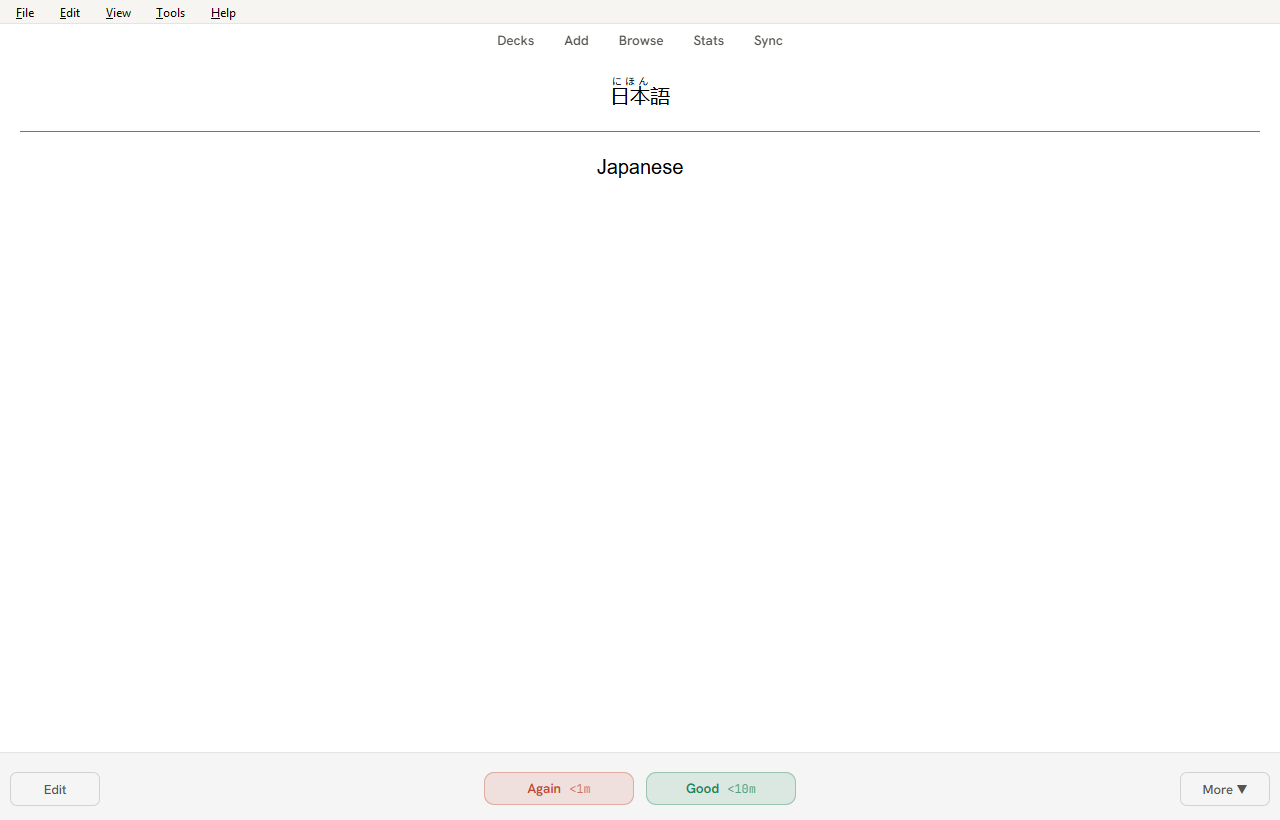
Refine gives Anki's home screen, deck overview, answer bar and menus a cleaner, more modern look, in light and dark. It never changes your cards, your scheduling or your collection: everything it shows is read from Anki's own data, and nothing is written.
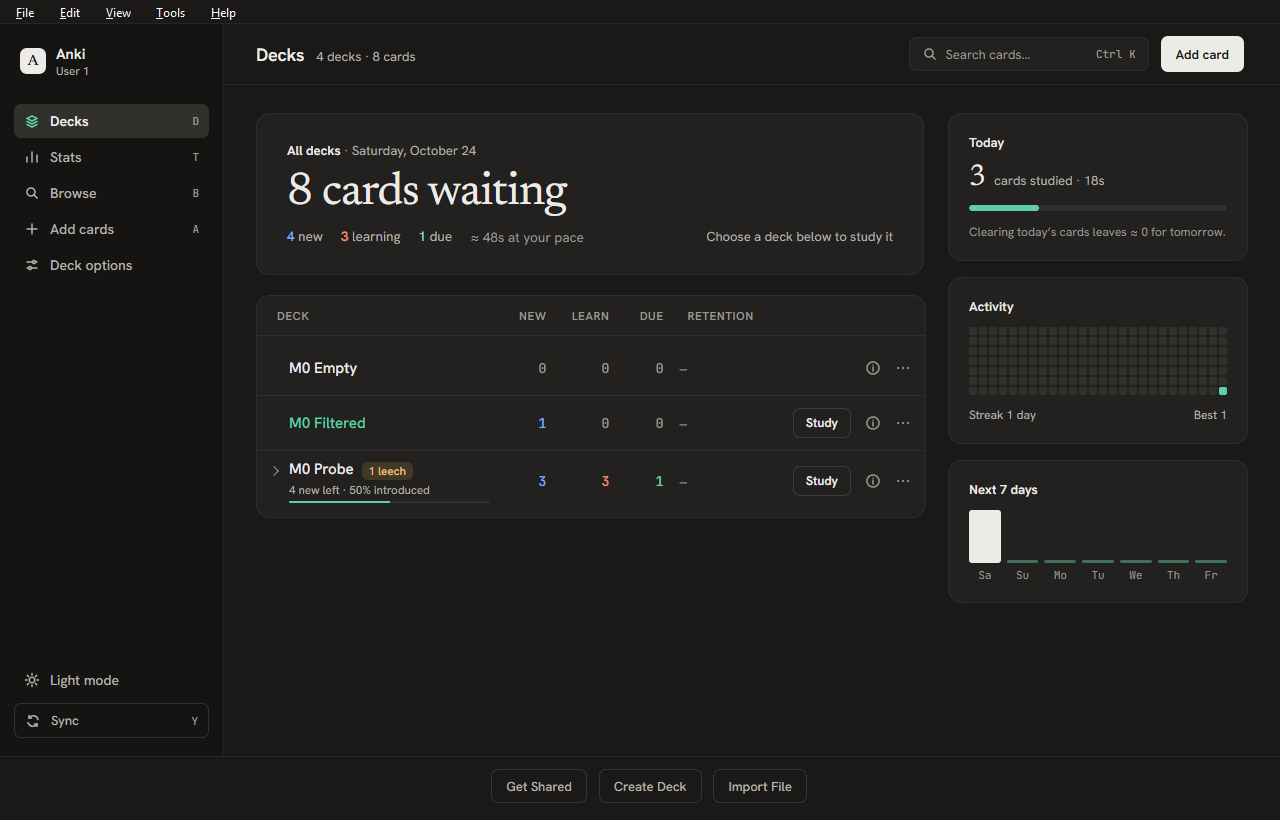
Home screen
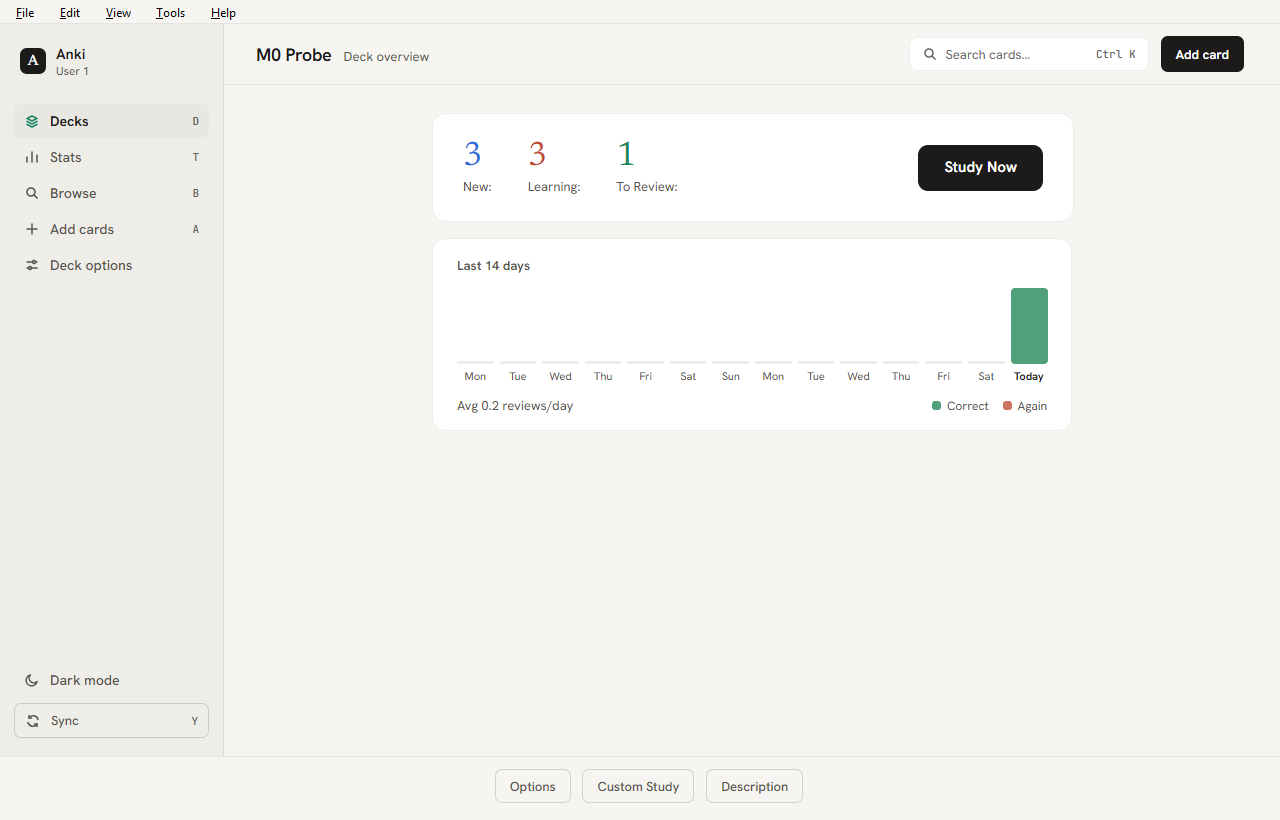
Studying
Settings: Tools > Refine > Settings. Choose from eight accent colours and two densities, set motion, and turn each screen or home panel on or off. A master switch turns everything off at once.
Safe by design: if a screen fails, Refine turns just that screen off and Anki keeps working normally. Refine makes no network requests.
Compatibility: Anki 25.09 to 26.09.3. Tested on Windows. Other add-ons that restyle the same screens may conflict.
Source code, changelog and bug reports: github.com/shreyanshsinghks/anki_refine (AGPL-3.0). Refine gives Anki's home screen, deck overview, answer bar and menus a cleaner, more modern look, in light and dark. It never changes your cards, your scheduling or your collection: everything it shows is read from Anki's own data, and nothing is written.
Home screen
Studying
Settings: Tools > Refine > Settings. Choose from eight accent colours and two densities, set motion, and turn each screen or home panel on or off. A master switch turns everything off at once.
Safe by design: if a screen fails, Refine turns just that screen off and Anki keeps working normally. Refine makes no network requests.
Compatibility: Anki 25.09 to 26.09.3. Tested on Windows. Other add-ons that restyle the same screens may conflict.
Source code, changelog and bug reports: github.com/shreyanshsinghks/anki_refine (AGPL-3.0).
Refine is an add-on for Anki Desktop that gives the home screen, deck overview, toolbar, reviewer answer bar and menus a cleaner, more modern look. It never changes your card templates, your scheduling or your data. Everything it shows is read from Anki's own data, and nothing is written to your collection.

| Home, light | Deck overview |
|---|---|
 |
 |
| Answer bar (card content untouched) | Statistics inside the main window |
 |
 |
| Hover any day for its figures | Settings |
 |
 |
Home screen
Studying
Everywhere
lang="ja" text, tidier furigana, furigana on hover).What Refine never touches: your card templates and card content, scheduling, and your collection. Everything it shows is read from Anki's own data; nothing is written.
From AnkiWeb (add-on page): in Anki, open Tools ▸ Add-ons ▸ Get Add-ons…, enter the code 1616260025, and restart Anki.
From GitHub:
refine-<version>.ankiaddon from the latest release.If updating Refine shows PermissionError: Access is denied … user_files, that is a bug in those two versions: they keep a log file open, which blocks Anki's update. It is fixed from 0.3.2 on, so you only need to do this once. Your Refine settings are kept.
Method 1: switch Refine off, update, switch it back on
Method 2: install the file with Anki closed
refine-0.3.2.ankiaddon (or newer) from the latest release and close Anki completely.Copy-Item "$env:USERPROFILE\Downloads\refine-0.3.2.ankiaddon" "$env:TEMP\refine.zip"
Expand-Archive "$env:TEMP\refine.zip" -DestinationPath "$env:APPDATA\Anki2\addons21\1616260025" -Force
Method 2 assumes you installed from AnkiWeb (folder 1616260025); if you used "Install from file" the folder name differs, so use Method 1.
Open Tools ▸ Refine ▸ Settings… to choose the accent colour and density, switch screens and home panels on or off, and reset to defaults. Advanced users can edit the same values under Tools ▸ Add-ons ▸ Refine ▸ Config; every key is described there.
<add-on folder>/user_files/logs/refine.log (open Tools ▸ Add-ons, select Refine, View Files). Include it when reporting a problem..ankiaddon file over the current one.Refine makes no network requests and sends no data anywhere. Settings live in Anki's add-on config and the log stays on your computer.
Refine is licensed under the GNU Affero General Public License v3.0, the same licence as Anki. Bundled fonts (Hanken Grotesk, JetBrains Mono, Newsreader) are under the SIL Open Font License; copies are in src/refine/LICENSES/.
Design and plan: PLAN.md. Milestone 0 verification: docs/M0-REPORT.md. Change history: CHANGELOG.md.
Requirements: Python 3.10–3.13 on PATH (py), Git. An installed Anki is optional.
py scripts/devenv.py venvs          # PyPI builds of Anki 25.09.5 and 26.09.3 in .venv/
py scripts/devenv.py targets        # shows which Anki builds were found
py scripts/devenv.py run 26.09.3-installed --port 8080
.anki-dev/<target>/. Your normal profile is never opened, and a running Anki is left alone.addons21/refine is a junction/symlink to src/refine. Edit, then restart Anki.http://127.0.0.1:8080 in Chrome or Edge.26.09.3-installed (official installer), 26.09.3-pypi, 25.09.5-pypi.py scripts/devenv.py snapshot --all # drives each Anki build, captures HTML, writes docs/M0-RESULTS.md
py -m unittest discover -s tests -t . # selector contract + unit tests (no Anki needed)
snapshot seeds a throwaway collection in .anki-dev/<target>/. It deletes and recreates that folder on every run. Never point it at real data. The probe refuses to run outside .anki-dev.
py scripts/devenv.py shots 26.09.3-installed # add --keep-profile to reuse .anki-dev/<target>
Launches an isolated Anki with the dev-only refine_ui_probe add-on, which seeds the throwaway collection and writes full-window PNGs (light_/dark_ + deck_browser, deck_browser_narrow, overview, reviewer_question, reviewer_answer, settings) plus shots.json and anki-console.log to out/ui/<target>/ (git-ignored). The settings shot is skipped if the add-on exposes no _ctx.
py scripts/build.py            # writes dist/refine-<version>.ankiaddon and validates it
py scripts/build.py --check    # only re-validates the existing file
The archive holds the contents of src/refine/ (no top-level folder, no __pycache__, no meta.json, nothing from user_files/ except its README.txt). The same input always produces the same bytes. The version comes from src/refine/manifest.json; add a matching entry to CHANGELOG.md.
| Path | What |
|---|---|
src/refine/ |
The add-on (this is what gets packaged) |
devtools/m0_probe/ |
Dev-only probe add-on; inert unless REFINE_M0_OUT is set; never shipped |
devtools/ui_probe/ |
Dev-only screenshot add-on; inert unless REFINE_UI_OUT is set; never shipped |
devtools/htmlinventory.py |
Stdlib HTML/selector helpers used by the report and tests |
scripts/build.py |
Builds dist/refine-<version>.ankiaddon |
scripts/devenv.py |
venvs, isolated profiles, linking, launching, snapshots, report |
tests/contract/fixtures/<target>/ |
Captured HTML + probe/DevTools data per Anki build |
py scripts/devenv.py setup <target> --fresh..anki-dev/. Nothing outside the repository is modified.