AnkiWeb
- Rating
- 0 (👍 0 · 👎 0)
- Updated
- 2025-06-02
- Anki versions
- 2.1.1~
- Description language
- en
AnkiWeb addon 1721577833
Aligns LaTeX-rendered equation images to their true baseline using preview.sty depth, improving on default Anki rendering and SVG/vertical-centering CSS.
Open on AnkiWeb GitHub Ask about alternatives
stale
| Min Anki | Max Anki | Updated |
|---|---|---|
| 2.1.1 | + | 2025-06-02 |
Loading…
Renders flashcards with advanced markdown, LaTeX math, syntax highlighting, theme-aware styling, tag badges, and interactive cloze toggles via React components.
Exports Anki decks to print-ready PDFs or standalone offline HTML with native rendering, themes, typography, layout controls, subdeck picking, and interactive image viewing.
Converts LaTeX $$...$$ and $...$ delimiters into Anki MathJax syntax via an editor button or bulk conversion of selected or all notes.
Converts pasted Wikipedia or MathJax mathematical formulas in the Anki editor into a standard equation box containing the corresponding LaTeX.
Replaces the editor's dropdown-menu generator to display shortcut tooltips for MathJax inline, block, chemistry, LaTeX, LaTeX equation, LaTeX math env., and Edit HTML.
Changes Anki's batch LaTeX rendering to suspend and flag failed cards instead of interrupting, avoiding constant debugging.
[!Tip] This is available as add-on 1721577833
By default, Anki renders LaTeX and includes the final images as-is.
However, the bounding box of the resulting image might not necessarily coincide with the actual baseline of the equation.
Using the widely available preview.sty, one can access the depth -- the offset from the baseline -- of the generated image and correct for that.
The Anki manual sports a picture of the default PNG rendering:
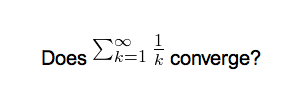
I've generally found it to be a bit better with SVGs + some CSS that just vertically centres the pictures:
This add-on gives a further improvement upon that:
In comparison with 1337660446, this add-on was written from scratch and tested with Anki 2.1+.
To use the add-on, you will need to include preview.sty in your LaTeX preamble:
% Header
\documentclass{article}
\usepackage[active,tightpage]{preview} % XXX
\usepackage{xcolor}
\begin{document}
\setlength{\parindent}{0in}
\setlength{\abovedisplayskip}{0pt}     % XXX better bounding boxes
\begin{preview}                        % XXX
% Footer
\end{preview}                          % XXX
\end{document}
If you use PNG output and not SVG output (which I would however advise against)
then you will need to further adjust the LaTeX build process to include a --depth argument in the call to dvipng.
For that, I suggest using 937148547.