AnkiWeb
- Rating
- 1 (👍 0 · 👎 1)
- Updated
- 2022-01-16
- Anki versions
- unknown
- Description language
- en
AnkiWeb addon 1726946295
Copies a chosen field from selected notes in Anki's browse window via Ctrl+Shift+C or menus, with configurable separator and optional HTML stripping.
Open on AnkiWeb GitHub Ask about alternatives
abandoned
| Min Anki | Max Anki | Updated |
|---|---|---|
| 2.1.0 | – | 2022-01-16 |
Loading…
Quickly adds many Anki notes by filling a table or YAML, copying data to external tools, and pasting results back for bulk creation.
Opens independent Browser windows for side-by-side deck work, with per-window layout/search memory, tiling, session restore, and copyable field content.
Duplicates selected cards from Anki's Browser via right-click into a chosen deck, with options to keep originals, copy revision history, and use Ctrl+Shift+Z.
Improves Anki's Add Notes dialog with hotkeys for copying fields from the last note in the same deck and a searchable field history window.
Turns clipboard study material into Anki flashcards inside the Add window using your chosen AI provider, with queue review, custom note-type mapping, and card-quality prompts.
Enables Ctrl+Click field editing during review with extensive cloze/HTML formatting commands, configurable fields, shortcuts, command palette, and translation support.
An Anki add-on for copying all the fields of a selection in the browse window.
Addon URL: https://ankiweb.net/shared/info/1726946295
Addon Code: 1726946295
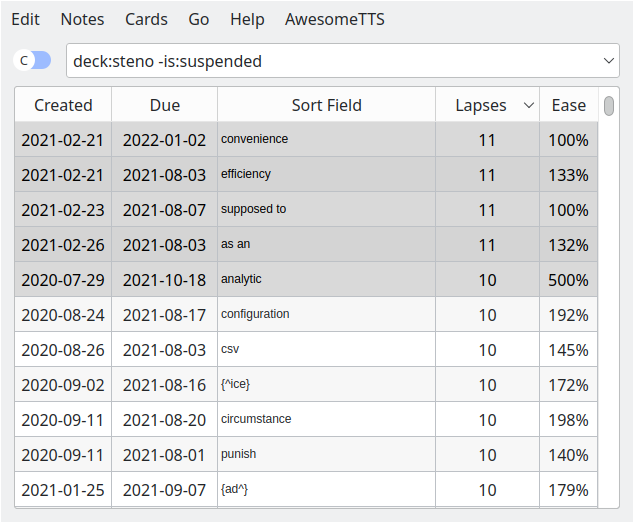
with the default options will paste the following:
analytic
convenience
efficiency
supposed to
as an
⚠️ Output might not be in the same order as on the browse window (#1)
ctrl+shift+c, or choose from the "Notes" menu (also available in
the right click context menu)| Option | Default Value | Description |
|---|---|---|
field_index |
0 |
(int) The index of the field you want to copy. The first field is number 0 |
separator |
"\n" |
(string) What goes in between each note |
strip_html |
true |
(bool) Whether or not to strip html tags (e.g. <div>, <strong>) |