AnkiWeb
- Rating
- 1 (👍 0 · 👎 1)
- Updated
- 2026-07-24
- Anki versions
- 25.09.2~
- Description language
- en
AnkiWeb addon 1850611434
Provides quick triage actions to set today's new-card limit to zero or bulk-answer due cards as Good or Easy collection-wide or deck-specific.
Open on AnkiWeb GitHub Ask about alternatives
active
| Min Anki | Max Anki | Updated |
|---|---|---|
| 2.1.55 | 25.09.2+ | 2026-07-24 |
Loading…
Automatically pauses new cards when the learning queue reaches a set size, resuming once it clears, with an optional hotkey and configurable deck limits.
Turns Anki reviews into chat-based AI sessions that semantically grade answers, suggest difficulty, support OpenAI/Gemini, and let users chat for deeper understanding.
Sets a daily study-time budget and adjusts the deck's today-only new-card limit using FSRS forecasts so predicted new-card and review load stays within budget.
Schedules fractional new-card limits like 1 every 3 days or by weekday, applies Today-only limits automatically, and adds deck health badges.
Adds plus/minus buttons by deck-browser new-card counts to proportionally adjust today's limits for a deck and its children, preserving baseline proportions.
Adds Study and Review buttons per deck to separate new-card study from due-card review, with a Wrap Up button during study.


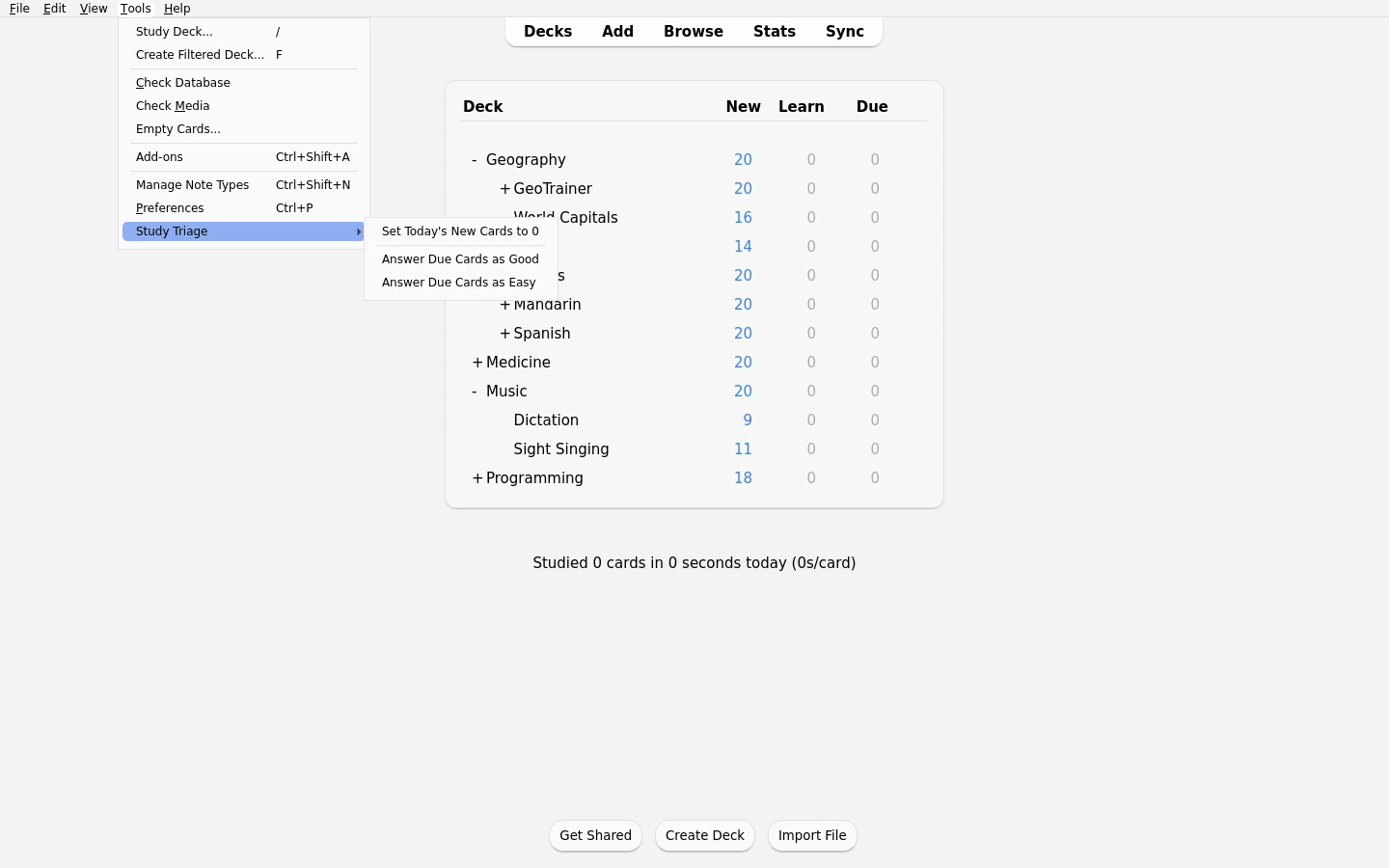
Study Triage is an Anki add-on that adds quick triage actions for days when you need to reduce today's study load.
Browse the full media gallery.
Use this on tired days when you want to do reviews only.
After installation, open:
Tools -> Study TriageAvailable collection-wide actions:
Set Today's New Cards to 0Answer Due Cards as GoodAnswer Due Cards as EasyOr click a deck's cog menu on the Decks screen and open:
Study TriageThe same deck menu is also available by right-clicking a deck name on the Decks screen. This is useful with deck-browser layout add-ons that hide Anki's cog icon.
The deck-menu actions apply to that deck. Anki's deck search includes subdecks, so answering due cards from a parent deck includes due cards in its children. Filtered decks can use the Good/Easy actions; the new-card limit action is only available for regular decks.
The new-card limit change is temporary. It uses Anki's Today only limit, so it
resets automatically on the next Anki day. Deck-cog Good/Easy actions answer the
queued due review and learning cards Anki's scheduler would currently show for
that deck, including review limits and sibling-burying behavior. Cards that
belong to the deck but are currently parked in another deck, such as a filtered
deck, are left alone. The actions show a count before running, process the batch
with progress, and group the change into a single Anki undo step. On current
Anki releases, Good/Easy actions use Anki's native bulk grader so every selected
card can be graded even when search order differs from the live reviewer queue.
Requires Anki 2.1.55 or newer.
Tools -> Add-ons -> Get Add-ons....1850611434.Tools -> Study Triage, use the deck cog menu, or right-click a deck name whenever you need to triage a deck.AnkiWeb page: https://ankiweb.net/shared/info/1850611434
StudyTriage.Tools -> Study Triage, use the deck cog menu, or right-click a deck name whenever you need to triage a deck.Today only new/day field; review limits and preset settings are left untouched.Grade Now action; older compatible releases retain the per-card fallback.user_files/study-triage.log inside the add-on folder.Run repository checks with:
make test
Run the disposable Anki GUI smoke test with:
make test-gui-smoke
The GUI smoke test uses anki-workbench from the PyPI
anki-addon-workbench[gui] package. It launches Anki with a temporary base
folder, installs this add-on plus the project-specific probe add-on, verifies
the Tools and deck-cog menu actions through Qt, checks the deck-name context
menu bridge, writes a JSON result, and quits. See
tests/gui_smoke/README.md for the Docker/Xvfb variant that keeps GUI activity
inside a virtual display.
For exploratory agent-driven GUI work, use:
uv run --extra dev anki-workbench launch --xvfb --keep
uv run --extra dev anki-workbench screenshot --out .tmp-gui-workbench/shot.png
The compatibility scripts in scripts/ delegate to the installed
anki-workbench package for older commands.
The release path dogfoods the sibling anki-addon-release framework. Put
1Password item references under the normal environment variable names in the
git-ignored .env file:
cp .env.example .env
Then run:
make release
The release targets run the framework through op run --env-file=.env -- ...,
so 1Password resolves any op:// references only for the child release
process. The command logs in to AnkiWeb, builds the .ankiaddon, fills the
AnkiWeb form, and stops before the final save button. The prepared browser
stays open until you press Enter in the terminal.
Use make release-login to refresh the browser-profile login, or
make release-publish to refill the publish form after login is already valid.
The dedicated publishing-account pattern is documented in
anki-addon-release.
If AnkiWeb says the dedicated account is too new, it is hitting AnkiWeb's
new-account sharing guard. AnkiWeb does
not publish an exact wait period there, so create the account before you need it
or switch .env to an older eligible publishing account. Keep that account
active too: AnkiWeb's
account-removal article
says account data may be deleted after 6 months without account access or sync,
even though shared add-ons are not subject to the usual data expiry.
Support continued development: ritornello.dev/support.
