AnkiWeb
- Rating
- 0 (👍 0 · 👎 0)
- Updated
- 2026-07-06
- Anki versions
- 25.07.1~
- Description language
- en
AnkiWeb addon 232699457
Hides selected text in Anki notes using transparent color, keeping it searchable, editable, synchronized, and stored without extra fields or template changes.
Open on AnkiWeb GitHub Ask about alternatives
active
| Min Anki | Max Anki | Updated |
|---|---|---|
| 23.09 | 25.07 | 2026-07-06 |
| 25.07.1 | + | 2026-07-06 |
Loading…
Assigns mouse buttons and scroll actions to answer, grade, or undo cards during Anki reviews, with separate question/answer mappings, long-press options, and quick toggling.
Opens a cursor-centered transparent menu via hotkey to change color, enlarge font, add hover-reveal spoilers, or remove HTML, requiring CSS setup.
Generates editor toolbar buttons from a note type's CSS classes, wrapping selected text automatically, with sorting, shortcuts, style previews, and configurable options.
Adds collaborative sticky notes to Anki flashcards for sharing, upvoting, tag-broadcasted clinical pearls, private cohorts, rich text, offline sync, and browsing.
Create Markdown-enabled sticky notes on Anki review screens with live preview, images/GIFs, presets, templates, export, keyboard shortcuts, and JSON syncing via media.
Exports and imports Anki note type definitions to plain text files in mirrored directory hierarchies, with searchable selective export, clean overwrite, round-trip editing, and lossless synchronization via metadata files.
Hide helper text inside your Anki notes without deleting it.
Transparent Text is a tiny editor add-on that makes selected text invisible using CSS while keeping it fully searchable, editable, synchronized, and stored inside the note.
Originally built for my own study workflow and shared with the Anki community.
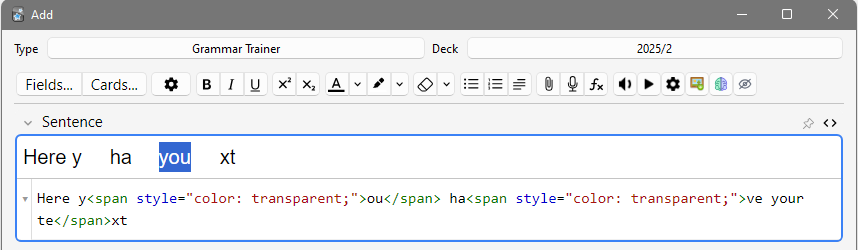
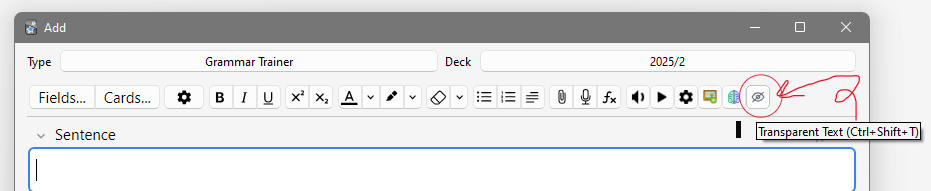
Internally the add-on simply wraps the selection with:
<span style="color: transparent;">Hidden text</span>
The content remains part of the note and can still be searched, synchronized, copied, and edited.
Install from AnkiWeb or clone this repository into your addons21 folder.
While studying, I often wanted to keep helper words, mnemonics, or personal notes inside my cards without displaying them during review.
Transparent Text provides a simple one-click solution without adding extra fields or changing your card templates. Because it uses transparent text instead of fixed colours, your hidden notes remain invisible in both Light and Dark mode without any extra work.
Found a bug or have an idea?
Open an issue on GitHub.
Hide what you need, remember what matters! - Adel