AnkiWeb
- Rating
- 6 (👍 5 · 👎 1)
- Updated
- 2020-04-16
- Anki versions
- unknown
- Description language
- en
AnkiWeb addon 38786043
Imports files and templates to convert pre-existing notes into existing Anki note types, letting users preview and edit cards before adding them.
Open on AnkiWeb GitHub Ask about alternatives
abandoned
| Min Anki | Max Anki | Updated |
|---|---|---|
| 2.1.0 | – | 2020-04-16 |
Loading…
Turns subtitles or text documents into Anki language-learning flashcards, extracting video subtitles via FFmpeg, supporting Chinese-to-English dictionaries, frequencies, and updating existing notes.
Imports PGN chess files into Anki, converting each game into a flashcard for any deck and note type with optional tags and book covers.
Adds an integrated CodeMirror code editor to Anki flashcards with syntax highlighting, themes, live preview, configurable languages and note types, and mobile highlighting.
Imports PowerPoint slides into Anki as formatted text and screenshots after manually converting to HTML with LibreOffice, but is not maintained.
Exports and imports Anki note type definitions to plain text files in mirrored directory hierarchies, with searchable selective export, clean overwrite, round-trip editing, and lossless synchronization via metadata files.
Streamlines CSV and pasted-text imports into Anki with auto-detection, note-type suggestions, quick import, deck locking, history, and tag support.
Ankidown is an in-progress add-on for Anki, the spaced repetition system. It's primary purpose is to prevent duplicate effort and streamline the creation of Anki cards from your pre-existing non-anki notes.
Currently Ankidown allows you to import a file and it's template, and convert it directly into a pre-existing Note Type (read the Anki manual if this is unfamiliar).
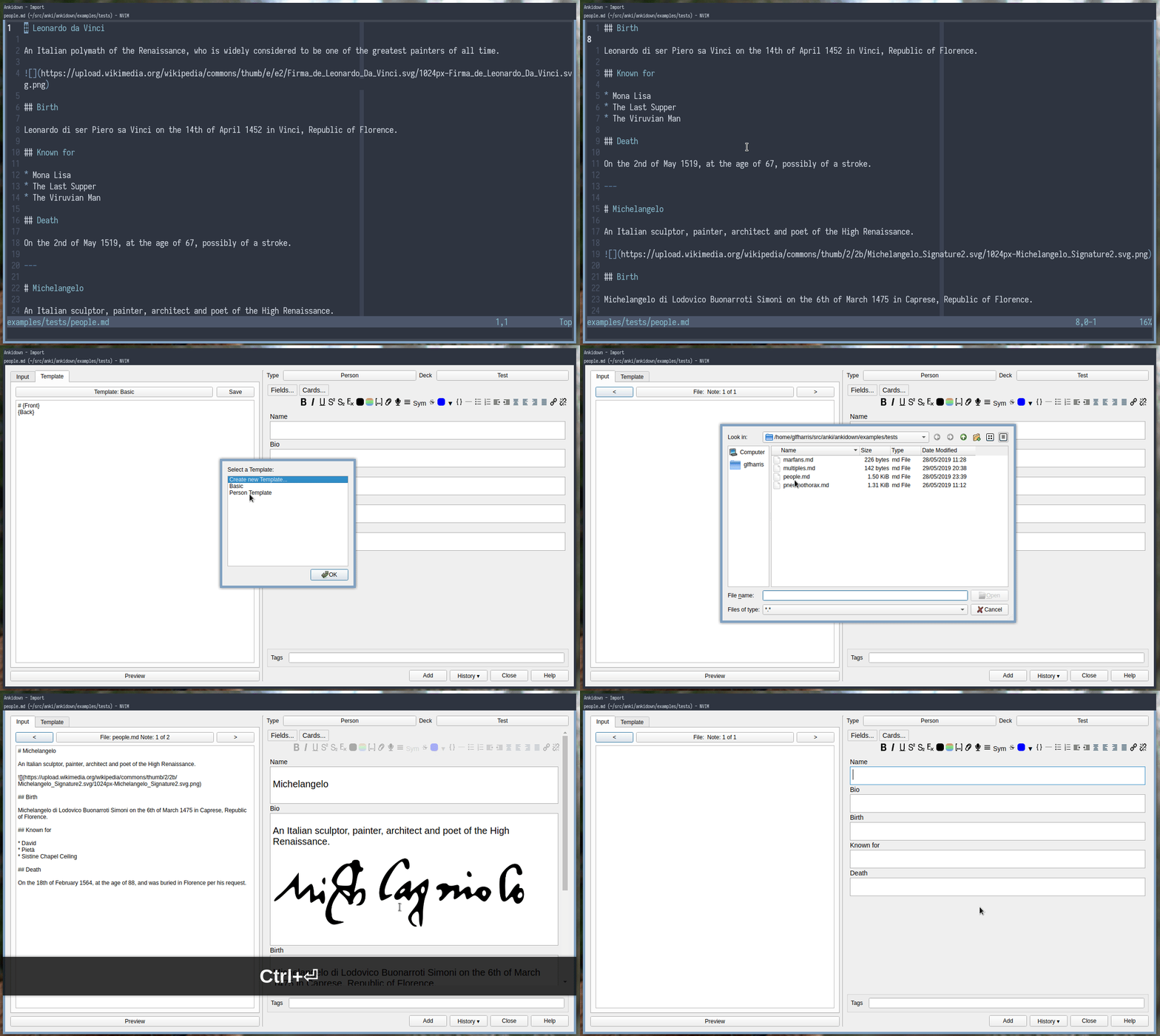
Ankidown is now available on Ankiweb, or just using the code 38786043 from within Anki itself.
{{}}, Ankidown uses the single braces to denote field names such as {Front}. Tags can be included using the reserved field name {Tags}.Ctrl+Enter, otherwise make your changes and click preview to view them. Ankidown will do nothing to your collection until your click add, and it will only add whats in the normal note editor on the right.First and foremost, this is a hobby project for me. I made it mostly to help some of the issues I was having with Anki at the time, and to see if I could. If you don't experience the same problems with Anki, this add-on probably won't help you.
Most of the existing ways of importing require strict formatting, such as CSV files. Even the ones that can import things like markdown, generally enforce a strict schema, such as enforcing cards be in lists. They also tend not to work for cards that aren't the default Front/Back fields. This basically means that the text documents don't stand for themselves as readable notes. No one wants to read a CSV to find out what they know about a subject. So Ankidown lets you write your notes in a format you choose, that makes sense to you, instead of being forced on you.
Personally I'm not a great fan of the text editor in Anki. It's ok for the quick session, but if making cards in bulk it gets tiresome, and I'd prefer to use a tool better suited.
If I'm spending all this time writing notes, I want to be able to read over them easily, and to have all my notes in one place. This allows me to write notes in the form of structured markdown documents, and have cards generated from them easily.
For instance, when I was trying to learn about medications I had a little fact sheet on each drug, including things like indication, side effects, contraindications, doses, and mechanism, keeping all the information in one place, and then made a note type that would have the requisite cards.
I'm not particularly fond of the existing way Anki imports cards as it doesn't give you much of a chance to edit/review before adding them to your collection, and once in the collection they're more difficult to find. I feel this especially when importing other peoples cards, as I often would want to edit them slightly into my words for example.
I think Ankidown helps in two ways, firstly you don't need to share opaque anki export objects, but just text files (for example written with others in google docs), and secondly gives you a chance to edit the cards before commiting them to your collection.
Everyone is welcome to open issues and to suggest new features. Slight word of warning is that Ankidown is still in the rapid prototyping (read: chaotic) phase, so pull requests might not be the best idea till it's a little more stable.