AnkiWeb
- Votes
- 0 (👍 0 · 👎 0)
- Updated
- 2026-11-01
- Anki versions
- 2.1.1~
- Languages
- Python, JavaScript, CSS, JSON
- Description language
- en
AnkiWeb addon 601027831
Applies customizable wallpapers, frosted-glass cards, adjustable text, and per-answer glow with piano notes across Anki screens, with daily wallpaper downloads or built-in images.
Open on AnkiWeb GitHub Ask about alternatives
active
| Min Anki | Max Anki | Updated |
|---|---|---|
| 2.1.1 | + | 2026-11-01 |
Loading…
Applies native macOS Liquid Glass material behind Anki's deck list, overview, toolbar, and reviewer, with configurable tints, plus an automatic frosted fallback on older macOS versions.
Decorates Anki's deck list, overview, study screen and windows with 46 customizable themes, backgrounds, card designs and a calm study mode.
Adds a customizable semi-transparent liquid-glass background that smoothly resizes between question and answer, with blur, animation settings, and automatic dark-text readability conversion.
Transforms the reviewer with animated space, neutral, earthy, and lake background themes, glass morphism, and 11 streak-effect tiers, controlled via menu toggles for themes, intensity, and effects.
Generates wallpapers from your hardest Anki flashcards, using the mere exposure effect to reinforce difficult cards passively across your devices.
Makes Anki's main window background transparent so content behind shows through, while keeping buttons and text opaque, with a saved, adjustable transparency level for dark and light themes.
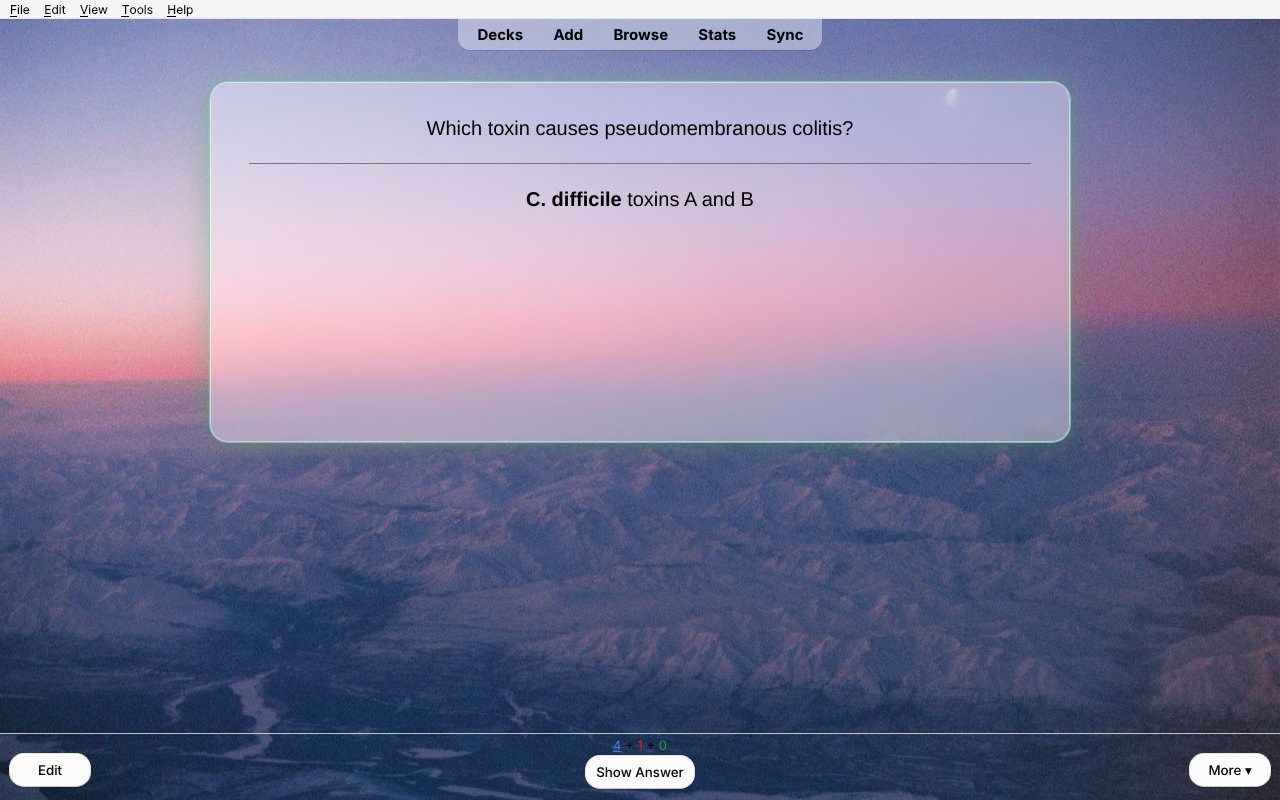
A calm, good-looking Anki. Your cards sit on frosted glass over a wallpaper that runs behind every screen, and each answer gets a soft glow and a quiet piano note.
⚠️ ALL DOWNLOADED PICTURES COME FROM THE INTERNET AND MAY BE INAPPROPRIATE FOR PROFESSIONAL SETTINGS. FOR THE SAFEST OPTION, TURN OFF RANDOM WALLPAPERS (set New pictures per day to Off and pick a built-in picture). Only pictures rated "safe" by their uploaders are downloaded.
Support, source and bug reports: github.com/aidansun525/liquid-glass-anki-theme
License: AGPL-3.0. The background code is based on "Custom Background Image and Gear Icon" by ijgnd and The AnKing. Downloaded wallpapers belong to their creators and are for personal use.
Want your cards read to you? Card Read Aloud reads your reviews aloud in a natural, gentle voice (Kokoro). It runs offline on your own computer and is made for med students, with 1,400+ medical pronunciations.
📷 Photo credit for the built-in wallpapers: Aidan S.
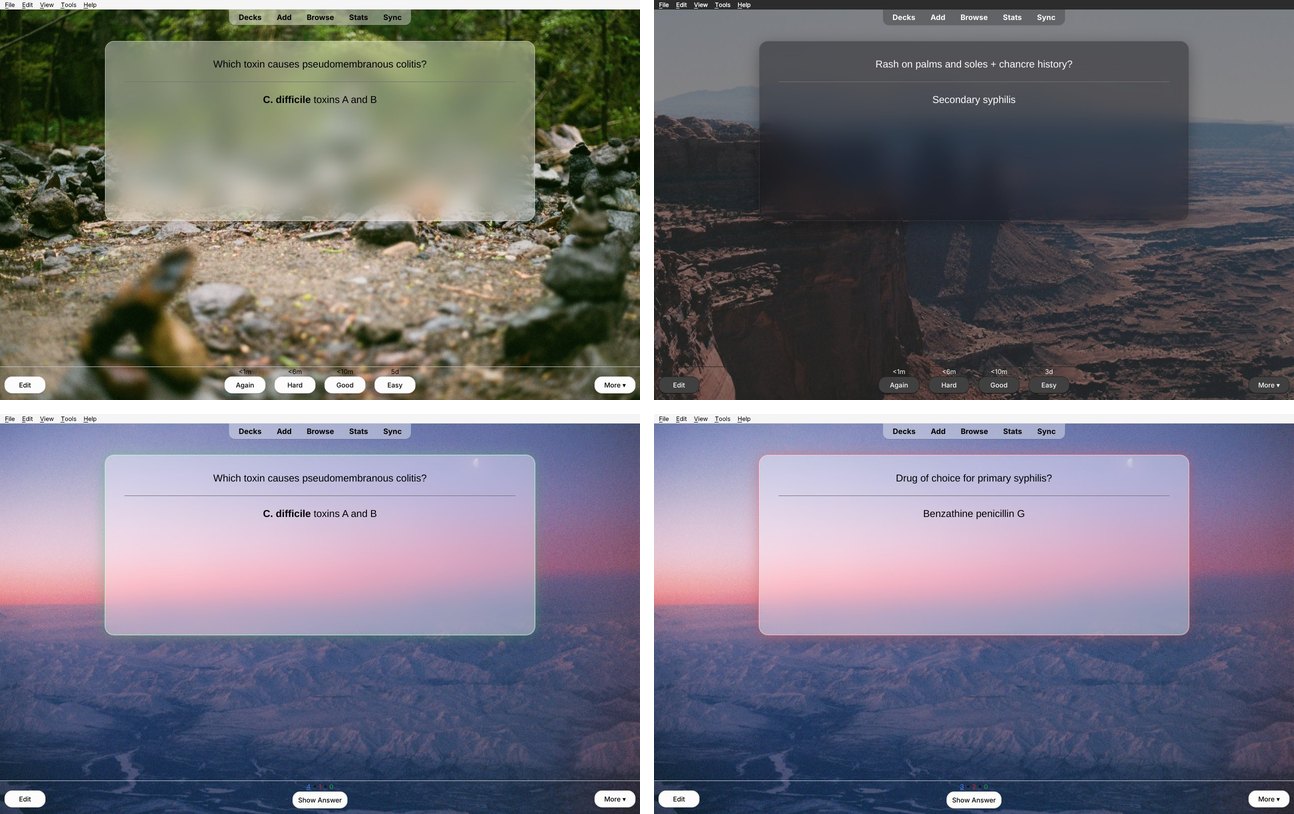
A calm, good-looking Anki. Your cards sit on a pane of frosted glass over a wallpaper that runs behind every screen, and each answer gets a soft glow and a quiet piano note.

| Light mode | Dark mode |
|---|---|
 |
 |
| Glow on Good | Glow on Again |
|---|---|
|
 |
From AnkiWeb (recommended): in Anki, go to Tools → Add-ons → Get Add-ons… and paste the code from the AnkiWeb page. Then restart Anki.
From a file: download frosted_glass_theme.ankiaddon from the latest release. Then go to Tools → Add-ons → Install from File… and restart Anki.
Updating keeps your settings and pictures. If you switch between installing from a file and installing from AnkiWeb, the copy you install last brings over everything from the other one and turns the other one off. You can then delete the old copy from Tools → Add-ons.
It needs Anki 2.1.50 or newer and works on Windows, macOS and Linux.
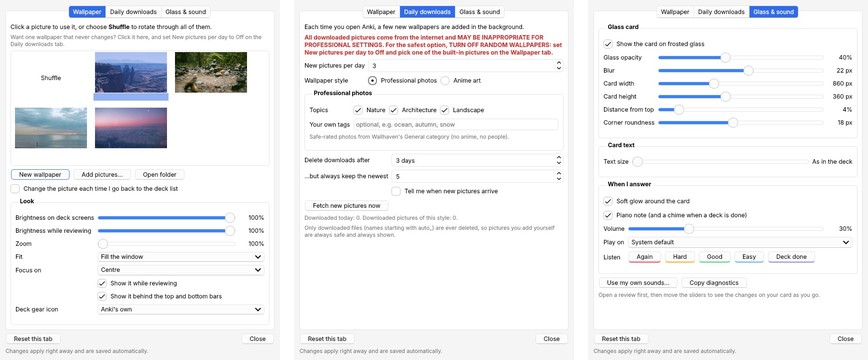
Open Tools → Frosted Glass → Settings….
| Wallpaper | Daily downloads | Glass & sound |
|---|---|---|
 |
 |
 |
Want a wallpaper that never changes? Click it on the Wallpaper tab, then set New pictures per day to Off.
All downloaded pictures come from the internet and MAY BE INAPPROPRIATE FOR PROFESSIONAL SETTINGS. Only pictures rated "safe" are downloaded, but that rating depends on how each uploader labeled their picture. For the safest option, TURN OFF RANDOM WALLPAPERS: set New pictures per day to Off and pick one of the built-in pictures. The Settings window always shows this warning.
On first launch, it imports your pictures, gear icons and settings from Custom Background Image and Gear Icon (AnKing). It then turns that add-on off so the two don't both draw backgrounds. The old add-on's folder stays in place, so you can remove it from Tools → Add-ons.
Everything you add or change lives in the add-on's user_files folder (Tools → Frosted Glass → Open add-on files folder) and is kept across updates:
background/: wallpapers. Drop in any .jpg, .png or .webp.gear/: deck gear icons.glass_sounds/: put again.wav, hard.wav, good.wav or easy.wav here to use your own sounds.css/custom_*.css: extra CSS for each screen, if you want to go further.python build.py
This writes dist/frosted_glass_theme.ankiaddon from src/frosted_glass_theme. To try changes, copy or link src/frosted_glass_theme into Anki's addons21 folder and restart Anki.
Want your cards read to you? Card Read Aloud reads your reviews aloud in a natural, gentle voice (Kokoro). It runs offline on your own computer and is made for med students: it says "I V", not "Roman four", and knows 1,400+ medical pronunciations.
📷 Photo credit for the built-in wallpapers: Aidan S.