Shiberu Sync — two-way sync between Anki and Shiberu

AnkiWeb addon 654311232

Syncs selected Anki decks bidirectionally with a Shiberu account, merging reviews, due dates, notes, media, card actions and matching deck options while leaving unlinked decks untouched.
AI-generated summary; may contain mistakes.

sync-integrationschedulingdeck-managementservice-client

Open on AnkiWeb Ask about alternatives

AnkiWeb

Votes
0 (👍 0 · 👎 0)
Updated
2026-10-22
Anki versions
26.09~
Languages
Python, JSON
Description language
en

Maintenance

active

  • Last update or commit: 2026-10-22 (10 days before the snapshot).

GitHub

No GitHub repository linked.

Will it work on my Anki?

Version branches
Min AnkiMax AnkiUpdated
25.0726.09+2026-10-22
History across monthly snapshots

Loading…

Similar addons

Transfer Review History

Transfers or copies review history between cards, can merge or replace target history, and optionally delete the old card.

scheduling

13 votes 67% approval 👍 12 · 👎 1 ⭐ 1 Anki 23.10.1~ Updated 2024-01-03
No-Sync Note Converter

Converts Anki notes between types without triggering a full sync, offering field mapping, presets, review-history preservation, deck/tag retention, browser and reviewer conversion, and one-step undo.

schedulingnote-managementcard-templatescloze

1 votes 21% approval 👍 1 · 👎 0 ⭐ 1 Anki 2.1.1~ Updated 2026-09-02

Description

Shiberu Sync keeps the Anki decks you choose in sync with your Shiberu account, in both directions. Review in Anki on your computer, or in Shiberu on the web or Android, and both apps end up with the same review history, due dates, notes and media.
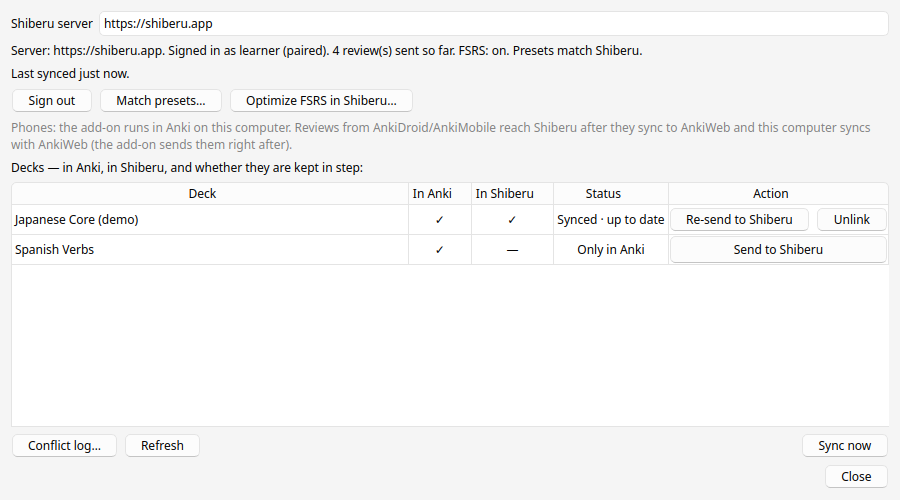
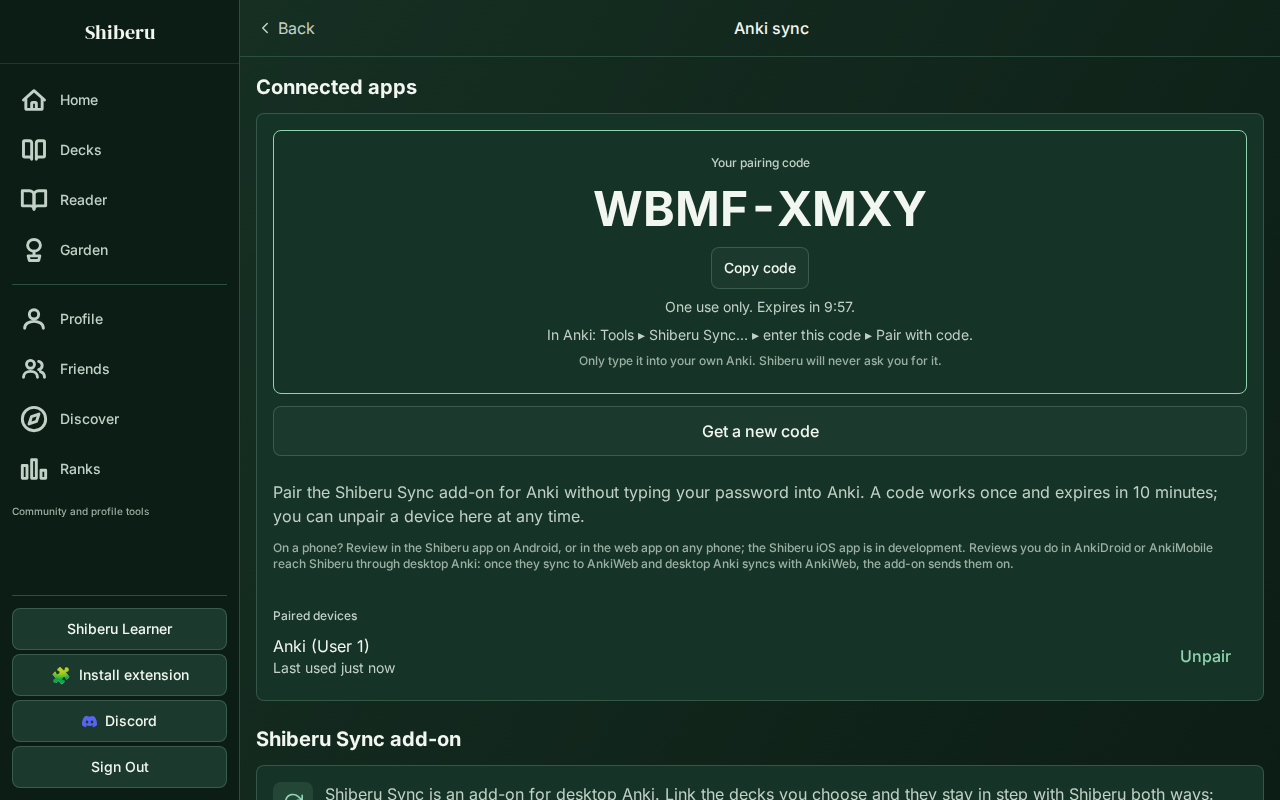
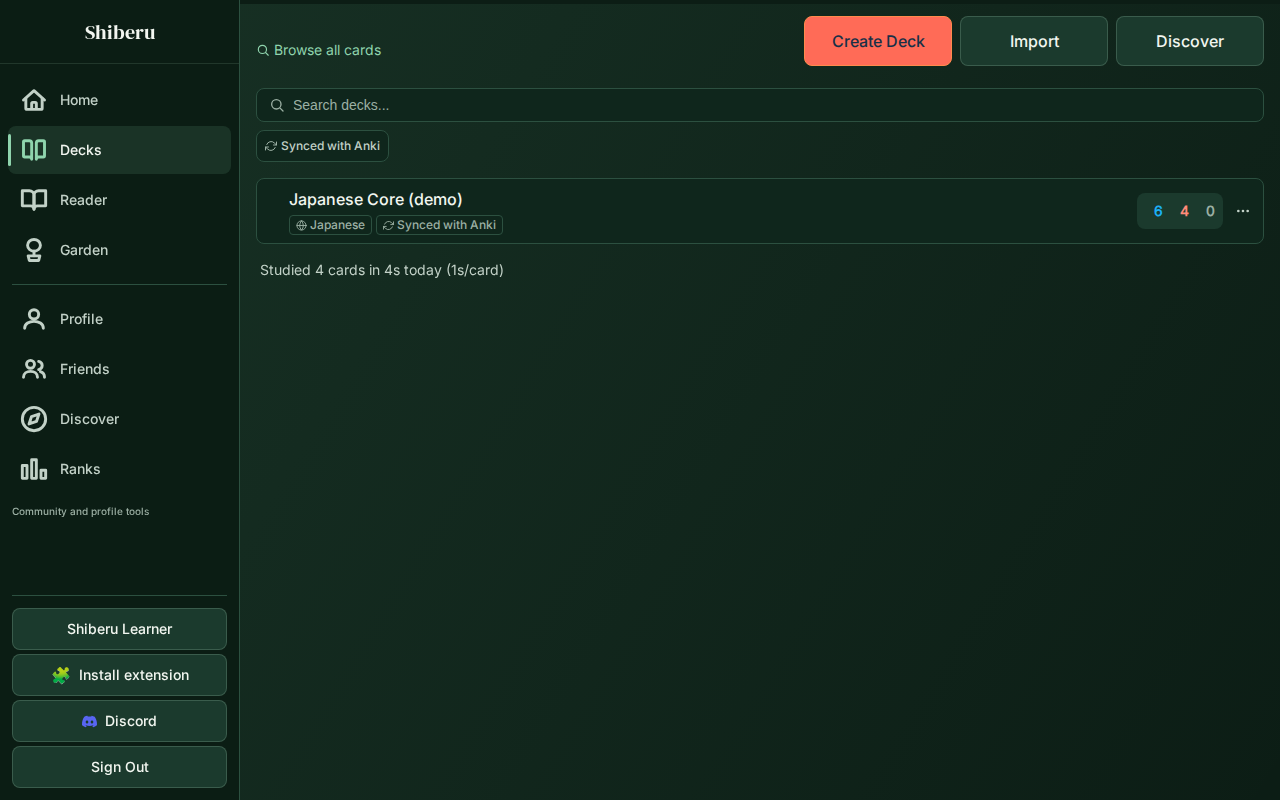
Shiberu Sync in Anki: linked decks
Shiberu's pairing-code page
The synced deck in Shiberu

What syncs

  • Only the decks you link. You link each deck yourself, one at a time ("Send to Shiberu" for an Anki deck, "Add to Anki" for a Shiberu deck). A subdeck is linked on its own, not with its parent. Your other decks are never read or changed.
  • Reviews, both ways. Each answer you give in Anki goes into Shiberu's review history, and each answer you give in Shiberu goes into Anki's review log. Each app then works out the schedule from the whole history with FSRS. Undoing a review on one side removes it on the other.
  • Due dates and card actions. Set Due Date, Forget and Reposition carry over, and so do suspended cards and flags.
  • Notes and media. Note edits, new notes, tags, note types (fields, templates and styling) and the images and audio your notes use travel both ways. If a note was edited in both apps, the newer edit wins. Nothing is ever deleted on the other side.
  • Deck options. Shiberu presets and Anki option groups with the same name are kept as twins: learning steps, daily limits, desired retention, FSRS parameters and more. "Match presets…" lets you choose which app's presets win.
  • Phones. Reviews you do in AnkiDroid or AnkiMobile reach Shiberu through desktop Anki. Once they have synced to AnkiWeb and this computer syncs with AnkiWeb, the add-on sends them on right away.

Setup

  1. Install the add-on with the code at the top of this page (Tools ▸ Add-ons ▸ Get Add-ons…), then restart Anki.
  2. Use the same scheduler in both apps: FSRS or SM-2 (Anki's classic scheduler). If they differ, the add-on offers to match them with Match presets….
  3. Open Tools ▸ Shiberu Sync….
  4. Press Get a code in Shiberu. Your browser opens shiberu.app/pair and shows a one-time code once you are signed in (you can create a free account there). Type the code into the add-on and press Pair with code. You can also sign in with your Shiberu username and password instead.
  5. In the deck list, press Send to Shiberu next to each Anki deck you want to sync, or Add to Anki next to a Shiberu deck. From then on the add-on syncs by itself: when a profile opens, about a minute after your last answer, after every AnkiWeb sync and every 10 minutes. Sync now runs a sync straight away.

What is sent, and where The add-on talks only to the Shiberu server (https://shiberu.app, over HTTPS), and only while you are paired or signed in. For the decks you link, it sends:

  • every review (time, answer button, time taken, review kind, interval) and Set Due Date / Forget / Reposition actions;
  • the full content of their notes (fields, tags, note type with templates and styling), plus each card's suspended state, flag and new-card position;
  • the media files those notes use;
  • with "Send to Shiberu", the whole deck as an Anki package (with its scheduling, review history and media);
  • the option groups those decks use, when you match presets in Shiberu's direction.
To spot decks that were renamed or deleted on either side, it also sends the names and ids of all decks in the collection (names only, no cards). It also sends your profile name (used as the device label in Shiberu), a random id for the collection, and the add-on and Anki version numbers. Nothing else leaves your computer: no notes or reviews from unlinked decks, nothing about your AnkiWeb account, and no password if you pair with a code. There is no analytics or tracking, and the add-on never downloads or runs code.

Pairing creates a device key, stored in the add-on's own folder on your computer. It can read and update your decks, but Shiberu refuses it for your account settings and password. To stop syncing:

  • One deck: press Unlink next to it in Tools ▸ Shiberu Sync…. Both copies of the deck keep everything.
  • Everything on this computer: press Sign out in the add-on, or press Unpair next to the device in Shiberu under Profile ▸ Anki sync. Unpairing in Shiberu cuts the device off even if the computer is lost.
Privacy policy: shiberu.app/privacy · Terms: shiberu.app/terms

Requirements

  • Desktop Anki 25.07 or newer (Windows, Mac or Linux). Tested on Anki 25.07 and 26.09.3.
  • FSRS or SM-2: either works, as long as Anki and Shiberu use the same one.
  • A Shiberu account (shiberu.app).

FAQ

What if I review the same card in both apps, or edit the same note in both? Reviews never clash. Every review from either app goes into one shared history, and each app works out the schedule from that full history with the same scheduler settings (FSRS or SM-2). The two apps use different scheduler code and may start the day at different hours, so a due date can sometimes be a day apart. For notes, the newer edit wins. To keep a field you curate by hand from ever being overwritten by the other app, tag the note Shiberu_Protect::FieldName. Renaming a deck in one app renames it in the other. If it was renamed differently in both, both names are kept and the clash is listed under "Conflict log…".

Does it change my other decks? No. Only linked decks are read and synced, and nothing is added to or removed from your other decks. One caveat: Anki option groups are shared between decks. If you choose "Use Shiberu's presets in Anki", each Anki option group with the same name as a Shiberu preset is updated, and any unlinked deck using that group sees the change too.

What happens when I unlink a deck, sign out or uninstall? Unlinking stops syncing that deck. It stays complete in both apps and you can link it again later. Signing out or unpairing stops all syncing from this computer. Uninstalling removes the add-on and its saved sign-in. Your decks stay in Anki and in Shiberu, and you can remove the device in Shiberu under Profile ▸ Anki sync. Nothing is ever deleted across the wire.

Do reviews in Anki count in Shiberu? They count toward your streak and history in Shiberu, but not toward XP or leaderboards.

Big decks? Decks with tens of thousands of notes and hundreds of MB of media work. The add-on sends them in batches and remembers its progress, so quitting Anki or losing the connection never starts it over.

I installed the file from shiberu.app earlier. Install from AnkiWeb and restart Anki. The AnkiWeb copy takes over your sign-in and settings and switches the old copy off, which you can then delete in Tools ▸ Add-ons. From then on, Tools ▸ Add-ons ▸ Check for Updates keeps it current.

Support Email support@shiberu.app. Please include the add-on version (shown in the dialog title) and, if you can, the log file user_files/shiberu-sync.log from the add-on's folder (Tools ▸ Add-ons ▸ Shiberu Sync ▸ View Files).

Changelog

  • 0.13.0: SM-2 support (FSRS is no longer required); deletions, buried cards, flag names, the load balancer switch and filtered decks sync both ways (large deletions are confirmed first); each card keeps its own deck (split notes, cloze subdecks); Change Note Type, field options and browser appearance sync; cloze and Image Occlusion note types made in Shiberu arrive in Anki as real cloze and Image Occlusion types. Needs Shiberu's current server (live); older add-ons keep syncing safely.
  • 0.10.7: The add-on now ships its licence file (AGPL-3.0, the licence its code already stated). No change to how it syncs.
  • 0.10.6: Ready for AnkiWeb. An AnkiWeb install takes over a copy installed from a shiberu.app file (sign-in, sync records, settings) and switches that copy off, so only one copy ever syncs. The "update needed" notice now shows the right way to update for each kind of install. New Unlink button for synced decks. Fixed a stray "Send to Shiberu" button that covered the first deck in the list. Fixed a timer warning on start-up.
  • 0.10.5: More reliable sync. Notes are sent before their reviews, and big decks and long backlogs are sent in resumable batches. Media files are only fingerprinted again when they change. History is filled in for cards linked later. When Shiberu asks the add-on to slow down, it waits and carries on. The dialog shows when it last synced and the last problem in plain words, and the Tools menu says when sync needs you. Reviews Shiberu could not take are listed, and you can retry them.
  • 0.10.4: A "Get a code in Shiberu" button next to the pairing-code field opens shiberu.app/pair.
  • 0.10.3: Installs on Anki 26.09 and later, including over an older copy.
  • 0.10.2: Removed the upper Anki version cap.
  • 0.10.1: Fixed media uploads. The deck list now shows all your Shiberu decks, not just the first 20, and the conflict log shows the newest entries. Preset errors are shown.
  • 0.10.0: Set Due Date, Forget and Reposition sync both ways.