AnkiWeb
- Votes
- 0 (👍 0 · 👎 0)
- Updated
- 2026-10-03
- Anki versions
- 26.09.3~
- Languages
- Python, JSON
- Description language
- en
AnkiWeb addon 762337484
Fills Japanese Anki cards offline with JMdict English definitions, furigana and part of speech, including batch filling and manual sense selection.
Open on AnkiWeb GitHub Ask about alternatives
active
| Min Anki | Max Anki | Updated |
|---|---|---|
| 2.1.50 | 26.09.3+ | 2026-10-03 |
Loading…
Automatically fills Anki fields with kanji readings, hiragana, word type, and limited JMdict definitions offline, plus example sentences, with configurable field mappings and bulk deck updates.
Auto-generates Japanese vocabulary notecards from a word list via the Jisho.org API, including definitions, readings, JLPT level, kanji explanations, furigana and example sentences, placed in a custom deck.
Automatically fills Japanese vocabulary and sentence flashcards from a typed word or sentence, adding translations, kana readings, kanji readings, transitivity, part-of-speech, offline dictionary lookups, and Google TTS audio.
Turns Japanese song lyrics into study material by fetching and tokenizing lyrics, tagging or copying matching deck cards per song, and generating missing cards with JMdict definitions and neural TTS audio.
Adds Japanese vocabulary to kanji-writing cards using known words from other decks, prioritizing common words, hiding target kanji, and saving results in fields for syncing.
Queries Anthropic or OpenAI APIs with custom prompts to fill Anki note fields, supporting batch updates, card creation, and per-note-type configurations.
Japanese Definitions fills your Japanese cards with English definitions from JMdict, the word's furigana and its part of speech — fully offline, and fully configurable.
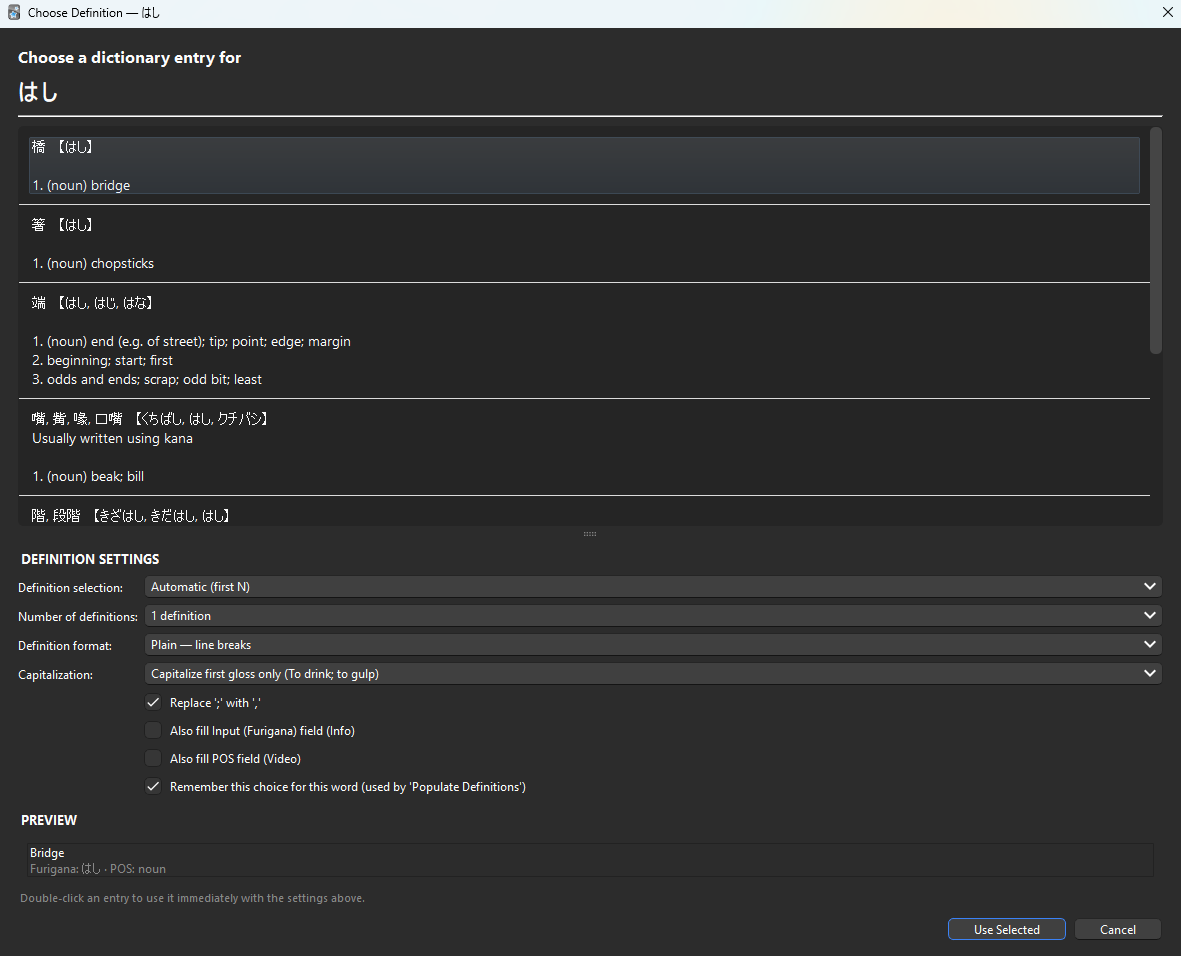
Features
How to use
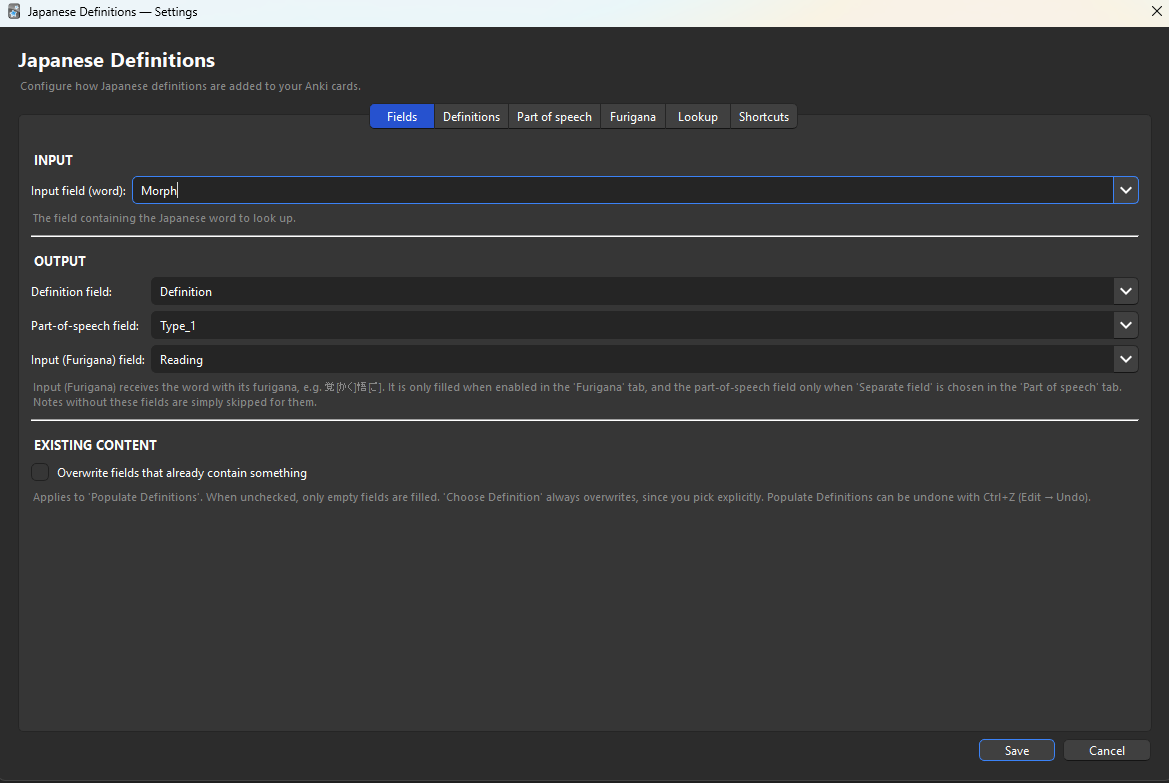
Everything is customizable in the settings: fields, number of definitions, list format, capitalization, separators, part-of-speech labels and templates, furigana format, lookup options and all keyboard shortcuts.
The first use builds a dictionary cache (about 15–20 seconds, once). After that, loading takes a couple of seconds in the background.
Requirements Anki 2.1.50 or later.
Credits & licence This add-on uses the JMdict dictionary file, property of the Electronic Dictionary Research and Development Group, used in conformance with the Group's licence (CC BY-SA 4.0). Furigana data from JmdictFurigana by Doublevil (CC BY-SA). Add-on code: MIT licence. Source: github.com/Jo-Mako-Anki/japanese-definitions
Feedback Bug reports and suggestions: GitHub. Please don't use reviews for bug reports — I can't reply to them.
Fill your Japanese cards with English definitions from JMdict, the word's furigana and its part of speech — fully offline and fully configurable.

覚[かく]悟[ご], 覚悟[かくご], plain kana or HTML <ruby>.覚悟[かくご] is looked up as 覚悟..ankiaddon file from Releases, then Tools → Add-ons → Install from file…Requires Anki 2.1.50 or later.
| Action | Default shortcut |
|---|---|
| Choose Definition (reviewer) | Ctrl+Alt+D |
| Choose Definition (browser) | Ctrl+Alt+D |
| Populate Definitions (browser) | Ctrl+Alt+Shift+D |
All shortcuts can be changed in the settings.

| Tab | Options |
|---|---|
| Fields | Input field, Definition, Part of speech, Input (Furigana); overwrite existing content |
| Definitions | Number of definitions, format (plain / bulleted / numbered), capitalization, ; → , |
| Part of speech | Separate field or inline, label style, custom labels, separator, HTML template |
| Furigana | Kana / Anki furigana / HTML ruby, per kanji or per word |
| Lookup | Ignore bracketed furigana, deinflection, background loading, remembered choices, cache |
| Shortcuts | Every keyboard shortcut, with conflict detection |
The first use builds a dictionary cache (~20 seconds, once). It is rebuilt automatically when the dictionary files change.
Requires Python 3.9+, standard library only.
python build.py                 # downloads the dictionaries if needed, then builds
python build.py --update-data   # forces the latest JMdict and JmdictFurigana
The add-on is written to dist/JapaneseDefinitions-<version>.ankiaddon. The version comes from src/JapaneseDefinitions/manifest.json.
For development, you can link src/JapaneseDefinitions into Anki's addons21 folder and copy JMdict_e.gz and JmdictFurigana.json.gz from data/ next to it.
Please open an issue with your Anki version, the word you looked up, and what you expected.