AnkiWeb
- Rating
- 302 (👍 281 · 👎 21)
- Updated
- 2024-10-27
- Anki versions
- 23.10~
- Description language
- en
AnkiWeb addon 874215009
Adds sortable custom columns to Anki's browser for note fields, card statistics, and optional internal values, with configurable display settings.
Open on AnkiWeb GitHub Ask about alternatives
stale
| Min Anki | Max Anki | Updated |
|---|---|---|
| 2.1.0 | 2.1.22 | 2020-02-20 |
| 2.1.24 | 2.1.34 | 2022-09-27 |
| 2.1.35 | 2.1.40 | 2022-09-27 |
| 2.1.41 | 2.1.44 | 2022-09-27 |
| 2.1.45 | 2.1.66 | 2023-07-01 |
| 23.10 | + | 2024-10-27 |
Loading…
Makes the browser's Card, Note, and Deck columns sortable case-insensitively, requiring a nonempty search and pairing card-type and note-type as primary and secondary sort keys.
Ranks First Aid subjects and subtopics from weakest to strongest by Anki-style retention, with sortable metrics and a read-only dashboard.
Adds Advanced Browser support, lets you set new note IDs, and recalculates moved notes' IDs instead of swapping with neighbors, requiring notes mode sorted by creation time.
Batch-updates multiple Anki note fields from CSV, matching rows via join keys, with dry-run, diff, and change logs for recovery.
Displays customizable study time and review statistics in Anki's main window, with configurable styles, ranges, deck exclusions, time formats, and text macros.
Adds sorting to Deck Browser columns for deck name, new, learning, and review counts, in ascending or descending order.
To build an .ankiaddon file that's suitable for uploading to ankiweb run python3 release.py.
On Ankiweb in 2023-10 there are 6 different versions of the Advanced Browser add-on for different Anki versions:
| Ankiweb version | corresponding branch in this repo |
|---|---|
| 2.1.0-2.1.22 | maintenance_for_00-22 |
| 2.1.24-2.1.34 | maintenance_for_24-34 |
| 2.1.35-2.1.40 | maintenance_for_35-40 |
| 2.1.41-2.1.44 | maintenance_for_41-44 |
| 2.1.45-2.1.66 | maintenance_for_45-66 |
| 23.10 or newer | master |
Up to 2022-09 this repo only used the master branch for fixing bugs in AB and adjustments to newer Anki versions. This made it hard to fix bugs in AB for older Anki versions. So ijgnd created the branches outlined in the table above in 2022-09. In each branch there's the file release.py to create an .ankiaddon file.
Advanced Browser is an Anki add-on that adds more features to the browser. It allows you to add a variety of new, sortable columns to the card browser. These columns range from:

The note browser mode (show a single card per note) for Anki versions 2.1.24-2.1.44 has been moved to a separate add-on maintained by another developer (@Arthur-Milchior). If you rely on this feature, you can download the add-on Browser have one line by note from ankiweb (GitHub: anki-browser-for-note). A "notes only" mode is built into Anki 2.1.45 or newer.
Right click on any of the currently visible columns and a menu will appear. Some new menu items will now appear in the list.
The - Fields - menu item contains a list of your note types. Each note type reveals a sub-menu with each of its fields that can be enabled as columns. If a field name exists in another note type, it will be enable as well, and sorting by this column will consider all of the note types together as one:<br>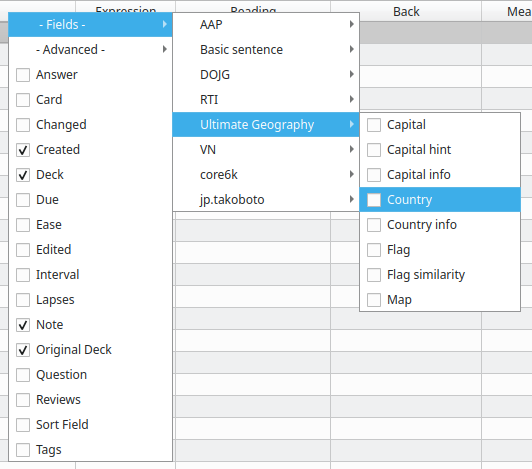
If you prefer to see every field in a single list instead of grouping fields by note type, you can toggle the behaviour by editing the configuration item Use a single list for fields using Anki's add-on manager and setting it to true:<br>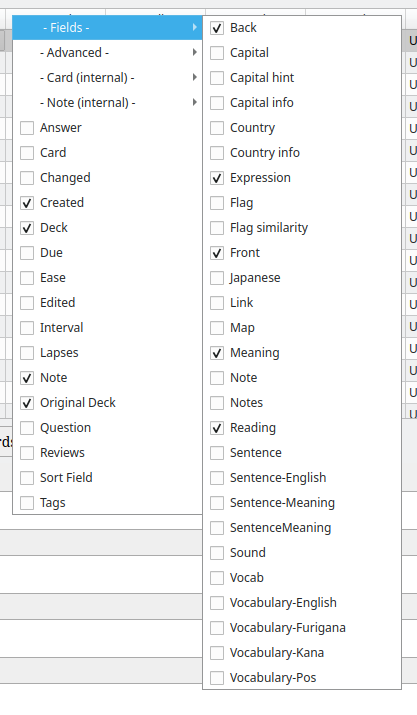
The - Advanced - menu item offers some columns with interesting statistics about each card.<br>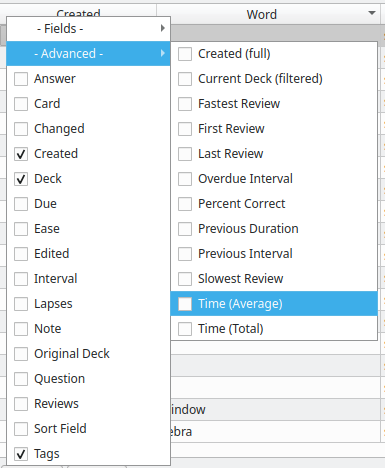
By setting "Table content" to "Selectable", you'll be able to select table content by double clicking on it. This way, you can copy it. Note that editing the content has no effect.
By setting "Table content" to "Editable" you can edit the content of some elements of the tables. You need to activate this feature in the configuration before being able to use it. It can be dangerous if you don't really know what you're doing and this feature is not widely used and tested. Please see the document [edition in table](edition in table.md) to see what editing each column does.
You can also show some fields used internally by Anki but probably aren't very useful for the typical user. These are disabled by default, but you can enable them in the add-on config by setting "Show internal fields" to true.
If you have a good idea for a new column, please open a new issue on GitHub. If you are a developer and would like to add it yourself, please see advanced_fields.py as it's the most likely place you'd want to put it. Contributions are more than welcome!
If you are an add-on author and would like to add a new column in your own add-on, then doing so is easy through Advanced Browser. Advanced Browser is designed to let add-ons add their own columns through a standard Anki hook. In fact, Advanced Browser uses this same hook to offer its own columns, so you already have a working example to look at. Your own add-on can easily add its own columns provided your user also has Advanced Browser installed.