AnkiWeb
- Rating
- 0 (👍 0 · 👎 0)
- Updated
- 2026-02-01
- Anki versions
- 2.1.1~
- Description language
- en
AnkiWeb addon 917616596
Transforms Anki cloze cards into interactive fill-in-the-blank exercises with multiple input fields, instant feedback, hints, dropdown answers, and duplicate-cloze autofill.
Open on AnkiWeb GitHub Ask about alternatives
stale
| Min Anki | Max Anki | Updated |
|---|---|---|
| 2.1.1 | + | 2026-02-01 |
Loading…
Adds editor buttons and a Markdown note type that render fill-in-the-blank, multiple-choice, annotations, and other interactive study elements in Anki.
Enables proper type:cloze cards with multiple cloze blanks as input fields, instant feedback, and next-character hints in Anki.
Creates interactive dropdown fill-in-the-blank grammar cards manually or with optional AI assistance, supporting many languages, automatic cloze generation, smart distractors, and text-to-speech.
Converts Anki cloze deletions into interactive dropdown multiple-choice quizzes with customizable feedback, answer ordering, keyboard shortcuts, and automatic card flip.
Enhances multiple typed-cloze cards with better IME support, automatic input sizing, and configurable width, color, font weight, feedback, case, accent, and whitespace options.
Renders Markdown in Anki Front/Back fields as interactive quizzes with fill-in, multiple choice, reveals, collapsible sections, tabs, highlighting, code, KaTeX, audio, and floating review controls.
This repository is a fork of the original Anki Plugins project by ssricardo, with additional custom plugins.
| Plugin | Description |
|---|---|
| Fill the Blanks Expanded | Enhanced cloze deletions with input fields |
| Note Type Export | Export and import note types as JSON |
Enhanced cloze deletion add-on with input fields and instant feedback, including:
All new features are built upon the excellent foundation created by the original author.
{{c1::Guten}} {{c2::Morgen}}, wie {{c3::geht}} es {{c4::dir}}?

Das ist {{c5::sehr}} {{c6::schön}}!
<table cellspacing="10" cellpadding="0" style="border-collapse:separate;"> <tr> <td style="vertical-align:top;"> <a href="https://raw.githubusercontent.com/belagrun/anki/refs/heads/main/images/2026-01-30_19-03-16.jpg" target="_blank" rel="noopener"> <img src="https://raw.githubusercontent.com/belagrun/anki/refs/heads/main/images/2026-01-30_19-03-16.jpg" width="260" alt="2026-01-30_19-03-16"> </a> </td> <td style="vertical-align:top;"> <a href="https://raw.githubusercontent.com/belagrun/anki/refs/heads/main/images/2026-01-30_19-03-24.jpg" target="_blank" rel="noopener"> <img src="https://raw.githubusercontent.com/belagrun/anki/refs/heads/main/images/2026-01-30_19-03-24.jpg" width="260" alt="2026-01-30_19-03-24"> </a> </td> </tr>
<tr> <td style="vertical-align:top;"> <a href="https://raw.githubusercontent.com/belagrun/anki/refs/heads/main/images/2026-01-30_19-03-33.jpg" target="_blank" rel="noopener"> <img src="https://raw.githubusercontent.com/belagrun/anki/refs/heads/main/images/2026-01-30_19-03-33.jpg" width="260" alt="2026-01-30_19-03-33"> </a> </td> <td style="vertical-align:top;"> <a href="https://raw.githubusercontent.com/belagrun/anki/refs/heads/main/images/2026-01-30_19-03-47.jpg" target="_blank" rel="noopener"> <img src="https://raw.githubusercontent.com/belagrun/anki/refs/heads/main/images/2026-01-30_19-03-47.jpg" width="260" alt="2026-01-30_19-03-47"> </a> </td> </tr>
<tr> <td style="vertical-align:top;"> <a href="https://raw.githubusercontent.com/belagrun/anki/refs/heads/main/images/2026-01-30_19-04-08.jpg" target="_blank" rel="noopener"> <img src="https://raw.githubusercontent.com/belagrun/anki/refs/heads/main/images/2026-01-30_19-04-08.jpg" width="260" alt="2026-01-30_19-04-08"> </a> </td> <td style="vertical-align:top;"> <a href="https://raw.githubusercontent.com/belagrun/anki/refs/heads/main/images/2026-01-31_21-24-50.jpg" target="_blank" rel="noopener"> <img src="https://raw.githubusercontent.com/belagrun/anki/refs/heads/main/images/2026-01-31_21-24-50.jpg" width="260" alt="2026-01-31_21-24-50"> </a> </td> </tr>
<tr> <td colspan="2" style="text-align:center; vertical-align:top;"> <a href="https://raw.githubusercontent.com/belagrun/anki/refs/heads/main/images/2026-01-31_21-29-45.jpg" target="_blank" rel="noopener"> <img src="https://raw.githubusercontent.com/belagrun/anki/refs/heads/main/images/2026-01-31_21-29-45.jpg" width="260" alt="2026-01-31_21-29-45"> </a> </td> </tr> </table>
Instant Feedback: As you type, each field changes color:
Settings Used:
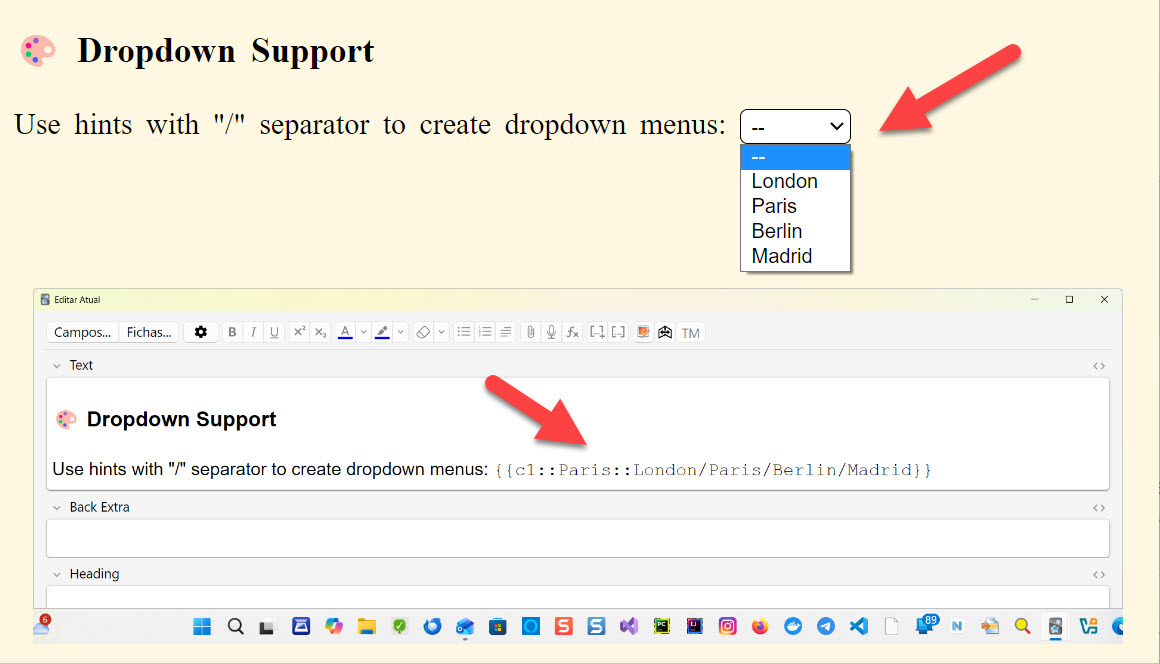
feedback-enabled: true (real-time visual feedback)feedback-ignore-case: false (distinguishes uppercase/lowercase)feedback-ignore-accents: true (ignores accents)Use hints with "/" separator to create dropdown menus:
{{c1::Paris::London/Paris/Berlin/Madrid}}
When the same ordinal appears more than once (e.g., c1 repeated), typing in one field instantly mirrors the input in the other(s). A small superscript number appears to the right of each repeated cloze to indicate the shared ordinal.
Example 1:
{{c1::Paris}} is the capital of France. {{c1::Paris}} is in Europe.
Example 2:
{{c1::Paris::London/Paris/Rio de Janeiro}} is the capital of France. {{c1::Paris::London/Paris/Rio de Janeiro}} is in Europe.
Notes:
c1 with c1).c1 and c2) are not linked.{{cloze:YourField}} with {{type:cloze:YourField}}{{type:cloze:YourField|fill-blanks}}{{c1::answer}}Access settings via Tools → Add-ons → Fill the Blanks Expanded → Config
Original Repository: https://github.com/ssricardo/anki-plugins
The original project contains several useful Anki add-ons developed by ssricardo. Please check out the original repository for more great add-ons!
Special thanks to ssricardo for creating and maintaining the original Fill the Blanks Expanded add-on. This project would not exist without their excellent work and dedication to the Anki community.
If you find this add-on useful, please consider supporting the original author:
Buy ssricardo a coffee
If you feel like supporting their work...
☕ https://www.buymeacoffee.com/ricardoss
Your support helps maintain and improve these tools for the entire Anki community!
# Generate distribution package (.ankiaddon)
# Fill the Blanks Expanded
python build.py -source 1 -dist

# Note Type Export
python build.py -source 2 -dist

# Install to local Anki (Windows)
python build.py -source 1 -dev  # Fill the Blanks
python build.py -source 2 -dev  # Note Type Export
Export and import Anki note types (models) as portable JSON files.
Export: Go to Tools → Export Note Types...
.json fileImport: Go to Tools → Import Note Types...
.json file{
"format_version": "1.0",
"metadata": {
"exported_at": "2026-02-04T12:00:00Z",
"anki_version": "24.11",
"count": 2
},
"note_types": [
{
"name": "Basic",
"type": 0,
"css": ".card { font-family: arial; }",
"fields": [...],
"templates": [...]
}
]
}
🌐 My Website:
👉 Isabela Grünevald
📧 My E-mail:
✉️ naveroute@gmail.com
This fork maintains the same license as the original project.