AnkiWeb
- Votes
- 0 (👍 0 · 👎 0)
- Updated
- 2026-10-12
- Anki versions
- 26.01~
- Languages
- CSS, JavaScript, Python, Swift, HTML, JSON
- Description language
- en
AnkiWeb addon 969150855
Automatically creates Anki cards from foreign-language videos by screenshotting unfamiliar words, capturing subtitle audio, and using local AI to translate and fill custom fields.
Open on AnkiWeb GitHub Ask about alternatives
active
| Min Anki | Max Anki | Updated |
|---|---|---|
| 23.10 | 26.01+ | 2026-10-12 |
Loading…
Generates contextual written explanations and spoken audio for target words in sentence cards using OpenAI models and selectable TTS engines, with one-click or batch processing.
Stores YouTube videos in a searchable sentence database, adds matching audio, sentences, and screenshots to existing cards, and creates Subs2SRS decks from videos or playlists.
Extracts timestamps and subtitles from MKV files to create Anki cards, plays speech segments in mpv, and auto-grades based on whether subtitles were shown.
Automatically generates styled foreign language vocabulary cards with translations, text-to-speech audio and optional reverse cards from word lists or files.
Converts videos or audio with subtitles into Anki cards split by scenes or phrases, with playback, mobile export and condensed audio support.
Converts YouTube videos, playlists, or channels into translated vocabulary flashcards with optional text-to-speech or video audio, screenshots, rom
I’ve made an add-on for immersion method learning. It captures the information from any video.
How to use it?
What it captures: word, sentence, audio of sentence, picture of the video
What it generates: translation and other custom fields that you would like
Type of AI: Local, using LM Studio or other compatible services
Base information:
License: AGPL-3.0 license
Cost: Free, open-source
Version: 0.4.0 beta
State: not stable
Device: MacOS only. Tested on Sequoia 15.7.7
Supported languages: 37
Settings:
Features
Github: https://github.com/quanora/Snap
You also have to download AnkiConnect to use this add-on
Remember that AI can make mistakes and you should verify the results
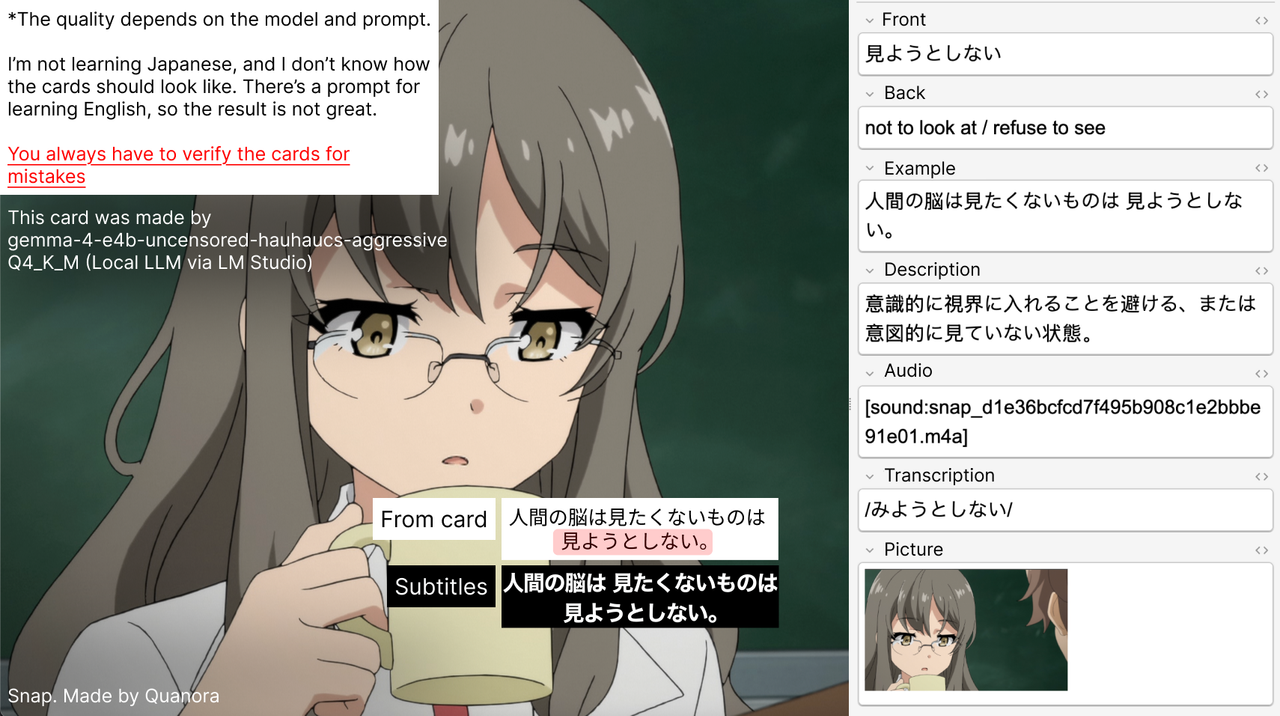
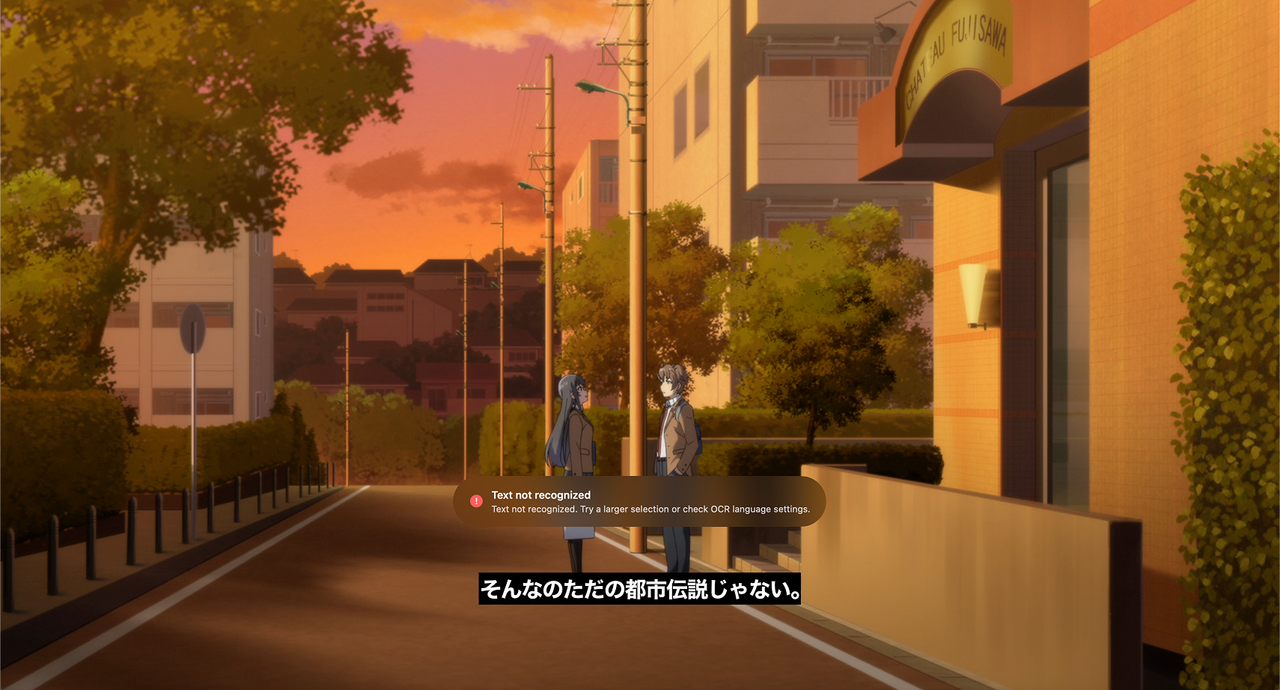
This is an add-on for Anki, which makes the process of creating cards faster while watching videos in a foreign language. You don't need to take multiple screenshots and search for information. It will capture information from your screen.
Example of card from my deck
The example how OCR works with Japaneese
%%{init: {"flowchart": {"curve": "stepAfter", "nodeSpacing": 24, "rankSpacing": 38}}}%%
flowchart TB

    subgraph capture["01  ·  CAPTURE & CONTEXT"]
        direction LR
        A(["Hotkey<br/>Cmd + Shift + A"])
        B["Screen Capture<br/>SCK + screenshot"]
        C["Word Selection<br/>Apple Vision OCR"]
        D["Resolve Context<br/>Subtitle history / cache<br/>or fallback screenshot OCR"]

        A --> B --> C --> D
    end

    subgraph generation["02  ·  AUDIO & GENERATION"]
        direction RL
        E["Create Card Job<br/>Send audio SELECT"]
        F["audio.swift<br/>Circular buffer → audio clip"]
        G["card_queue<br/>Wait for audio or timeout"]
        H["Load Settings<br/>Language profiles"]
        I{"OCR Correction<br/>Enabled?"}
        J["Detect language if needed<br/>Correct OCR + generate card"]
        K["Unicode / profile selection<br/>Generate card directly"]

        E --> F --> G --> H --> I
        I -->|Yes| J
        I -->|No| K
    end

    subgraph export["03  ·  VALIDATION & EXPORT"]
        direction LR
        L["Validate Card<br/>Fields, tag, translation language"]
        M{"Valid output?"}
        N["Repair translation<br/>or reject job"]
        O["AnkiConnect<br/>Attach media + addNote"]
        P(["Anki<br/>Card Added notification"])

        L --> M
        M -->|No| N
        M -->|Yes| O --> P
    end

    capture --> generation
    generation --> export

    classDef input fill:#DBEAFE,stroke:#60A5FA,color:#1E3A8A,stroke-width:1.5px
    classDef process fill:#F1F5F9,stroke:#94A3B8,color:#1E293B,stroke-width:1px
    classDef decision fill:#FEF3C7,stroke:#D97706,color:#78350F,stroke-width:1.5px
    classDef ai fill:#EDE9FE,stroke:#8B5CF6,color:#4C1D95,stroke-width:1.5px
    classDef output fill:#DCFCE7,stroke:#22C55E,color:#14532D,stroke-width:1.5px
    classDef error fill:#FEE2E2,stroke:#F87171,color:#7F1D1D,stroke-width:1px

    class A input
    class B,C,D,E,F,G,H process
    class I,M decision
    class J,K ai
    class O,P output
    class N error
https://github.com/user-attachments/assets/66e97406-e0f7-4398-a40a-6c5de6095eee
Tools → Snap