AnkiWeb
- Rating
- 0 (👍 0 · 👎 0)
- Updated
- 2026-07-02
- Anki versions
- 25.07~
- Description language
- en
AnkiWeb addon 1062267970
Adds a lightweight drawing and handwriting panel to Anki for writing, sketching, annotating, and taking notes during review with mouse, touch, pen, or stylus.
Open on AnkiWeb GitHub Ask about alternatives
active
| Min Anki | Max Anki | Updated |
|---|---|---|
| 2.1.0 | – | 2026-03-05 |
| 2.1.2 | – | 2026-03-10 |
| 2.1.3 | – | 2026-03-22 |
| 2.1.4 | – | 2026-04-06 |
| 2.1.5 | – | 2026-04-07 |
| 2.1.6 | – | 2026-04-08 |
| 2.1.7 | – | 2026-04-08 |
| 23.10 | 25.07+ | 2026-07-02 |
Loading…
Adds a customizable floating typing scratchpad to Anki for writing answers, notes, and calculations during review, with shortcuts, transparency, auto-clearing, and position controls.
Cycles through Normal, Standard, and Ultra focus modes via customizable shortcut, hiding Anki menus, toolbars, buttons, status bar, and card header for distraction-free review.
Draw and sync annotations on Anki cards during review using three-color markers, underline, freehand pen, eraser, undo/clear, draggable toolbar, and shortcuts.
Enables Mac users to draw or annotate Anki cards on iPad/iPhone via Apple Continuity, insert sketches, and integrate with Image Occlusion Enhanced.
Build sentences by arranging interactive word tiles in Anki, with customizable layout, keyboard shortcuts, answer checking, automatic reveal, and cross-platform card support.
Assigns mouse buttons and scroll actions to answer, grade, or undo cards during Anki reviews, with separate question/answer mappings, long-press options, and quick toggling.
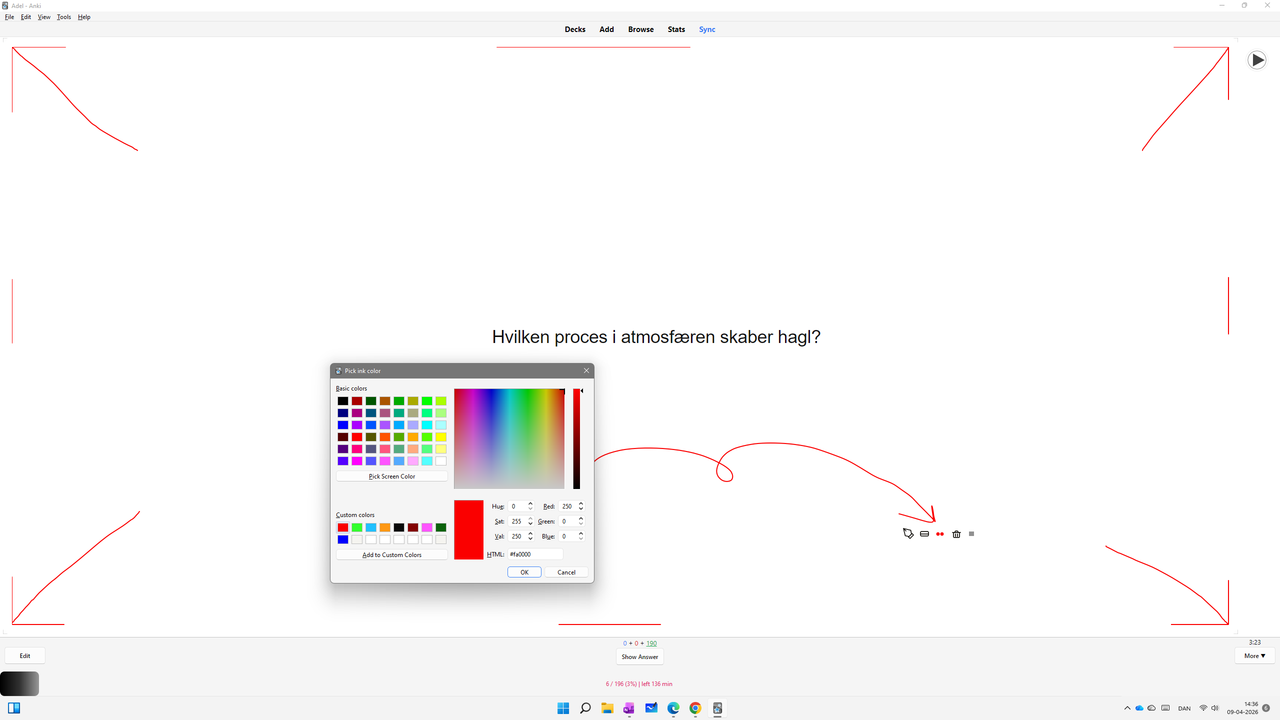
A clean and lightweight drawing add-on for Anki that lets you write, sketch, highlight, and solve directly on your cards while studying.
Perfect for:
The add-on is designed to stay minimal, fast, and distraction-free.
<h3>Quick Demo</h3>
<p align="center"> <img src="https://i.postimg.cc/Dzk4cfDB/2026-04-2921-00-03-ezgif-com-video-to-gif-converter-(4).gif" style="width:auto; height:auto; border-radius:10px;"> </p>
<h3>Screenshot</h3>
C:\Users\YOUR_NAME\AppData\Roaming\Anki2\addons21\
~/Library/Application Support/Anki2/addons21/
~/.local/share/Anki2/addons21/
The add-on includes:
If you have any suggestions, feature ideas, or find any issues, feel free to contact me or open an issue on GitHub.
Feedback helps improve both the add-on and my own learning journey as I continue developing it.
Keep calm, keep drawing, and study on! — Adel
MIT License
Copyright (c) 2026 Adel