AnkiWeb
- Rating
- 1 (👍 1 · 👎 0)
- Updated
- 2026-09-20
- Anki versions
- 23.09~
- Description language
- en
AnkiWeb addon 1177622942
Crop, rotate, flip, annotate, and edit images directly in Anki's Note Editor with fast cropping, vector drawing, floating toolbar, and 40+ language support.
Open on AnkiWeb GitHub Ask about alternatives
active
| Min Anki | Max Anki | Updated |
|---|---|---|
| 2.1.1 | 23.09+ | 2026-09-20 |
Loading…
Enables Mac users to draw or annotate Anki cards on iPad/iPhone via Apple Continuity, insert sketches, and integrate with Image Occlusion Enhanced.
Integrates ChatGPT and Gemini sidebars, a tabbed browser, enhanced editor, bulk card creator, and text snippets into Anki for faster studying and card creation.
Searches and inserts images into Anki cards from selected text or configured fields using multiple providers, with per-note-type settings, smart replacement, and result browsing.
Lets Windows users edit Editor pictures in an external viewer, showing changes after closing it, though sync and recent-Anki support are limited.
Embeds Anki's native editor in the review window so note fields, including cloze and Image Occlusion cards, can be edited with configurable triggers and exclusions.
Automatically adds customizable SVG pitch accent annotations to Anki cards via bulk or manual editing, with mobile sync and reading disambiguation.
An advanced image editing, cropping, and annotation add-on for Anki. It allows you to quickly crop, rotate, flip, annotate, and edit images directly within the Anki Note Editor without leaving your study workflow.
This project is an enhanced fork of the original work by community developers:
| Feature | Original / Upstream (789309990) | Enhanced Edition |
|---|---|---|
| Instant Cropper Tool | Not available (only full SVG vector canvas) | Built-in fast cropper with aspect ratio presets (1:1, 4:3, 16:9, 3:2, Free), rotations (-90°/+90°), horizontal/vertical flips, and zoom controls |
| Floating Popover Button | Not supported | Automatic quick-action button injected into Anki's floating image bubble menu |
| Internationalization (i18n) | English only | Full localization across 40+ Anki languages (French, German, Spanish, Japanese, Chinese, Russian, Italian, Portuguese, Arabic, Korean, etc.) |
| UTF-8 & Non-ASCII Filenames | Risk of corrupted paths on special characters | Robust TextDecoder UTF-8 parsing for international filenames |
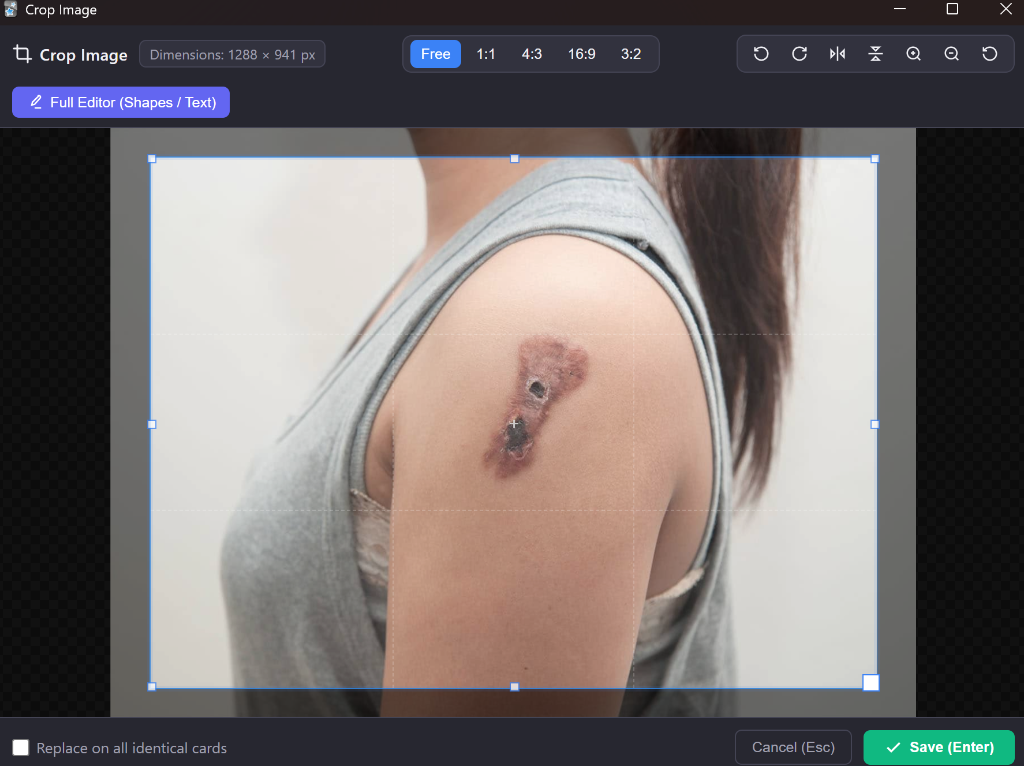
Enter or click Save to update the image in your card.Ctrl + Shift + I.Ctrl + Shift + I: Open Image Editor on selected image, or open a blank canvas if nothing is selected.Enter (in Cropper): Save the cropped image.Esc (in Cropper): Cancel and close dialog.The add-on automatically detects your Anki language setting and provides native translations for:
ar)bg)ca)cs)da)nl)en)eo)et)eu)fa)fi)fr)de)el)he)hr)hu)id)it)ja)ko)ms)nb_NO)pl)pt_BR, pt_PT)ro)ru)sk)sl)es)sr)sv)th)tr)uk)vi)zh_CN, zh_TW)This program is free software: you can redistribute it and/or modify it under the terms of the GNU Affero General Public License (AGPLv3) as published by the Free Software Foundation, either version 3 of the License, or (at your option) any later version.