AnkiWeb
- Votes
- 0 (👍 0 · 👎 0)
- Updated
- 2026-10-31
- Anki versions
- 26.09~
- Languages
- Python, JavaScript, JSON, CSS
- Description language
- en
AnkiWeb addon 469771230
Combines looping background sounds, classical music, a Pomodoro focus timer with break screens, and shared study rooms with friends for Anki.
Open on AnkiWeb Ask about alternatives
active
No GitHub repository linked.
| Min Anki | Max Anki | Updated |
|---|---|---|
| 23.10 | 26.09+ | 2026-10-31 |
Loading…
Runs a customizable Pomodoro focus timer on the review screen with break games, session stats, adaptive coaching, optional prayer-time pauses, and offline background sounds.
Adds a Pomodoro timer, offline multi-track soundscape mixer, and smart card-audio ducking directly to the review screen, plus guided break and breathing exercises.
Combines a customizable Pomodoro timer with XP, level, retention, streak and study metrics, multiple layouts, focus audio, bilingual settings, and backup/reset tools for focused Anki study.
Adds a social layer to Anki's Decks screen showing friends' daily progress, with cheers, shared study rooms, group bingo, collaborative study plans, deck insights, and shareable stat images.
Adds an all-in-one study workspace with study plans, deadlines, Pomodoro timer, notebook, PDF viewer, mind maps, AI assistant, gamified XP, ranks, streaks, and themes.
Displays a small gym-bro character who does one push-up per card answered, grows more muscular with daily review count, flexes at milestones, and can be repositioned and customized.
Background sound, classical music, a Pomodoro timer and study rooms with friends for Anki, in one panel.
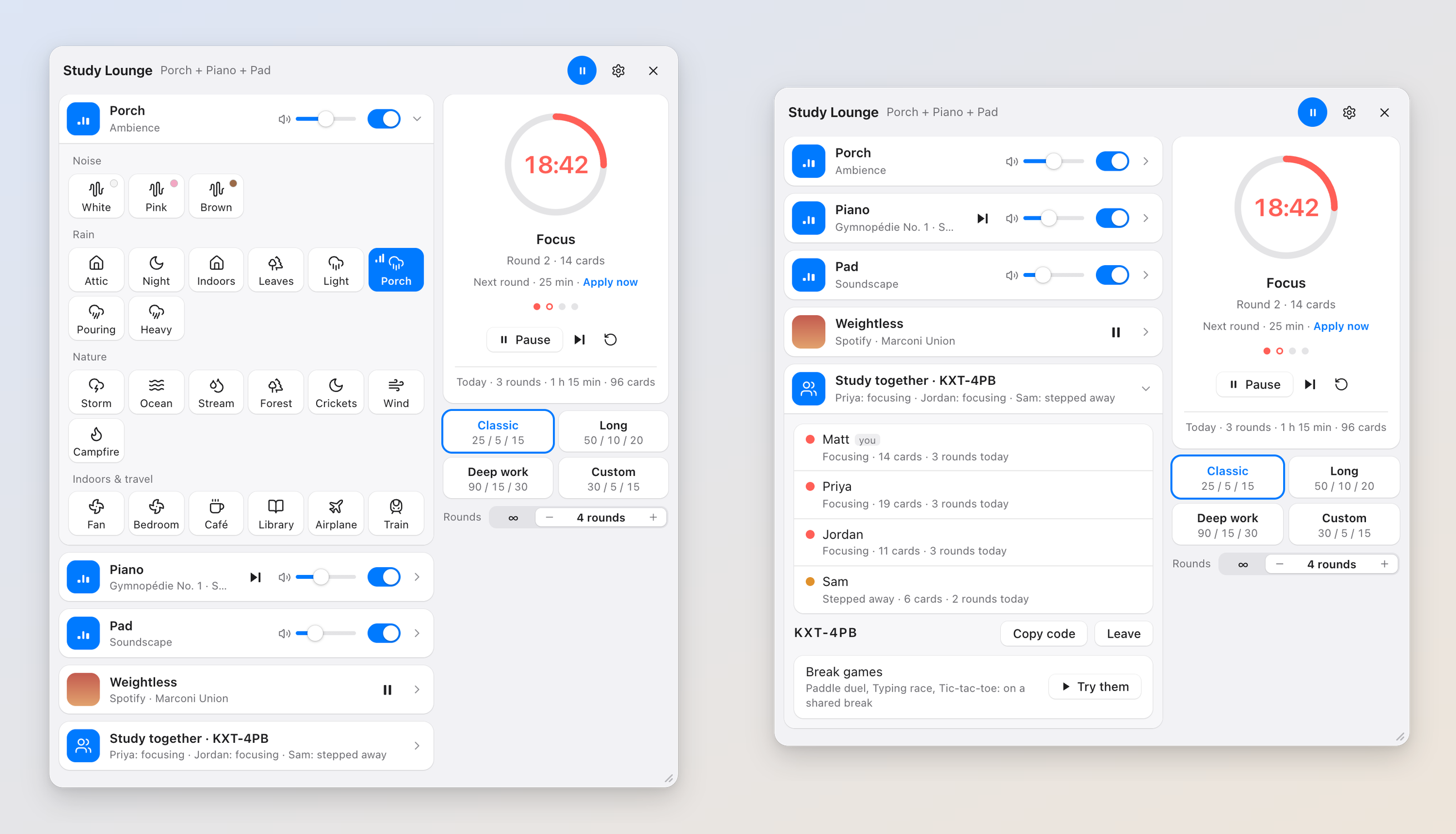
Study Lounge (formerly Study Sounds) plays rain, brown noise, a café or a piano station behind your cards, starts and stops with your reviews, and runs a focus timer that fades the sound down, chimes, and covers Anki with a break screen when the round is over. Study with friends in a room that shares one timer, and play a quick game together on the break. Open it from the Study Lounge link in the top bar; Shift+W plays or pauses the whole mix from anywhere. Drag the panel by its title bar to put it where you like, or by its corner to make it bigger or smaller.
Sound
Each layer has its own switch and volume. The mix starts by itself when you begin reviewing and fades out when you leave. It keeps playing when a card plays audio or text-to-speech, because it has its own audio stream; a switch lowers it while a card speaks if you prefer.
Focus timer
A Pomodoro timer: study for 25 minutes, break for 5, and take a longer break every fourth round. Or pick Long, Deep work, or your own numbers, and set how many rounds you want (1 to 12) or keep going.
Breaks
When the round ends, Anki dims under a break screen with the countdown and something to do:
Keys you type there go to the game, not to Anki behind it. "Back to cards" hides it; the break keeps counting.
Study together
Share the timer with friends who also have Study Lounge. Under "Study together" in the panel, type your name and start a room; you get a code like KXT-4PB to send them. Then everyone runs one timer: a start, pause or skip on anyone's Anki happens on everyone's, and you see how each other is doing (focusing, on a break, stepped away, cards this round). A quick note pops up when a friend steps away, comes back or closes Anki, and if someone's been gone a while, press Ping by their name and pick the sound their Anki makes to call them back: a doorbell, a rooster, a clown horn, an air horn…
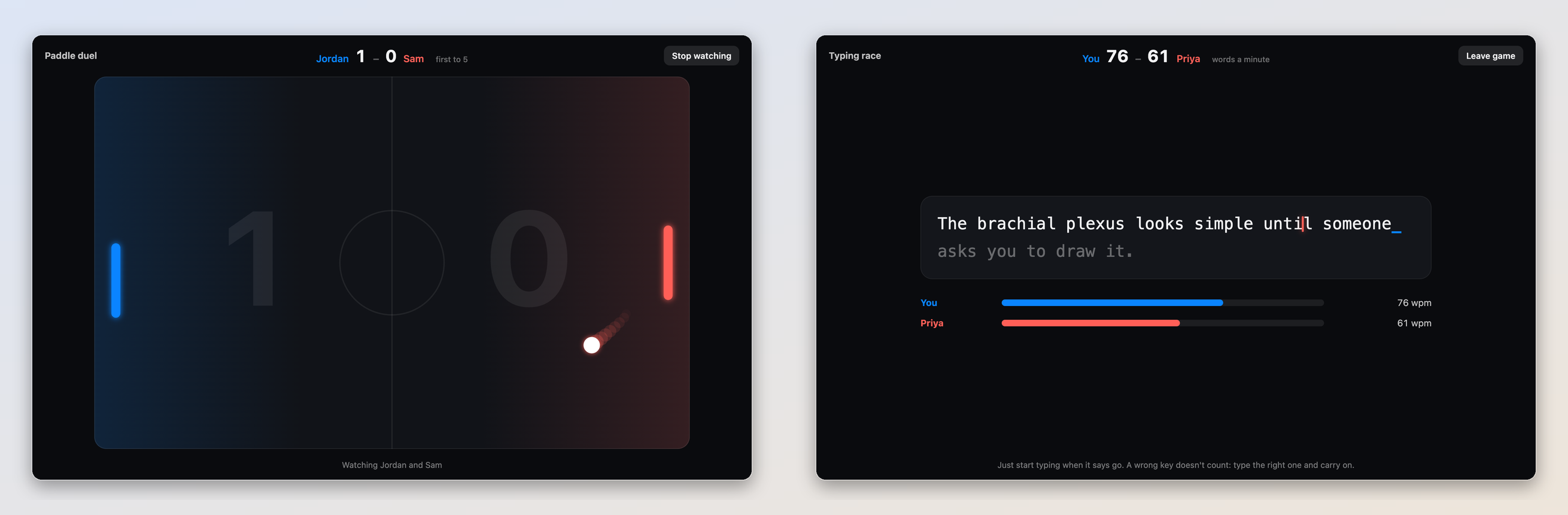
On a shared break, the break screen gets a Together tab: challenge a friend to Paddle duel (arrow keys or mouse), a Typing race (the same sentence, both of you on screen as you type; fastest time wins) or Tic-tac-toe. Several pairs can play at once, and anyone in the room can watch a game that's on. Want to try them first? Press "Try them" under Study together and play the computer, no room needed.
On a Mac: when Spotify or Apple Music is open, the panel shows what's playing with the album art, a position slider, play/pause, skip and volume. The ⏯ key, AirPods and Control Center play and pause the mix too, like any music app (switch it off under Settings → Sound).
Just for fun, in Settings: tomatoes instead of dots for your rounds, and "Metal pipe", which drops a very loud metal pipe at a random moment every few minutes while your sound plays.
Works on Mac, Windows and Linux (the Spotify / Apple Music controls and the media keys are Mac-only). Needs Anki 23.10 or newer, the standard Qt6 build. The download is about 95 MB because the recordings ship with it; the music and photos stream from Wikimedia Commons and are kept after the first play.
Privacy: no account, no analytics. Study Lounge connects to Wikimedia Commons for music and photos, to YouTube if you pick the aquarium or a meditation, and to whichever break websites you choose to open. Only while you're in a study room, it shares the name you type, the timer, whether you're focusing, on a break or away, your card counts, and the moves of a game you play, through a small database run for this add-on. A room can only be read with its code and is deleted when the last person leaves. Nothing on your cards is ever shared.
Sources and licences for every sound are listed in the add-on's CREDITS.md. Found a bug? Please report it on the support page rather than in a review, since reviews don't let me reply.
Made by Matthew Correll, a medical student who also made Year in Cards, Manna and Swole Mate.
Enjoying it? You can support more of my work ☕